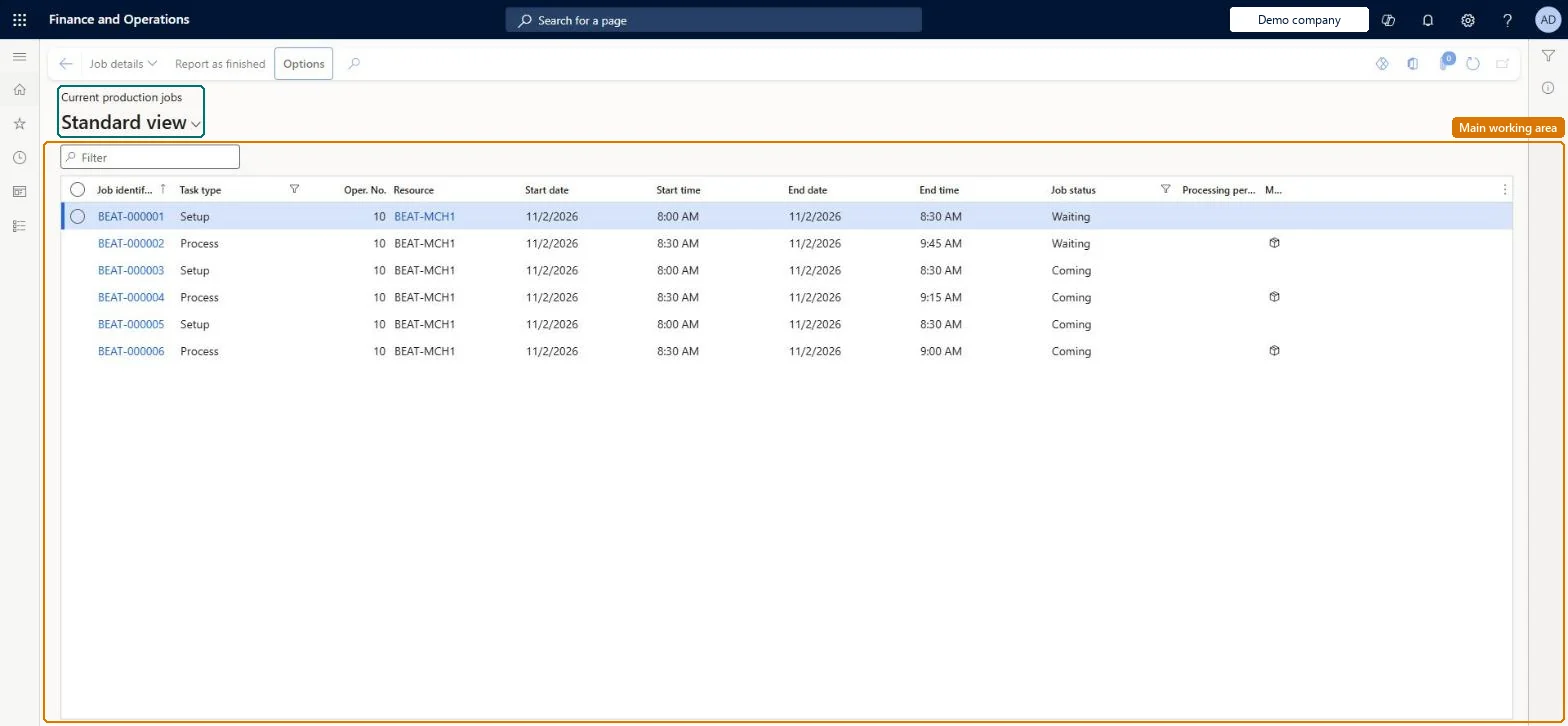
A list of the individual jobs (setup, process, queue, transport and so on) that job scheduling created for production orders, with their resource, status and scheduled times.
Machine operator, Shop supervisor, Production manager and 3 more roles
Business process
Schedule production using Job scheduling in Dynamics 365 Supply Chain Management
Menu item
ProdRouteJobListPage
Main table
ProdRouteJob
Data entity
ProdProductionOrderRouteJobEntity
Show what matters for
PAGE GUIDEWhat the page does and how to use it8 sections. Choose a role to highlight what matters to you.
Everyone
1What it is and why
What it is
A list of the individual jobs (setup, process, queue, transport and so on) that job scheduling created for production orders, with their resource, status and scheduled times.
What you do here
Use this page to monitor and, where needed, reschedule the jobs of production orders that were scheduled at job level, and to see which resource each job is assigned to.
Example
For example, a supervisor locks a job for an express order so that the next job scheduling run cannot move it.
The page in Dynamics 365. page title tab to open what to set or check
About the examples: Examples and screenshots in this guide use BEAT, a demo company in a Dynamics 365 test environment. Use your own company's codes and values instead of copying them.
How to use it
Go to Production control > Production orders > Current production jobs.
Type in the Filter box to narrow the list by job identification or resource.
Read the Job identification, Task type, Oper. No., Resource, Start date, Start time, End date, End time, Job status and Processing percentage columns for each job.
Select a job and select Job details on the Action Pane to open its details.
Select Report as finished to report the selected job as finished.
Source: Checked in Dynamics 365
Fields on the page
Field
What it means
Table column
Task type
The kind of job: queue before, setup, process, overlap, transport or queue after.Microsoft Learn
JobType
Resource
The resource or resource group the job is assigned to.Microsoft Learn
Rescheduling or locking a job changes what later job scheduling runs can move; a locked job stays where it is. Microsoft Learn
Technical architect
6Technical
Menu item
ProdRouteJobListPageChecked in Dynamics 365
Form
ProdRouteJobListPageChecked in Dynamics 365
Table
ProdRouteJobShown as “ROUTE JOBS” in Record infoKey field: JobIdChecked in Dynamics 365
Data entities
ProdProductionOrderRouteJobEntityProduction order route job entity Microsoft data model
Who can open it
PrivilegesView production jobs ProdRouteJobViewDutiesMaintain production order feedback ProdProductionOrderFeedbackMaintainInquire into production orders ProdProductionOrderProgressInquire6 security rolesMachine operator JmgMachineOperatorShop supervisor JmgShopSupervisorProduction manager ProdProductionManagerProduction supervisor ProdProductionSupervisorProject manager ProjProjectManagerProduction planner ReqProductionPlannerChecked in Dynamics 365
Roles to set it up and use it
To use itProduction supervisor ProdProductionSupervisorProduction manager ProdProductionManagerShop supervisor JmgShopSupervisorProduction planner ReqProductionPlannerProject manager ProjProjectManagerGive people one of these roles. On this system, 6 roles can open this page.Checked in Dynamics 365
Actions on the page
(Action Pane without tabs): Job details, Report as finishedChecked in Dynamics 365