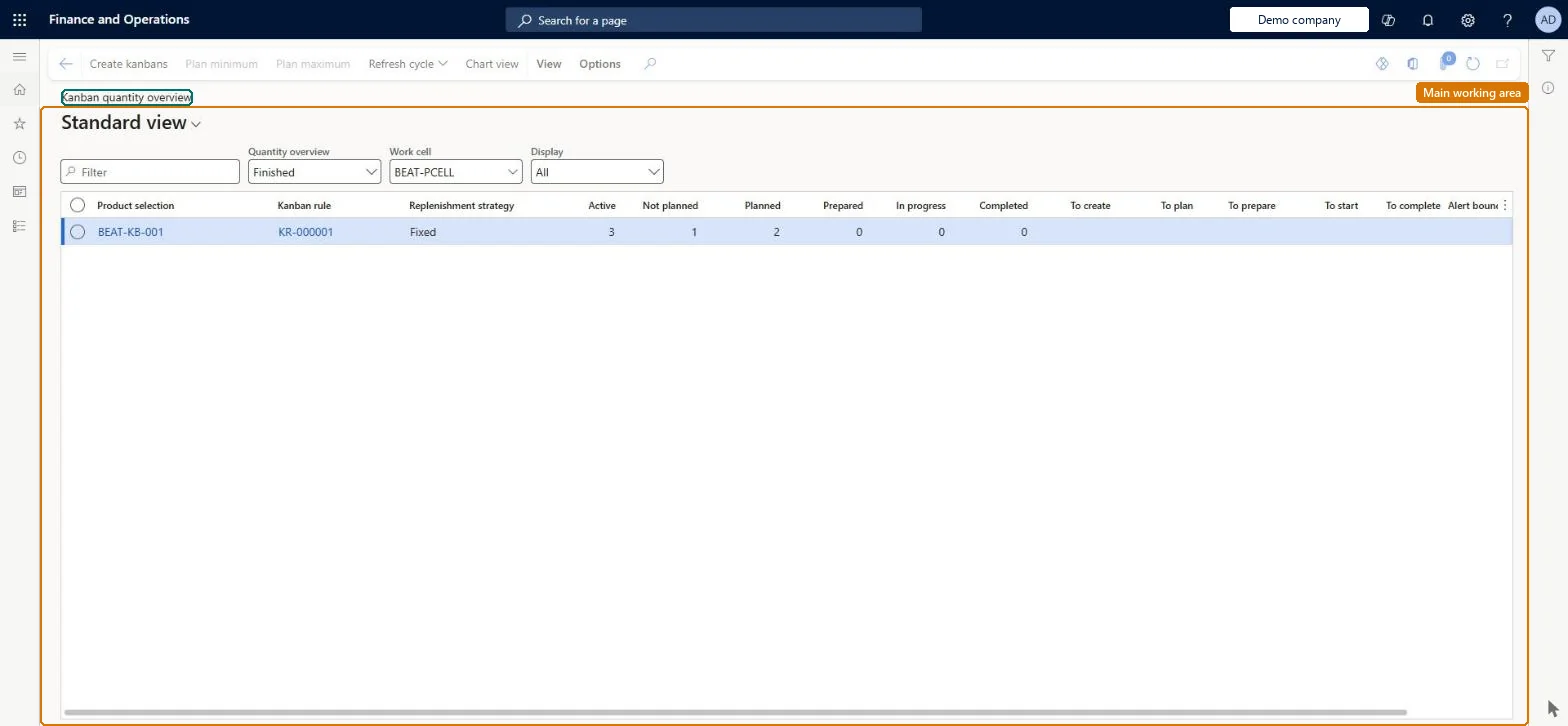
An overview of all active kanbans and their jobs grouped by kanban rule, showing stock in supermarkets, work in progress and jobs that are planned or not planned.
Materials manager, Receiving clerk, Shipping clerk and 8 more roles
Business process
Create Kanbans in Dynamics 365 Supply Chain Management
Menu item
KanbanQuantityOverview
Main table
KanbanQuantityOverviewTm
Show what matters for
PAGE GUIDEWhat the page does and how to use it6 sections. Choose a role to highlight what matters to you.
Everyone
1What it is and why
What it is
An overview of all active kanbans and their jobs grouped by kanban rule, showing stock in supermarkets, work in progress and jobs that are planned or not planned.
What you do here
Use this page to see whether the number of active kanbans for each rule is within its minimum and maximum alert quantities, and to plan, cancel, prioritise or create kanbans from the rule.
Example
For example, a planner spots a rule shown in red because its kanban quantity has dropped below the minimum alert quantity and creates extra kanbans for it.
The page in Dynamics 365. page title tab to open what to set or check
About the examples: Examples and screenshots in this guide use BEAT, a demo company in a Dynamics 365 test environment. Use your own company's codes and values instead of copying them.
How to use it
Go to Production control > Kanban > Kanban quantity overview.
Read the active kanbans and their jobs grouped by kanban rule.
Select a kanban rule and select Create kanbans to add kanbans for it.
Select Plan minimum or Plan maximum to plan the jobs needed for the rule's minimum or maximum quantity.
Select Refresh cycle to recalculate, or Chart view to see the quantities as a chart.
Source: Checked in Dynamics 365
Fields on the page
Field
What it means
Product
The product selection the kanban rule can supply.Microsoft Learn
Jobs
The active jobs of the rule, shown in descending status order.Microsoft Learn
Background colour
Green when the kanban quantity is within the rule's alert limits, red when outside.Microsoft Learn
Technical architect
4Technical
Menu item
KanbanQuantityOverviewChecked in Dynamics 365
Form
KanbanQuantityOverviewChecked in Dynamics 365
Table
KanbanQuantityOverviewTmShown as “KANBAN QUANTITY OVERVIEW” in Record infoChecked in Dynamics 365
Who can open it
PrivilegesPlan kanban jobs KanbanJobPlanView kanban quantity overview KanbanQuantityOverviewViewDutiesMaintain materials kanban execution KanbanExecutionMaterialsMaintainInquire into materials kanban progress KanbanExecutionMaterialsProgressInquireEnable kanban execution process KanbanExecutionProcessEnableMaintain production kanban execution KanbanExecutionProductionMaintainInquire into production kanban progress KanbanExecutionProductionProgressInquireMaintain kanban schedule KanbanScheduleMaintain11 security rolesMaterials manager InventMaterialsManagerReceiving clerk InventReceivingClerkShipping clerk InventShippingClerkMachine operator JmgMachineOperatorShop supervisor JmgShopSupervisorWaterspider LeanWaterspiderProduction manager ProdProductionManagerProduction supervisor ProdProductionSupervisorProduction planner ReqProductionPlannerWarehouse manager WMSWarehouseManagerWarehouse worker WMSWarehouseWorkerChecked in Dynamics 365
Roles to set it up and use it
To use itProduction supervisor ProdProductionSupervisorProduction manager ProdProductionManagerShop supervisor JmgShopSupervisorProduction planner ReqProductionPlannerMachine operator JmgMachineOperatorGive people one of these roles. On this system, 11 roles can open this page.Checked in Dynamics 365
Actions on the page
View(Action Pane without tabs): Create kanbans, Plan minimum, Plan maximum, Refresh cycle, Chart viewChecked in Dynamics 365