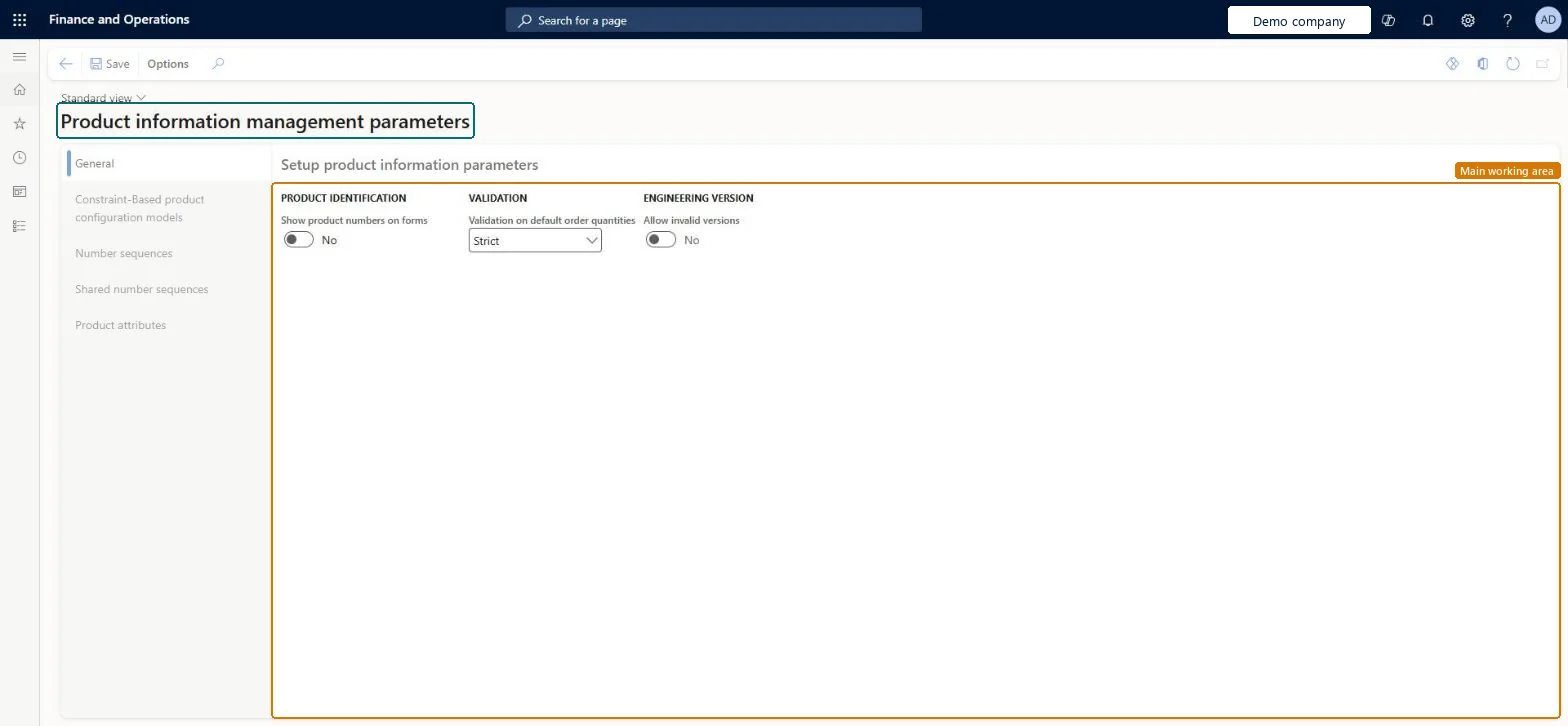
A setup page where you set the general parameters for Product information management, such as product identification, validation of default order quantities and engineering versions.
PAGE GUIDEWhat the page does and how to use it8 sections. Choose a role to highlight what matters to you.
Everyone
1What it is and why
What it is
A setup page where you set the general parameters for Product information management, such as product identification, validation of default order quantities and engineering versions.
What you do here
Use this page to control how products are identified and validated across the module, and to maintain its constraint-based product configuration, number sequence and product attribute settings.
The page in Dynamics 365. page title tab to open what to set or check
About the examples: Examples and screenshots in this guide use BEAT, a demo company in a Dynamics 365 test environment. Use your own company's codes and values instead of copying them.
Setup steps on this page
Set up Product information management parameters
Use this page to control how products are identified and validated across the module, and to maintain its constraint-based product configuration, number sequence and product attribute settings.
How to use it
Go to Product information management > Setup > Product information management parameters.
On the General tab, set Show product numbers on forms, Validation on default order quantities and Allow invalid versions.
Open the Constraint-Based product configuration models, Number sequences, Shared number sequences and Product attributes tabs to review the related settings.
Select Save.
Source: Checked in Dynamics 365
Fields on the page
Field
What it means
Table column
Validation on default order quantities
Strict requires every Standard order quantity in the default order settings to be a multiple of the Multiple value. Standard uses standard validation.Microsoft Learn
DefaultOrderQuantitiesValidation
Product attributes
On this tab you select the master company where the product and item identifiers are primarily maintained.Microsoft Learn
Test checklist
Set Validation on default order quantities to Strict
Open Default order settings for a product and set Multiple 5 and Standard order quantity 12 on the Purchase order FastTab
Check the save is refused with an error in the message bar
Change the standard quantity to 10 and check it saves
Should default order quantities be validated strictly?Turning on Strict validation without checking existing data: you can no longer save default order settings whose standard order quantity isn't a multiple of the Multiple value.
Number sequences
Reference
Shared or per company
Note
Item - barcode association
Per company
BEAT uses number sequence Prod_43. Checked in Dynamics 365
Solution architect
5Design impact
Can it be undone
Reversible: The validation option can be changed back; it only governs saving default order settings, not existing orders. Microsoft Learn
Technical architect
6Technical
Menu item
EcoResProductParametersChecked in Dynamics 365
Form
EcoResProductParametersChecked in Dynamics 365
Table
EcoResProductParametersShown as “PRODUCT PARAMETERS” in Record infoChecked in Dynamics 365
Data entities
EcoResConstraintBasedProductConfigurationModelParametersEntityConstraint-based product configuration model parameters Microsoft data model EcoResProductParametersEntityProduct parameters Microsoft data model
Who can open it
PrivilegesManage product parameters EcoResProductParametersMaintainView product parameters EcoResProductParametersViewDutiesInquire into product management policies EcoResProductManagementPoliciesInquireEnable the product management process EcoResProductManagementProcessEnableEnable the engineering change management process EngChgEngineeringChangeManagementProcessEnableEnable product configuration modeling process PCProductConfigurationModelProcessEnablInquire into product configuration reference data PCProductConfigurationRefDataInquire5 security rolesProduct designer BOMProductDesignerProduct design manager BOMProductDesignManagerProduct engineering manager EngChgProductEngineeringManagerInventory accountant InventCostAccountantInventory accountant clerk InventCostCostClerkChecked in Dynamics 365
Roles to set it up and use it
To set it up or change itProduct design manager BOMProductDesignManagerProduct engineering manager EngChgProductEngineeringManagerTo use itProduct designer BOMProductDesignerInventory accountant InventCostAccountantInventory accountant clerk InventCostCostClerkGive people one of these roles. On this system, 5 roles can open this page.Checked in Dynamics 365
EcoResConstraintBasedProductConfigurationModelParametersEntity data entity Microsoft data model
Data migration
EcoResConstraintBasedProductConfigurationModelParametersEntity (Constraint-based product configuration model parameters): shared by all companies, in Microsoft's default template 300 - Inventory.EcoResProductParametersEntity (Product parameters): shared by all companies, in Microsoft's default template 300 - Inventory.Load order: Microsoft's default template 300 - Inventory loads Constraint-based product configuration model parameters at execution unit 1, level 300, sequence 90. Lower levels load first, and entities at the same level load in sequence order.Load first: the default templates at lower levels (System setup to Budgeting)Microsoft Learn