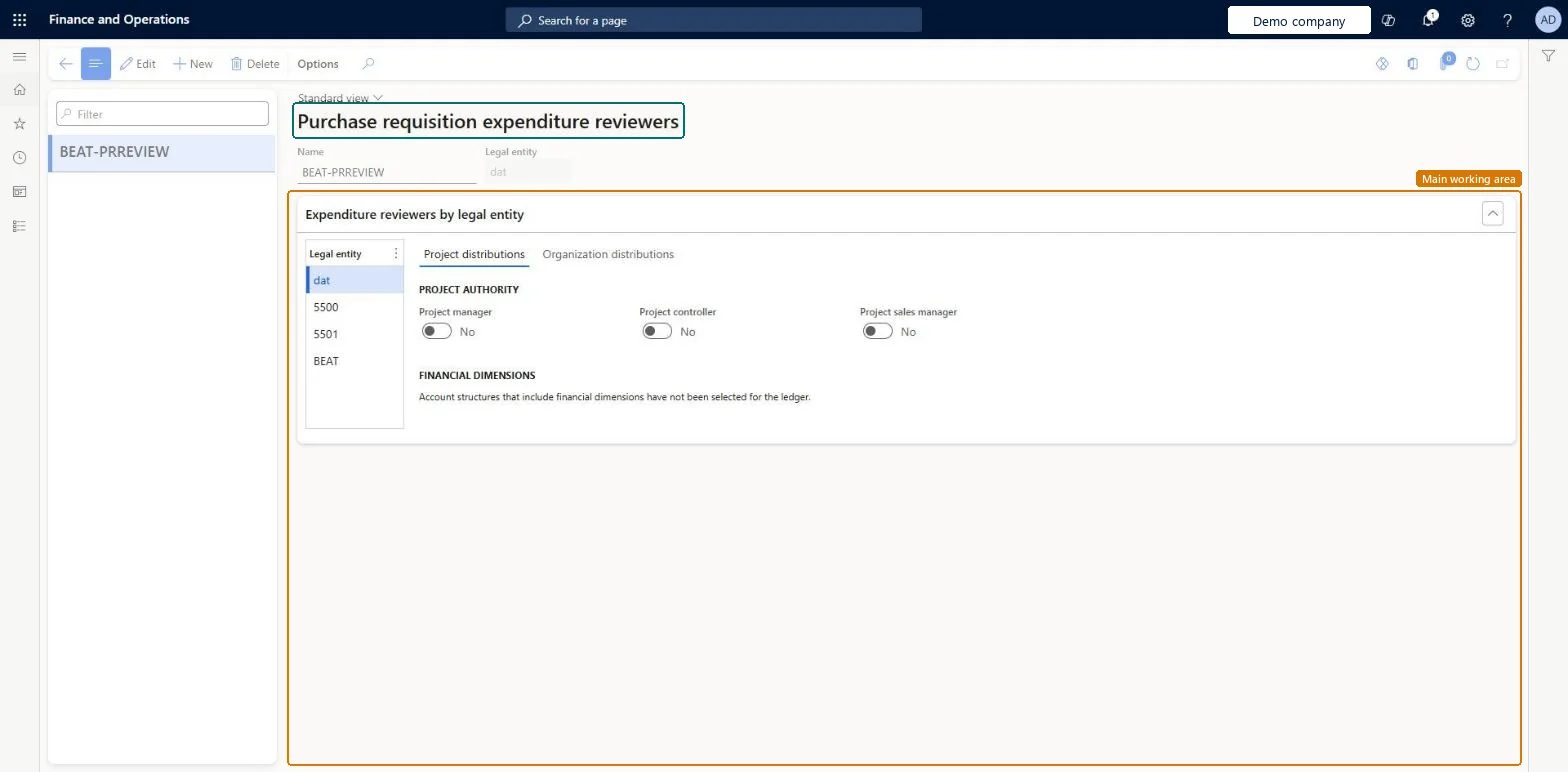
A setup page where you create expenditure reviewer configurations that send purchase requisitions for review to the person in a project role or the owner of a financial dimension.
PAGE GUIDEWhat the page does and how to use it8 sections. Choose a role to highlight what matters to you.
Everyone
1What it is and why
What it is
A setup page where you create expenditure reviewer configurations that send purchase requisitions for review to the person in a project role or the owner of a financial dimension.
What you do here
Use this page to pick the right reviewer automatically in a purchase requisition workflow, so the workflow doesn't need updating every time a reviewer changes job.
Example
For example, a company with six departments and 10 cost centers sets up one reviewer for the department and one for the cost center, so each requisition is approved first by the department manager and then by the cost center manager.
The page in Dynamics 365. page title tab to open what to set or check
About the examples: Examples and screenshots in this guide use BEAT, a demo company in a Dynamics 365 test environment. Use your own company's codes and values instead of copying them.
Step by step, with screenshots
Set up Purchase requisition expenditure reviewers1 screen
Use this page to pick the right reviewer automatically in a purchase requisition workflow, so the workflow doesn't need updating every time a reviewer changes job.
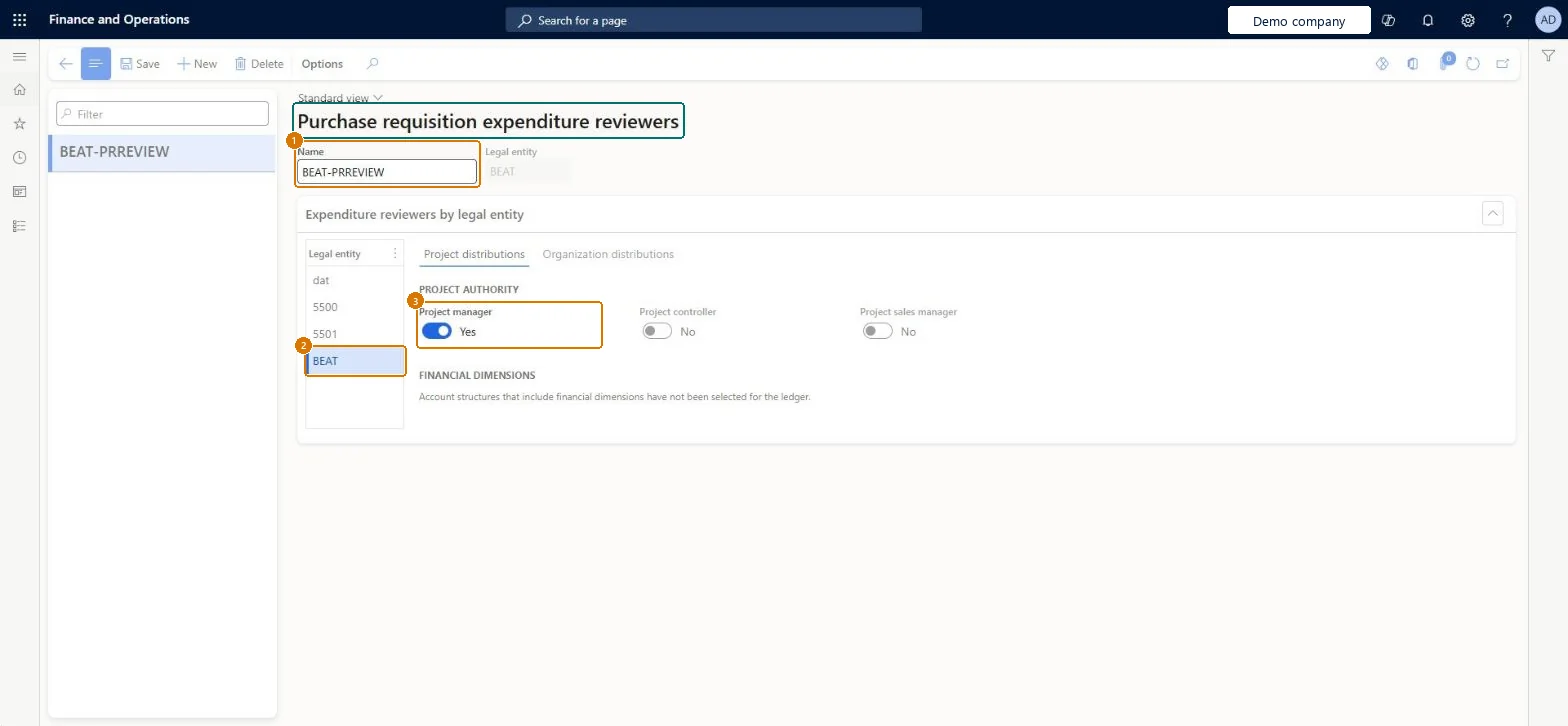
Screen 1
Choose who reviews requisition spending
Go to Procurement and sourcing > Setup > Policies > Purchase requisition expenditure reviewers
Select New and enter a name
In the legal entity list, select the legal entity
On the Project distributions tab, set Project manager to Yes
Select Save
1Name
BEAT-PRREVIEW
2Legal entity
BEAT
3Project manager
Yes
Show the full screen page title tab to open what to set or check
Steps from Microsoft
Go to Procurement and sourcing > Setup > Policies > Purchase requisition expenditure reviewers.
Select New.
In the Name field, enter a name for the configuration, such as cost center.
On the Expenditure reviewers by legal entity FastTab, select the legal entity to set up.
For a project distribution, select each project authority you want and set each financial dimension you want to Yes.
For an organization distribution, on the Organization distributions tab, set each financial dimension you want to Yes.
The name of the expenditure reviewer configuration, such as cost center.Microsoft Learn
PRReview
Name
Project distributions
Sends the review to a project authority (project manager, project controller or project sales manager) or to the owner of a financial dimension taken from the project.Microsoft Learn
Organization distributions
Sends the review to the owner of a financial dimension taken from the requisition itself.Microsoft Learn
Legal entity
DataArea
Project manager
Yes
IsProjectManagerAuthority
Test checklist
Create a reviewer configuration, select the legal entity and enable the Cost Center dimension on Organization distributions.
Set an Owner on each cost center value under Financial dimension values.
Assign the configuration as an Expenditure participants approver in the requisition workflow.
Submit a requisition and check the work item goes to the cost center owner.
Organization distributions on the Department or Cost Center dimension, with an Owner set on every value of that dimensionThe workflow then routes each requisition to the owner of the dimension value on its lines, so when ownership changes you only update the Owner field.
Reversible: Change the configuration or the Owner on the dimension value; new workflow steps use the new owner. Microsoft Learn
If you change it later
When the owner of a cost center changes, you only update the Owner field on that financial dimension value; the workflow then routes to the new owner. Microsoft Learn
Technical architect
6Technical
Menu item
PurchReqWorkflowParticipantExpenTokenChecked in Dynamics 365
Form
WorkflowParticipantExpenTokenChecked in Dynamics 365
Table
WorkflowParticipantExpenTokenShown as “Workflow participant expenditure token” in Record infoChecked in Dynamics 365
Data entities
PurchPurchaseRequisitionExpenditureReviewerConfigurationEntityPurchase requisition expenditure reviewer configurations Microsoft data model
Who can open it
PrivilegesMaintain purchase requisition process PurchReqPurchasingProcessEnableInquire into purchase requisition process PurchReqPurchasingProcessInquireDutiesEnable purchasing process ProcPurchasingProcessEnableInquire into purchasing policies ProcPurchasingProcessInquire5 security rolesAuditor AuditPolicyManagerPurchasing manager TradePurchasingManagerAccounts payable manager VendInvoiceAccountsPayableManagerPurchasing agent VendPurchasingAgentPurchasing Agent - Public Sector VendPurchasingAgent_PSNChecked in Dynamics 365
Roles to set it up and use it
To set it up or change itPurchasing manager TradePurchasingManagerAccounts payable manager VendInvoiceAccountsPayableManagerTo use itPurchasing agent VendPurchasingAgentPurchasing Agent - Public Sector VendPurchasingAgent_PSNAuditor AuditPolicyManagerGive people one of these roles. On this system, 5 roles can open this page.Checked in Dynamics 365
Actions on the page
Options: Personalize, Page options, ShareChecked in Dynamics 365
Checked in a working Dynamics 365 system, version 10.0.49: the menu item, form, table and security, the page, the demo records and the values in the screenshots.