About the examples: Examples and screenshots in this guide use BEAT, a demo company in a Dynamics 365 test environment. Use your own company's codes and values instead of copying them.
Step by step, with screenshots
Set up Organization-wide fixed asset identifiers1 screen
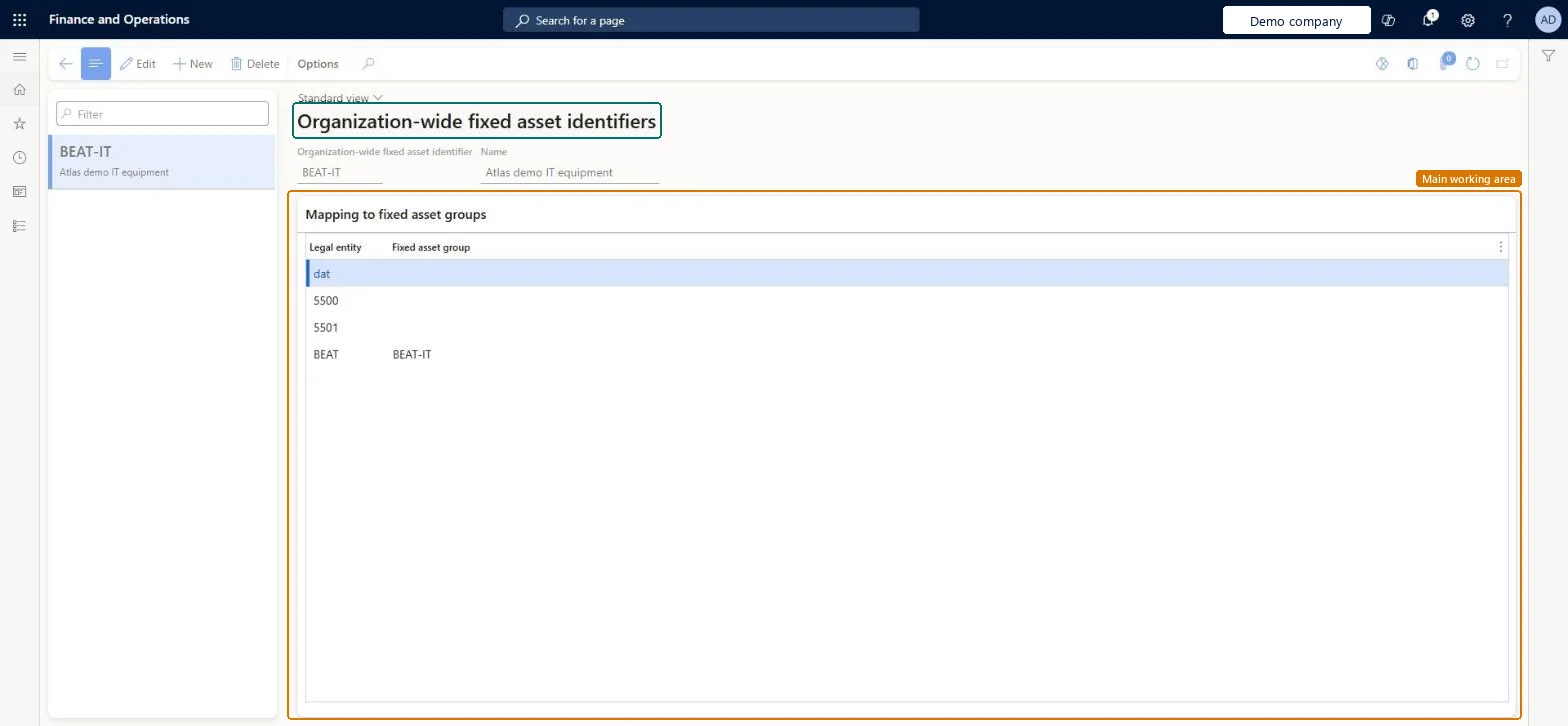
Use this page to give the whole organization one fixed asset classification that the business rules for fixed asset determination can point to.
Screen 1
Create the organization-wide fixed asset identifier
Go to Procurement and sourcing > Setup > Fixed assets > Organization-wide fixed asset identifiers
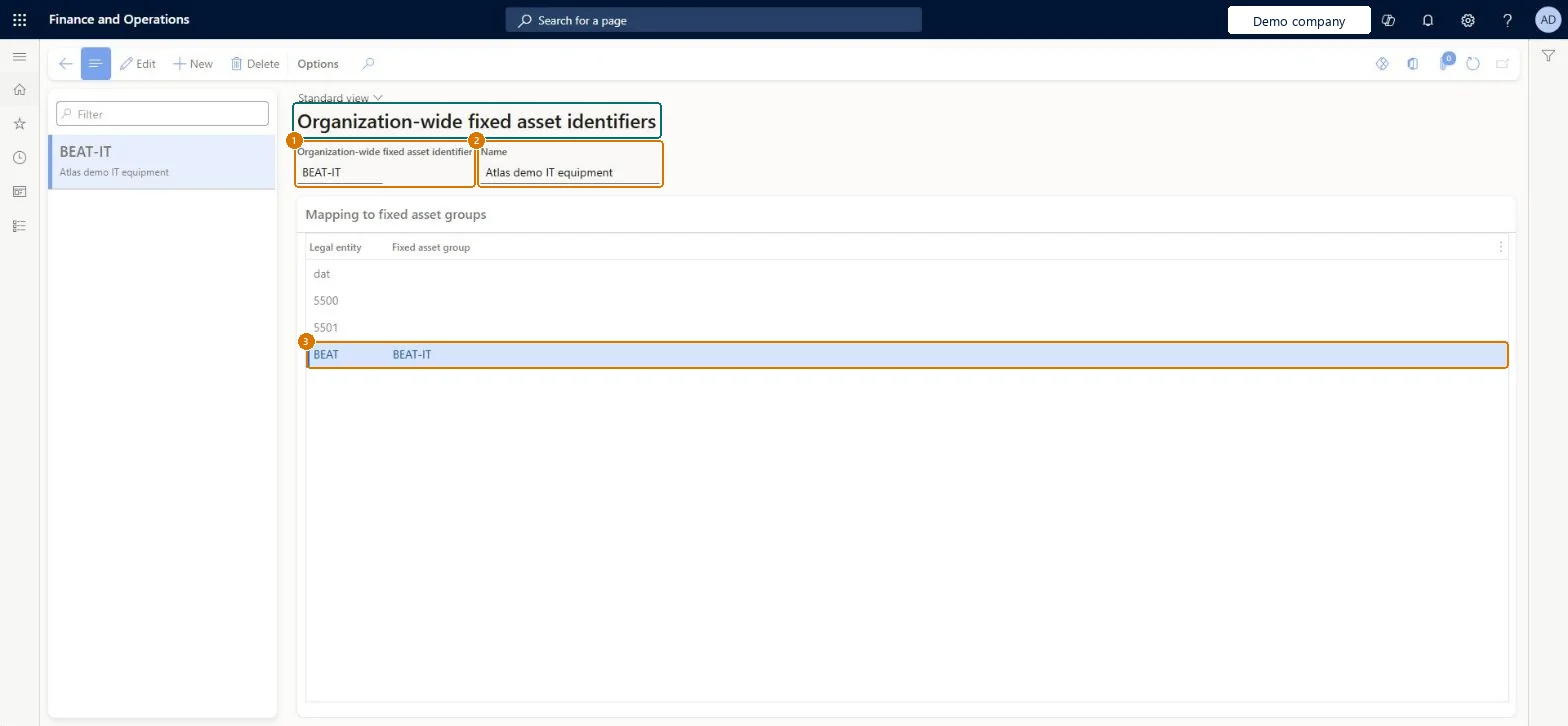
Select New and enter the identifier and name
Under Mapping to fixed asset groups, choose the fixed asset group for each legal entity that uses it
Select Save
1Organization-wide fixed asset identifier
BEAT-IT
2Name
IT equipment
Fixed asset group (BEAT)
BEAT-IT
Show the full screen page title tab to open what to set or check
Steps from Microsoft
Go to Procurement and sourcing > Setup > Fixed assets > Organization-wide fixed asset identifiers.
Select New.
In the Organization-wide fixed asset identifier field, enter a unique short name.
In the Name field, enter a descriptive name.
Save the identifier.
In the Mapping to fixed asset groups list, select a legal entity and the fixed asset group to link.
A new or changed identifier must be saved before it can be linked to a fixed asset group for a legal entity. Microsoft Learn
Technical architect
5Technical
Menu item
AssetGroupGlobalMappingChecked in Dynamics 365
Form
AssetGroupGlobalMappingChecked in Dynamics 365
Table
AssetGroupGlobalShown as “Organization-wide fixed asset identifiers” in Record infoChecked in Dynamics 365
Who can open it
PrivilegesMaintain global groups for fixed asset records AssetGroupGlobalMaintainView global groups for fixed asset records AssetGroupGlobalViewMaintain purchase requisition process PurchReqPurchasingProcessEnableDutiesInquire into fixed asset reference data AssetFixedAssetReferenceDataInquireEnable fixed assets process AssetFixedAssetsProcessEnableEnable purchasing process ProcPurchasingProcessEnable7 security rolesAccountant LedgerAccountantAccounting manager LedgerAccountingManagerAccounting supervisor LedgerAccountingSupervisorRental manager RentalManagerRental purchasing manager RentalPurchasingManagerPurchasing manager TradePurchasingManagerAccounts payable manager VendInvoiceAccountsPayableManagerChecked in Dynamics 365
Roles to set it up and use it
To set it up or change itPurchasing manager TradePurchasingManagerAccounts payable manager VendInvoiceAccountsPayableManagerRental manager RentalManagerRental purchasing manager RentalPurchasingManagerAccounting supervisor LedgerAccountingSupervisorTo use itAccounting manager LedgerAccountingManagerGive people one of these roles. On this system, 7 roles can open this page.Checked in Dynamics 365
Actions on the page
Options: Personalize, Page options, ShareChecked in Dynamics 365
Checked in a working Dynamics 365 system, version 10.0.49: the menu item, form, table and security, the page, the demo records and the values in the screenshots.