PAGE GUIDEWhat the page does and how to use it8 sections. Choose a role to highlight what matters to you.
Everyone
1What it is and why
What it is
A page where you create pricing rules that move item prices up or down from the base price.
What you do here
Use this page to set up each margin price adjustment, the customers and items it applies to, and how it is calculated, so that you can adjust prices without changing the base price.
Example
For example, a price structure can contain two sequential adjustments, such as general price adjustments followed by seasonal price adjustments.
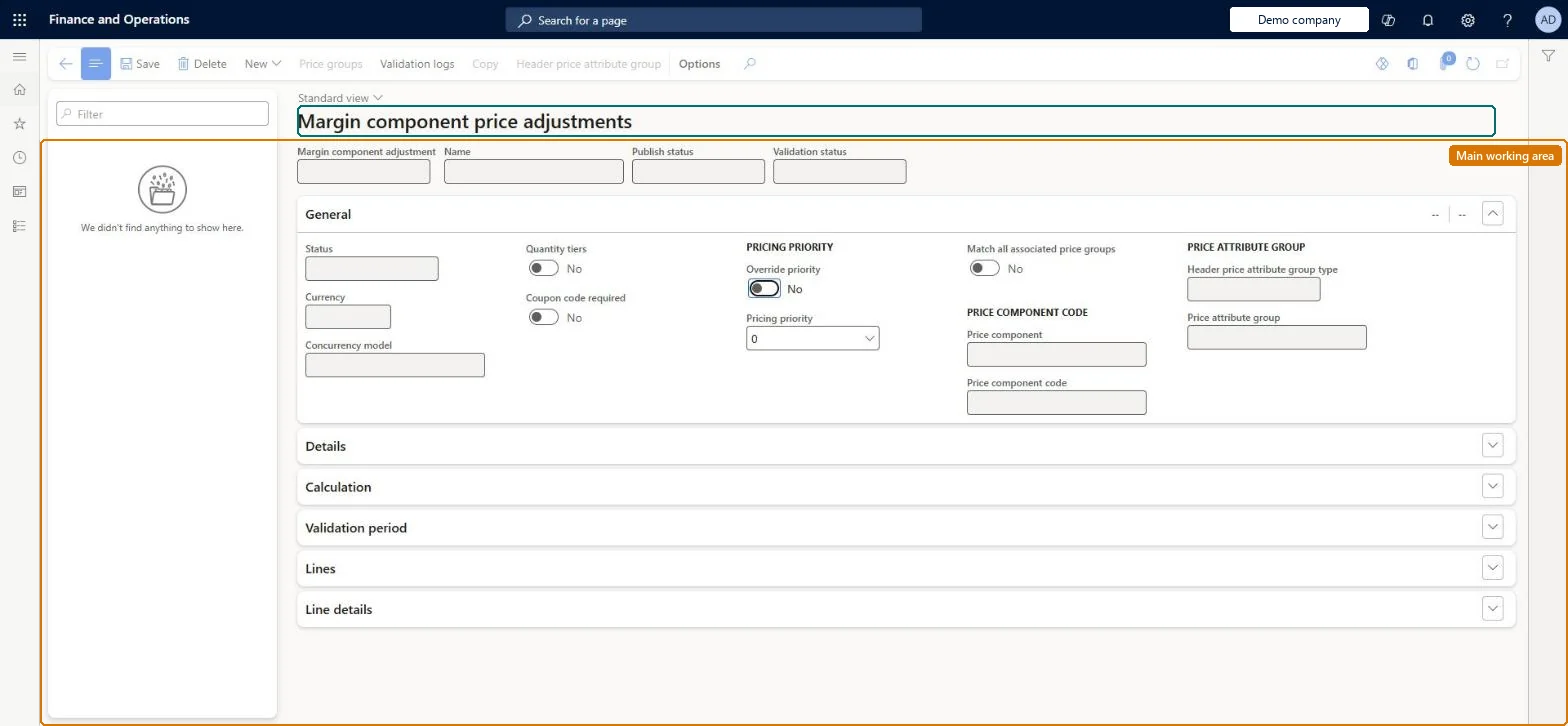
The page in Dynamics 365. page title tab to open what to set or check
About the examples: Examples and screenshots in this guide use BEAT, a demo company in a Dynamics 365 test environment. Use your own company's codes and values instead of copying them.
Setup steps on this page
Set up Margin component price adjustments
Use this page to set up each margin price adjustment, the customers and items it applies to, and how it is calculated, so that you can adjust prices without changing the base price.
Steps from Microsoft
Go to Pricing management > During-sales pricing > Price adjustments > Margin component price adjustments.
Select New on the Action Pane.
Enter an identifier in the Margin component adjustment field and a Name.
On the General FastTab, select the Currency and the Price component code.
On the Action Pane, select Header price attribute group to choose the customers that the rule applies to.
On the Lines FastTab, select New, choose the items, and set the Calculation type and value.
On the Validation period FastTab, set the Effective date and Expiration date.
Create a margin component adjustment with a Margin component price component code, header attributes set to All and one line for a test item with Percent 10.
Set the Effective date and Expiration date to include today and enable the rule.
Create a sales order line for the item and open the price details.
Check that the price adjustment is added to the base price at the rule's pricing sequence.
In the Price simulator, check the rule appears under Applied margin component price adjustments.
Leave new rules Disabled until every required field is set; use Quantity tiers only for price changes that depend on the quantity on one order lineNew records are created Disabled and can be enabled only when required fields are set. Margin adjustment quantity tiers are based on quantity per line, while quantity discounts are based on quantity per order.
Trying to fix a live rule. All fields are read-only while a rule is Enabled, and disabling it to edit stops it from applying until you enable it again.Test: Compound vs non-compound margin adjustment
Number sequences
Reference
Shared or per company
Note
Discount
Per company
New records on this page take their Discount from the RetailOfferIdEx3 reference; BEAT uses number sequence Comm_79. Checked in Dynamics 365
Solution architect
5Design impact
Can it be undone
Reversible: Only enabled rules are used in calculations. To change a rule, set Status to Disabled, edit, then enable it again. Microsoft Learn
If you change it later
A rule is read-only while it is enabled, so you must disable it before you change it. Microsoft Learn
Technical architect
6Technical
Menu item
GUPMarginComponentPriceAdjustmentsChecked in Dynamics 365
Form
RetailPeriodicDiscountChecked in Dynamics 365
Table
RetailPeriodicDiscountShown as “PERIODIC DISCOUNT” in Record infoKey field: OfferIdChecked in Dynamics 365
PrivilegesMaintain sales margin component price adjustments GUPMarginComponentPriceAdjustmentMaintainView pricing service margin component price adjustments GUPMarginComponentPriceAdjustmentViewDutiesInquiries into pricing service margin component price adjustments GUPMarginComponentInquiryMaintain sales margin component price adjustments GUPMarginComponentMaintain3 security rolesMCRTestUserRoleSales clerk TradeSalesClerkSales manager TradeSalesManagerChecked in Dynamics 365
Roles to set it up and use it
To set it up or change itSales manager TradeSalesManagerTo use itSales clerk TradeSalesClerkGive people one of these roles. On this system, 2 roles can open this page.Checked in Dynamics 365
Actions on the page
(Action Pane without tabs): New, Price groups, Validation logs, Copy, Header price attribute groupChecked in Dynamics 365