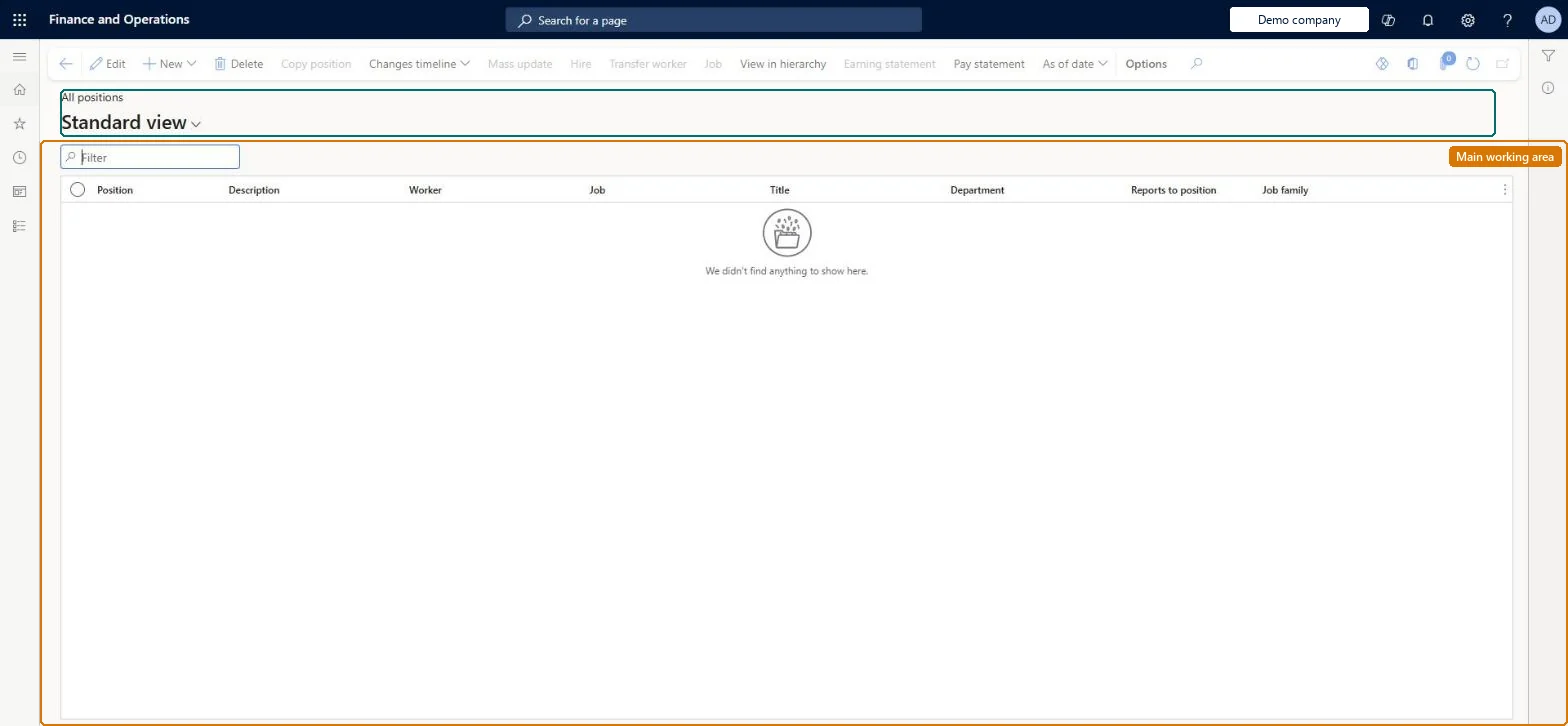
A list page that shows every position in the company, where each position is based on a job and holds its title, duration, reporting relationships, labor union and financial dimension details.
Budget clerk, Budget contributor, Budget manager and 15 more roles
Business process
Develop people strategy
Menu item
HcmPositionList
Main table
HcmPosition
Data entity
HcmPositionV2Entity
Show what matters for
PAGE GUIDEWhat the page does and how to use it7 sections. Choose a role to highlight what matters to you.
Everyone
1What it is and why
What it is
A list page that shows every position in the company, where each position is based on a job and holds its title, duration, reporting relationships, labor union and financial dimension details.
What you do here
Use this page to create and maintain positions, set when they are available for worker assignment, and define which position each one reports to.
Example
For example, a summer position can have a duration from May 1 to August 31.
The page in Dynamics 365. page title tab to open what to set or check
About the examples: Examples and screenshots in this guide use BEAT, a demo company in a Dynamics 365 test environment. Use your own company's codes and values instead of copying them.
Steps from Microsoft
Go to Payroll > Positions > All positions.
Use the Quick Filter to find the position.
Open the position from the list.
Expand the Reports to position section and select New.
In the Reports to field, select the position, and then select Create.
Expand the Relationships section to add reporting relationships for other hierarchy types.
Hard to reverse: Worker assignment, duration, compensation region and reports-to are date-effective, so changes are kept as history rather than overwritten. A worker assignment cannot start before the activation date or run past the retirement date. Changing the reports-to position changes the worker's manager in self service, workflow routing and checklist tasks from the effective date. Microsoft Learn
If you change it later
Changing the reports-to position changes who is treated as the worker's manager, including in workflow routing rules and checklist tasks. Microsoft Learn
Technical architect
5Technical
Menu item
HcmPositionListChecked in Dynamics 365
Form
HcmPositionChecked in Dynamics 365
Table
HcmPositionShown as “POSITIONS” in Record infoKey field: PositionIdChecked in Dynamics 365
PrivilegesMaintain positions using a list page HcmPositionListMaintainView positions using a list page HcmPositionListViewMaintain operating units OMOperatingUnitsMaintainExtView operating units OMOperatingUnitsViewExtMaintain retail worker position RetailWorkerPositionMaintainDutiesInquire into jobs and positions HcmJobPositionInquireMaintain job and position master HcmJobPositionMaintainReview organizational information HcmOrganizationalReviewInquire into organizational model OMOrganizationsInquireMaintain and configure organizational model OMOrganizationsMaintainInquire into payroll position and worker setup PayrollPositionWorkerSetupInquireSet up payroll positions and workers PayrollPositionWorkerSetupMaintainMaintain retail worker RetailWorkerMaintain18 security rolesBudget clerk BudgetBudgetClerkBudget contributor BudgetBudgetContributorBudget manager BudgetBudgetManagerChief executive officer CompanyChiefExecutiveOfficerChief financial officer CompanyChiefFinancialOfficerCompensation and benefits manager HcmCompensationAndBenefitsManagerHuman resource assistant HcmHumanResourceAssistantHuman resource manager HcmHumanResourceManagerPayroll administrator HcmPayrollAdministratorPayroll manager HcmPayrollManagerRecruiter HcmRecruiterTraining manager HcmTrainingManagerAccounting manager LedgerAccountingManagerProduction manager ProdProductionManagerRetail operations manager RetailOperationsManagerRetail service RetailServiceRetail store manager RetailStoreManagerInformation technology manager SysServerITManagerChecked in Dynamics 365
Roles to set it up and use it
To set it up or change itPayroll administrator HcmPayrollAdministratorCompensation and benefits manager HcmCompensationAndBenefitsManagerRecruiter HcmRecruiterHuman resource assistant HcmHumanResourceAssistantRetail operations manager RetailOperationsManagerTo use itPayroll manager HcmPayrollManagerHuman resource manager HcmHumanResourceManagerTraining manager HcmTrainingManagerChief executive officer CompanyChiefExecutiveOfficerChief financial officer CompanyChiefFinancialOfficerGive people one of these roles. On this system, 18 roles can open this page.Checked in Dynamics 365
Actions on the page
(Action Pane without tabs): New, Delete, Copy position, Changes timeline, Mass update, Hire, Transfer worker, Job, View in hierarchy, Earning statement, Pay statement, As of dateChecked in Dynamics 365