Budget manager, Chief executive officer, Chief financial officer and 10 more roles
Business process
List open positions
Menu item
HcmPositionList_Open
Main table
HcmPosition
Data entity
HcmPositionV2Entity
Setup steps
1 on this page
Show what matters for
PAGE GUIDEWhat the page does and how to use it8 sections. Choose a role to highlight what matters to you.
Everyone
1What it is and why
What it is
A list of positions that are active but have no worker assigned as of today.
What you do here
Use this page to see which positions are vacant and need to be filled.
Example
For example, BEAT's Sales department has 3 open positions on April 1, 2026; the new hire for position 000245 starts on April 15, so 000245 stays in the list, and in the Open positions tile count, until April 15.
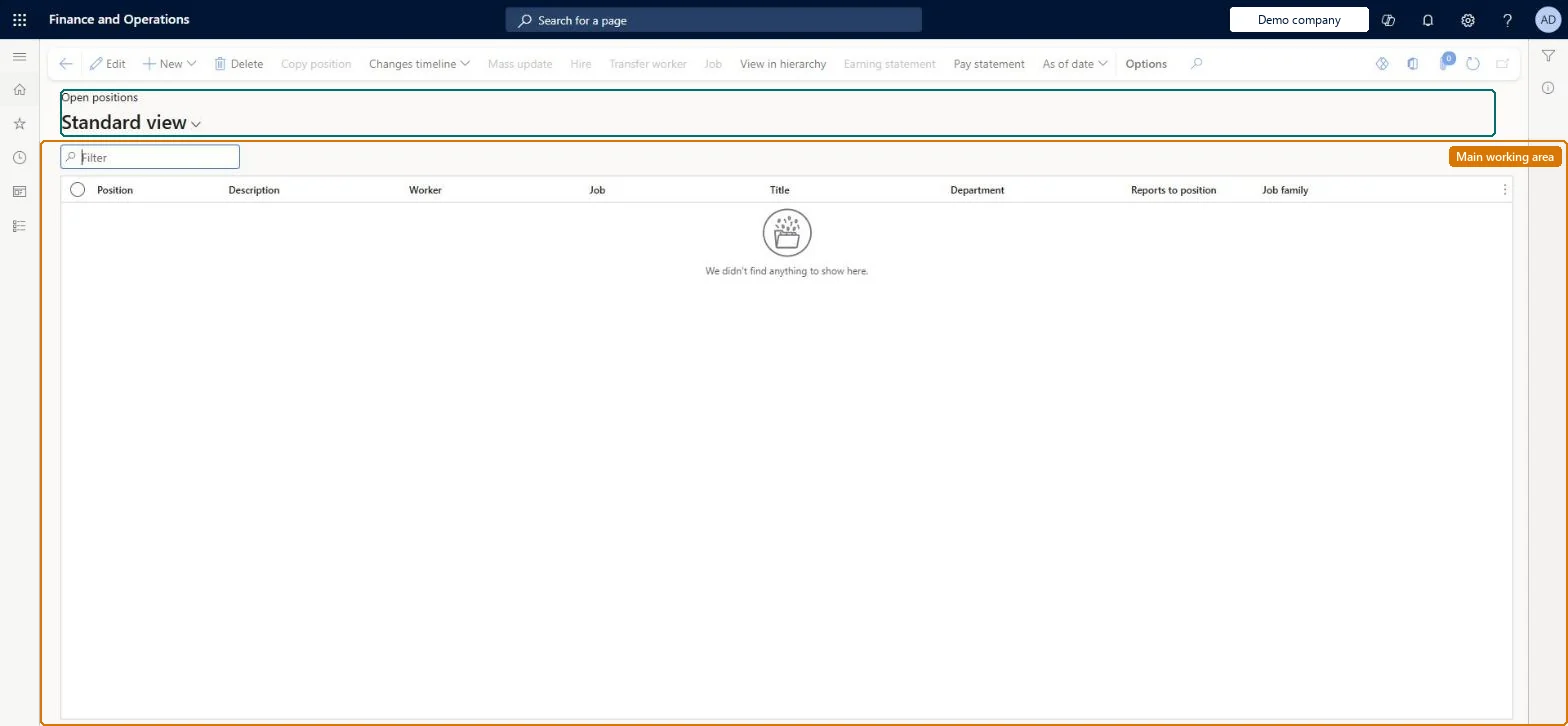
The page in Dynamics 365. page title tab to open what to set or check
About the examples: Examples and screenshots in this guide use BEAT, a demo company in a Dynamics 365 test environment. Use your own company's codes and values instead of copying them.
Setup steps on this page
Track vacant positions
Use the open-position list as the source for recruitment.
Steps from Microsoft
Go to Human resources > Positions > Open positions.
Use the Filter box to find a position.
Review the Position, Description, Worker, Job, Title, Department, Reports to position and Job family columns; the list shows only positions with no worker assigned.
Select New to create a position, View in hierarchy to see where it sits, or use Changes timeline and As of date to see it at another date.
The position ID. A position is one instance of a job and holds one worker at a time.Microsoft Learn
000245
Worker
The worker assigned to the position; blank when the position is vacant.Microsoft Learn
Kim Akers
Job
The job the position is based on; title, description, full-time equivalent and job family come from it.Microsoft Learn
Sales manager
Department
The department (operating unit) the position exists in.Microsoft Learn
Sales
Reports to position
The position this one reports to; its worker is the manager of this position's worker.Microsoft Learn
000300
Common errors and fixes
Message
What to do
A position that has a new hire still counts as open
The worker assignment starts in the future. Open positions considers the assignment as of today, so the position leaves the list on the assignment's start date. Microsoft Learn
A vacant position isn't listed
Its activation date is in the future. Positions appear only from their activation date. Microsoft Learn
Test checklist
Create a position with an activation date of today and no worker; check it appears in Open positions and in the Open positions tile count in the Personnel management workspace.
Assign a worker with a start date in the future; check the position still shows as open.
On the assignment's start date, check the position has dropped out of the list.
Filter on Department or Job first, then check each listed position has a recruitment plan or a hire with a start date.A position is open when it is active and has no worker assignment as of today; the workspace tile counts the same positions.
On BEAT the page is maintained by Human resource assistant, Compensation and benefits manager, Recruiter, Payroll administrator and Retail operations manager; viewed by Human resource manager, Payroll manager, Training manager, Chief executive officer and Chief financial officer; the full list is under the page's security roles. No Feature management feature is needed for this page.
Shared: positions are not per company. Data management lists the Positions V2 entity as shared, and Learn's shared parameters article names Position as a record shared across companies. Checked in Dynamics 365
Can it be undone
Reversible: This is a calculated list: a position shows here when its activation date is today or earlier and it has no current worker assignment. Nothing is stored on this page. A position with a future-dated assignment stays in the list until the assignment's effective date. Microsoft Learn
If you change it later
The list is calculated, not stored: a position appears when its activation date is today or earlier and it has no current worker assignment, and leaves it on the effective date of a worker assignment. The Open positions tile in the Personnel management workspace counts the same positions. Microsoft Learn
Technical architect
6Technical
Menu item
HcmPositionList_OpenChecked in Dynamics 365
Form
HcmPositionChecked in Dynamics 365
Table
HcmPositionShown as “POSITIONS” in Record infoKey field: PositionIdChecked in Dynamics 365
PrivilegesInquire into open positions BudgetOpenPositionsViewMaintain positions using a list page HcmPositionListMaintainView positions using a list page HcmPositionListViewMaintain retail worker position RetailWorkerPositionMaintainDutiesView positions using a list page BudgetOpenPositionsInquireInquire into jobs and positions HcmJobPositionInquireMaintain job and position master HcmJobPositionMaintainReview organizational information HcmOrganizationalReviewInquire into payroll position and worker setup PayrollPositionWorkerSetupInquireSet up payroll positions and workers PayrollPositionWorkerSetupMaintainMaintain retail worker RetailWorkerMaintain13 security rolesBudget manager BudgetBudgetManagerChief executive officer CompanyChiefExecutiveOfficerChief financial officer CompanyChiefFinancialOfficerCompensation and benefits manager HcmCompensationAndBenefitsManagerHuman resource assistant HcmHumanResourceAssistantHuman resource manager HcmHumanResourceManagerPayroll administrator HcmPayrollAdministratorPayroll manager HcmPayrollManagerRecruiter HcmRecruiterTraining manager HcmTrainingManagerRetail operations manager RetailOperationsManagerRetail service RetailServiceRetail store manager RetailStoreManagerChecked in Dynamics 365
Roles to set it up and use it
To set it up or change itHuman resource assistant HcmHumanResourceAssistantCompensation and benefits manager HcmCompensationAndBenefitsManagerRecruiter HcmRecruiterPayroll administrator HcmPayrollAdministratorRetail operations manager RetailOperationsManagerTo use itHuman resource manager HcmHumanResourceManagerPayroll manager HcmPayrollManagerTraining manager HcmTrainingManagerChief executive officer CompanyChiefExecutiveOfficerChief financial officer CompanyChiefFinancialOfficerGive people one of these roles. On this system, 13 roles can open this page.Checked in Dynamics 365
Actions on the page
(Action Pane without tabs): New, Delete, Copy position, Changes timeline, Mass update, Hire, Transfer worker, Job, View in hierarchy, Earning statement, Pay statement, As of dateChecked in Dynamics 365
HcmPositionV2Entity Positions V2: the position records. Shared by all companies.Load order: Load with the Jobs and positions template: Position hierarchy types and Position type, then Positions V2, then Position hierarchies and Position default dimensions. Jobs load earlier in the same template, and departments (Operating unit) come from the System setup template.Load first: HcmJobEntity, HcmPositionTypeEntity, HcmPositionHierarchyTypeEntity, OMOperatingUnitEntityMicrosoft Learn