BeyondERP.Newsletter
Menu

Job page · Inventory management

Corrections

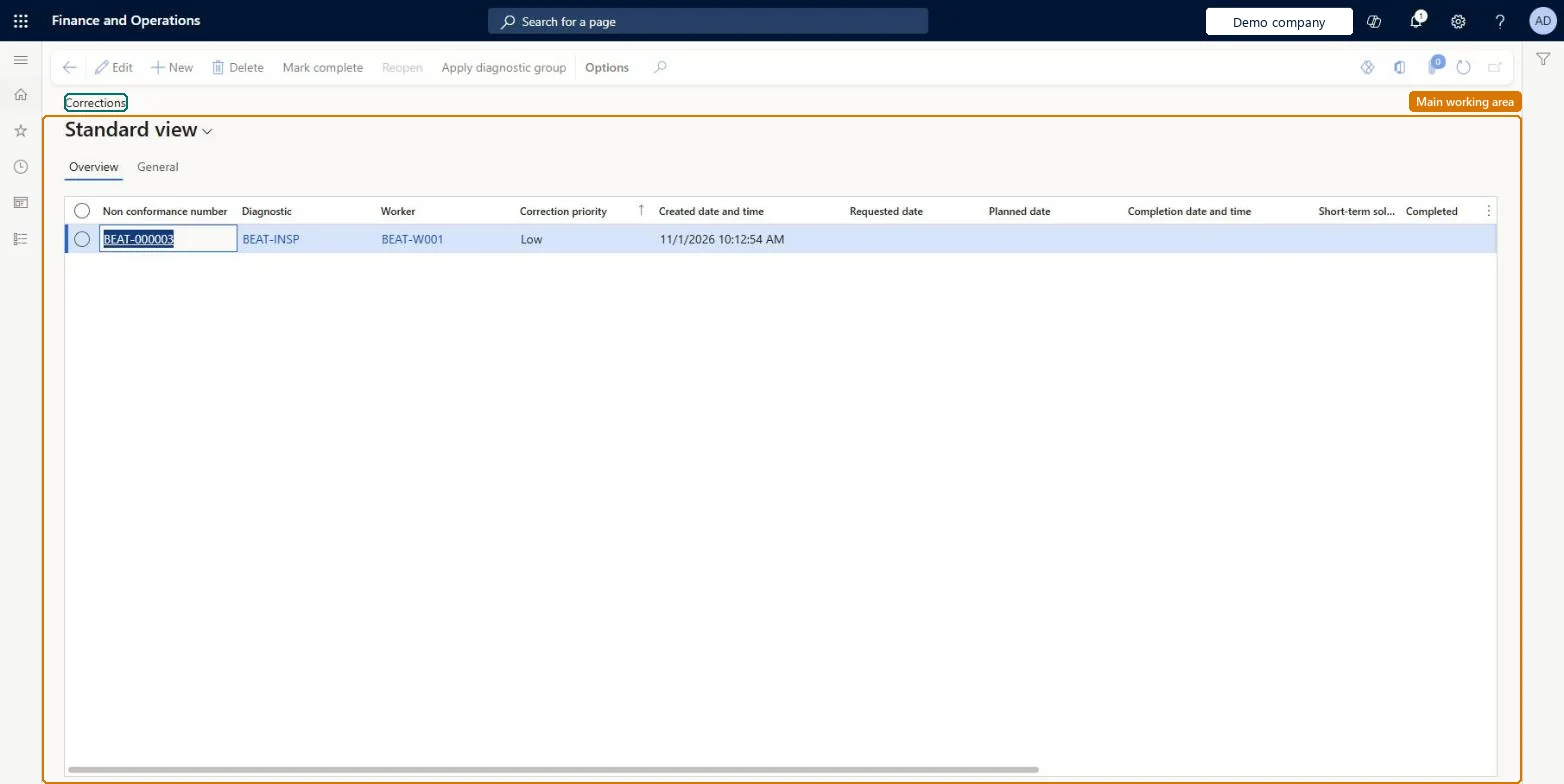
A list page that holds the corrections needed for nonconformances, including who must act and by when.

Business process
Manage inventory quality
Menu item
InventTestCorrection
Show what matters for
PAGE GUIDEWhat the page does and how to use it7 sections. Choose a role to highlight what matters to you.
Everyone

1What it is and why

What it isA list page that holds the corrections needed for nonconformances, including who must act and by when.
What you do hereUse this page to plan and track corrective actions for nonconformances and mark them as completed once the problem is fixed.
Corrections page in Dynamics 365
The page in Dynamics 365. page title tab to open what to set or check
Functional consultant · Solution architect

2Where it fits

Business processManage inventory quality
Menu pathInventory management › Periodic tasks › Quality management › Corrections
Set up firstNon conformances Microsoft Learn Diagnostic types Microsoft Learn Correction root cause codes Microsoft Learn
Used next byCorrections report Microsoft Learn
End user · Functional consultant

3How to do it

About the examples: Examples and screenshots in this guide use BEAT, a demo company in a Dynamics 365 test environment. Use your own company's codes and values instead of copying them.

When to run it

When to run itWhen an approved nonconformance needs corrective action with an owner and a due date.
How oftenOn demand, for each corrective action.
What the output showsCorrections with diagnostic, responsible worker, priority, dates and completion. A correction still open past its Planned date shows work that is overdue.

Source: Microsoft Learn

Steps from Microsoft

  1. Go to Inventory management > Periodic tasks > Quality management > Corrections.
  2. Open Non conformances, select an approved nonconformance, and on the Action Pane select Corrections.
  3. Select New to add a correction, or Apply diagnostic group to add one for each diagnostic in a group.
  4. Fill in Diagnostic, Worker, Correction priority, Requested date and Planned date, and mark Short term solution if the fix only lasts a short time.
  5. When the work is done, select the correction, select Mark complete and confirm, and add the Root cause code.

Source: Microsoft Learn

Fields on the page

FieldWhat it means
DiagnosticThe diagnostic type that identifies what kind of correction this is.Microsoft Learn
WorkerThe person responsible for the correction.Microsoft Learn
Correction priorityHow urgent the correction is: Low, Normal or High.Microsoft Learn
Requested dateThe date when the corrective action was asked for.Microsoft Learn
Planned dateThe date when the correction should be finished.Microsoft Learn
Short term solutionShows that the fix only solves the nonconformance for a short time.Microsoft Learn
Root cause codeThe code for the root cause of the issue that needed the correction.Microsoft Learn
CompletedCloses the correction once the nonconformance has been fixed.Microsoft Learn

Test checklist

  1. Each correction has a worker and a planned date.
  2. Completed corrections show a completion date.
  3. A reopened correction can be edited again.

Source: Microsoft Learn

Solution architect

4Design impact

Can it be undoneYes: A completed correction can be reopened, which clears its completion date and time so it can be edited again. Microsoft Learn
If you change it laterA completed correction can be reopened, which clears its completion date and time so it can be edited again. Microsoft Learn
Technical architect

5Technical

Menu itemInventTestCorrection
Roles to set it up and use itTo set it up or change itQuality control clerk InventQualityControlClerkTo use itQuality control manager InventQualityControlManagerWarehouse manager WMSWarehouseManagerMaterials manager InventMaterialsManagerProduction supervisor ProdProductionSupervisorShipping clerk InventShippingClerkGive people one of these roles. On this system, 10 roles can open this page.Checked in Dynamics 365
Developer

6Developer

Open it by URLhttps://<your-environment>/?mi=InventTestCorrection
Everyone

7Sources