Budget clerk, Budget contributor, Budget manager and 15 more roles
Business process
Develop people strategy
Menu item
OMDepartment
Main table
OMOperatingUnit
Data entity
None for this page's own settings
Setup steps
1 on this page
Show what matters for
PAGE GUIDEWhat the page does and how to use it8 sections. Choose a role to highlight what matters to you.
Everyone
1What it is and why
What it is
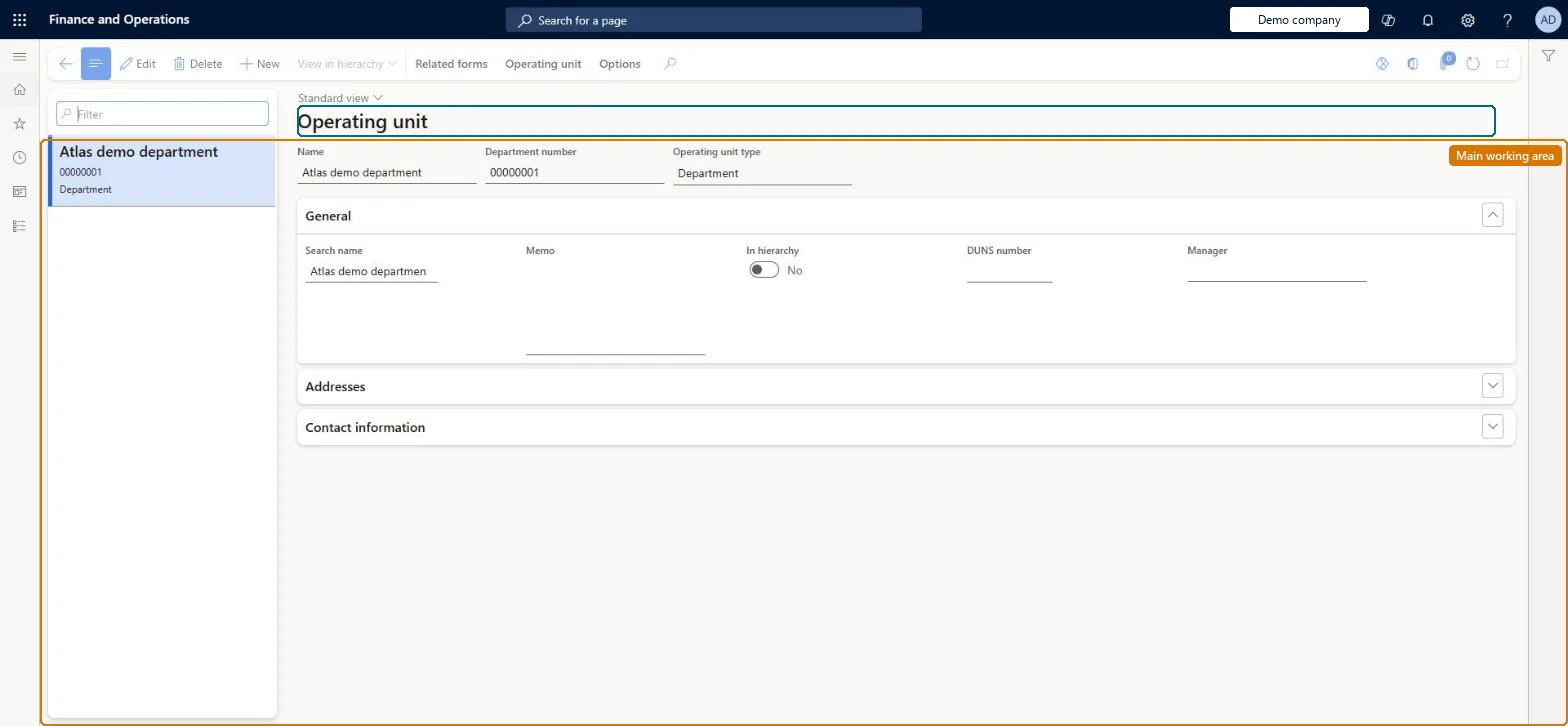
A page where you create and maintain departments, the operating units that represent functional areas of the organisation such as sales or accounting.
What you do here
Use this page to set up departments, their manager and contact details, so that positions can be assigned to them and they can be added to the department hierarchy.
Example
For example, BEAT creates the department Project billing (number 022 from the Organization number sequence) with manager Ana Bowman; its 4 positions name it, and it is published in the department hierarchy under Finance from January 1, 2027.
The page in Dynamics 365. page title tab to open what to set or check
About the examples: Examples and screenshots in this guide use BEAT, a demo company in a Dynamics 365 test environment. Use your own company's codes and values instead of copying them.
Setup steps on this page
Create departments
Create each functional area as a department with a manager, before positions are created.
Steps from Microsoft
Go to Human resources > Departments > Departments.
Select New.
In the Name field, enter a name.
In the Memo field, enter any additional information.
No number sequence is assigned to the Organization number reference. Assign one on the Number sequences page, or enter the number by hand. Microsoft Learn
In hierarchy is cleared for a new department
The department isn't in the department hierarchy yet. Insert it in Department hierarchy and publish. Microsoft Learn
Test checklist
Create a department with a name, memo and manager and save it.
Check Department number is assigned from the Organization number sequence, if one is set up.
Add the department to the department hierarchy and publish; check In hierarchy is selected on the department.
Assign a position to the department and check it shows on the position.
One department per functional area that is reported on or has profit and loss responsibility, with Name, Manager and a number from the Organization number sequence; insert it in the department hierarchy straight away.Departments are operating units used to report on functional areas, positions exist in a department, and the hierarchy places departments in the organization.
Department number takes a default value when a number sequence code is assigned to the Organization number reference on the Number sequences page. Microsoft Learn
Feature management and licence
Licence or add-in
On BEAT the page is maintained by Human resource assistant; viewed by Human resource manager, Compensation and benefits manager, Recruiter, Training manager and Chief executive officer; the full list is under the page's security roles. No Feature management feature is needed for this page.
Shared: departments are operating units, and Data management lists the Operating unit entity as shared, so every legal entity uses the same departments. Checked in Dynamics 365
Can it be undone
Hard to reverse: Positions are assigned to departments and departments are placed in the department hierarchy, so changing or retiring a department means moving its positions and republishing the hierarchy. Department number can come from the Organization number sequence. Microsoft Learn
If you change it later
Positions are assigned to departments and departments are placed in the department hierarchy, so renaming or retiring a department reaches every position in it and needs a new publish of the hierarchy. Microsoft Learn
Technical architect
6Technical
Menu item
OMDepartmentChecked in Dynamics 365
Form
OMOperatingUnitChecked in Dynamics 365
Table
OMOperatingUnitShown as “OPERATING UNIT” in Record infoChecked in Dynamics 365
Data entities
OMOperatingUnitEntityOperating unit (Operating units of every type; departments are one type of operating unit.) Microsoft data model OMOperatingUnitContactEntityOperating unit contacts (The contact information of the operating units.) Microsoft data model
Who can open it
PrivilegesCreate departments OMDepartmentCreateEdit departments OMDepartmentEditMaintain departments OMDepartmentMaintainView departments OMDepartmentViewDutiesEnable organizational process HcmOrganizationalProcessEnableInquire into organizational process HcmOrganizationalProcessInquireInquire into organizational model OMOrganizationsInquireMaintain and configure organizational model OMOrganizationsMaintainInquire into organizational model RentalOMOrganizationsInquireMaintain and configure organizational model RentalOMOrganizationsMaintain18 security rolesBudget clerk BudgetBudgetClerkBudget contributor BudgetBudgetContributorBudget manager BudgetBudgetManagerChief executive officer CompanyChiefExecutiveOfficerCompensation and benefits manager HcmCompensationAndBenefitsManagerHuman resource assistant HcmHumanResourceAssistantHuman resource manager HcmHumanResourceManagerRecruiter HcmRecruiterTraining manager HcmTrainingManagerAccounting manager LedgerAccountingManagerProduction manager ProdProductionManagerRental clerk RentalClerkRental coordinator agent RentalCoordinatorAgentRental manager RentalManagerRental purchasing manager RentalPurchasingManagerRental representative RentalRepresentativeRental sales manager RentalSalesManagerInformation technology manager SysServerITManagerChecked in Dynamics 365
Roles to set it up and use it
To set it up or change itHuman resource assistant HcmHumanResourceAssistantTo use itHuman resource manager HcmHumanResourceManagerCompensation and benefits manager HcmCompensationAndBenefitsManagerRecruiter HcmRecruiterTraining manager HcmTrainingManagerChief executive officer CompanyChiefExecutiveOfficerGive people one of these roles. On this system, 18 roles can open this page.Checked in Dynamics 365
Actions on the page
Related formsOperating unit: Registration(Action Pane without tabs): New, View in hierarchyChecked in Dynamics 365
Developer
7Developer
Open it by URL
https://<your-environment>/?mi=OMDepartment
Data migration
OMOperatingUnitEntity Operating unit: departments and other operating units. Shared by all companies.OMOperatingUnitContactEntity Operating unit contacts.Load order: Load Operating unit with the System setup template (010) before the Jobs and positions template, because positions name their department.Microsoft Learn