Budget manager, Chief financial officer, Compensation and benefits manager and 7 more roles
Business process
Develop currency policies
Menu item
ExchangeRate
Main table
ExchangeRateCurrencyPair
Data entity
ExchangeRateCurrencyPairEntity
Setup steps
1 on this page
Show what matters for
PAGE GUIDEWhat the page does and how to use it8 sections. Choose a role to highlight what matters to you.
Everyone
1What it is and why
What it is
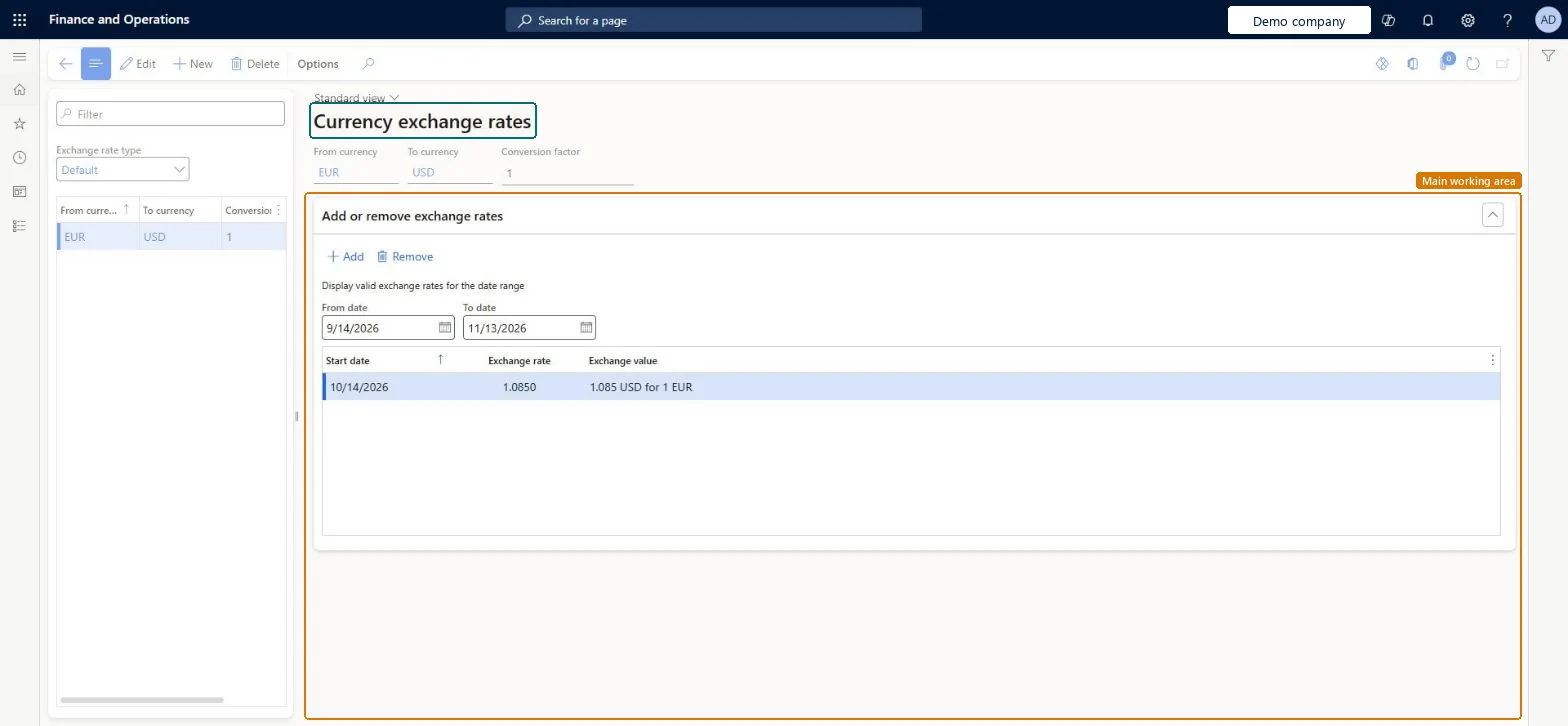
The page that holds exchange rates for currency pairs under each exchange rate type.
What you do here
Use this page to select an exchange rate type, add currency pairs, and enter the rates that apply for each period.
Example
For example, BEAT pays its UK staff from a GBP grade grid and values stock units in USD; the compensation and benefits manager adds the pair USD to GBP under the Default rate type with 0.7900 from 1 January 2026 and a new line with 0.7700 from 1 July 2026 instead of overwriting, so a conversion dated 15 March 2026 still uses 0.7900.
The page in Dynamics 365. page title tab to open what to set or check
About the examples: Examples and screenshots in this guide use BEAT, a demo company in a Dynamics 365 test environment. Use your own company's codes and values instead of copying them.
Step by step, with screenshots
Set up Currency exchange rates1 screen
Use this page to select an exchange rate type, add currency pairs, and enter the rates that apply for each period.
Screen 1
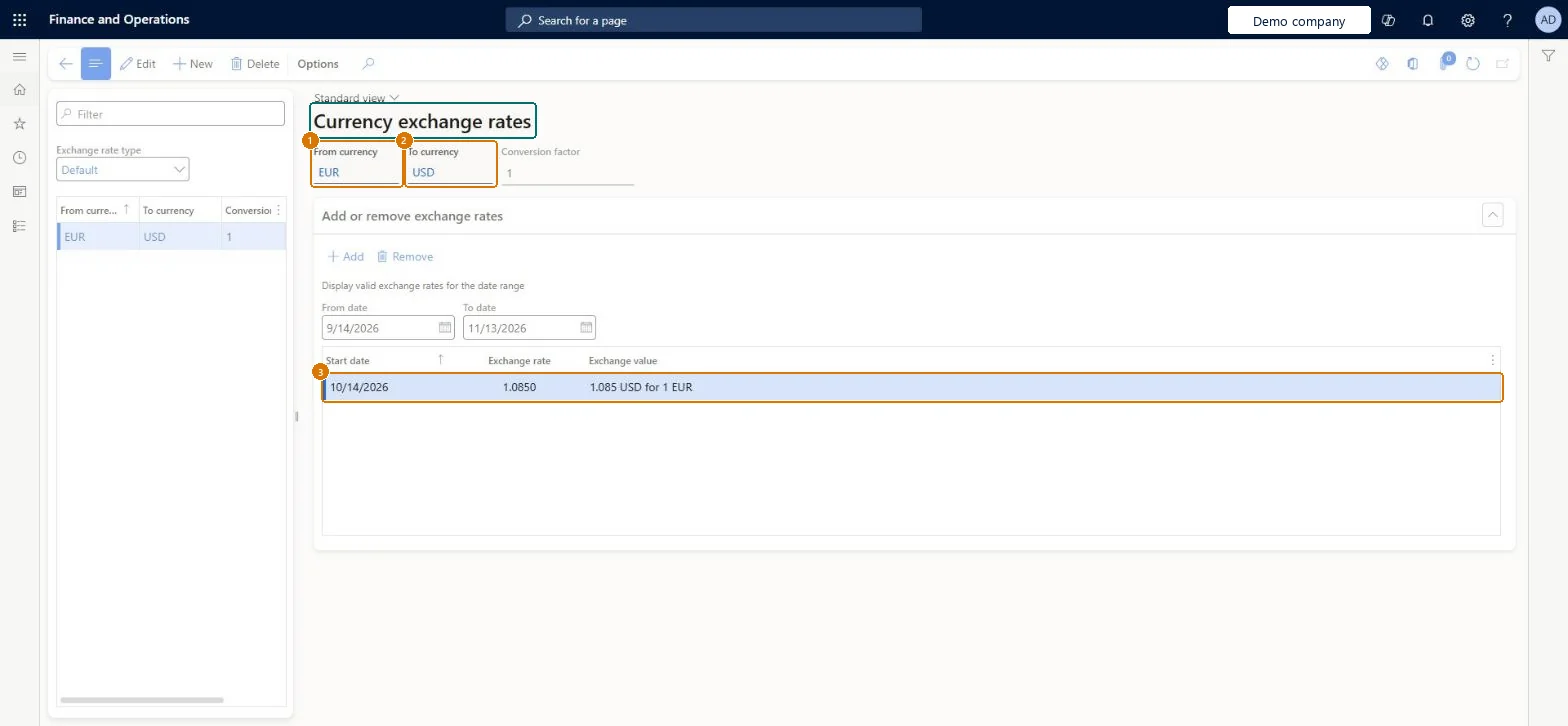
Enter the exchange rate
Go to General ledger > Currencies > Currency exchange rates
Select the Default exchange rate type
Select New and enter the from and to currencies
Under Add or remove exchange rates, select Add and enter the rate for 10/14/2026
1From currency
EUR
2To currency
USD
Exchange rate type
Default
Exchange rate
1.0850
Show the full screen page title tab to open what to set or check
Steps from Microsoft
Go to Human resources > Compensation > Currency exchange rates.
Select the Exchange rate type.
Enter a new currency pair, or select the pair to change.
Add a new line with a Start date and the rate, instead of changing an existing rate.
In the Conversion factor field, enter how many units of the From currency the rate converts, usually 1 or 100.
The rate for the pair from the start date, for the number of From currency units in the conversion factor.Microsoft Learn
0.7900
ExchangeRate
Common errors and fixes
Message
What to do
Saving GBP to USD is refused because exchange rates are already defined between the two currencies for the rate type
A pair can exist only once per rate type and reciprocal rates can't be entered; the reverse rate is calculated automatically. Keep the existing pair and add a dated line to it. Microsoft Learn
An old rate is used for a recent date
The rate with the latest start date before the date is used. Add a new line with the new start date. Microsoft Learn
Test checklist
Add USD to GBP with 0.7900 from 1/1/2026 and 0.7700 from 7/1/2026.
Try to add GBP to USD for the same rate type and check it is refused.
Check the pair shows two lines and the line used for 3/15/2026 is 0.7900.
Add a new dated rate for each change rather than overwriting the old one; Conversion factor 1 or 100The system uses the latest start date before each transaction date, so keeping dated history keeps past rates traceable. Most organizations use a conversion factor of 1 or 100.
Compensation and benefits managers keep the rates their plans and grids need; the page is the same shared list that General ledger users maintain. No Feature management feature is needed for this page.
A saved rate is used at once for transactions in its date range, in every legal entity. A reverse pair, such as EUR to USD when USD to EUR exists, can't be entered for the same rate type. Microsoft Learn
Technical architect
6Technical
Menu item
ExchangeRateChecked in Dynamics 365
Form
ExchangeRateChecked in Dynamics 365
Table
ExchangeRateCurrencyPairShown as “EXCHANGE RATE CURRENCY PAIR” in Record infoKey field: FromCurrencyCode, ToCurrencyCode, ExchangeRateType_NameChecked in Dynamics 365
Data entities
ExchangeRateCurrencyPairEntityExchange rate currency pair Microsoft data model ExchangeRateEntityExchange rates (The dated rates of each currency pair.) Microsoft data model
Who can open it
PrivilegesMaintain currency exchange rates CurrencyExchangeRatesMaintainexchange rate report -ViewCurrencyCurrentExchangeRates: CurrencyExchangeRatesViewDutiesEnable budget process BudgetBudgetProcessEnableEnable compensation process HcmCompensationProcessEnableEnable general ledger process LedgerGeneralLedgerProcessEnableInquire into general ledger reference data LedgerGeneralLedgerReferenceDataInquireEnable general ledger process RentalLedgerGeneralLedgerProcessEnable10 security rolesBudget manager BudgetBudgetManagerChief financial officer CompanyChiefFinancialOfficerCompensation and benefits manager HcmCompensationAndBenefitsManagerAccountant LedgerAccountantAccounting manager LedgerAccountingManagerAccounting supervisor LedgerAccountingSupervisorFinancial controller LedgerFinancialControllerRental manager RentalManagerRental purchasing manager RentalPurchasingManagerRental sales manager RentalSalesManagerChecked in Dynamics 365
Roles to set it up and use it
To set it up or change itCompensation and benefits manager HcmCompensationAndBenefitsManagerBudget manager BudgetBudgetManagerAccounting manager LedgerAccountingManagerRental sales manager RentalSalesManagerRental purchasing manager RentalPurchasingManagerTo use itChief financial officer CompanyChiefFinancialOfficerFinancial controller LedgerFinancialControllerAccountant LedgerAccountantGive people one of these roles. On this system, 10 roles can open this page.Checked in Dynamics 365
ExchangeRateCurrencyPairEntity Exchange rate currency pair: the pair and rate type. Shared by all companies.ExchangeRateEntity Exchange rates: the dated rates of each pair. Shared by all companies.Load order: Load after the currencies and exchange rate types the pairs name; then the dated rates. Rates can also be brought in with Import currency exchange rates from a provider.Load first: CurrencyEntity, ExchangeRateTypeEntityMicrosoft Learn
Checked in a working Dynamics 365 system, version 10.0.49: the menu item, form, table and security, the page, the demo records and the values in the screenshots.