Accountant, Accounting manager, Accounting supervisor and 13 more roles
Business process
Support systems
Menu item
GeneralLedgerAdjustmentProposedAdjustmentListPage
Main table
GeneralLedgerAdjustmentProposedAdjustment
Show what matters for
PAGE GUIDEWhat the page does and how to use it7 sections. Choose a role to highlight what matters to you.
Everyone
1What it is and why
What it is
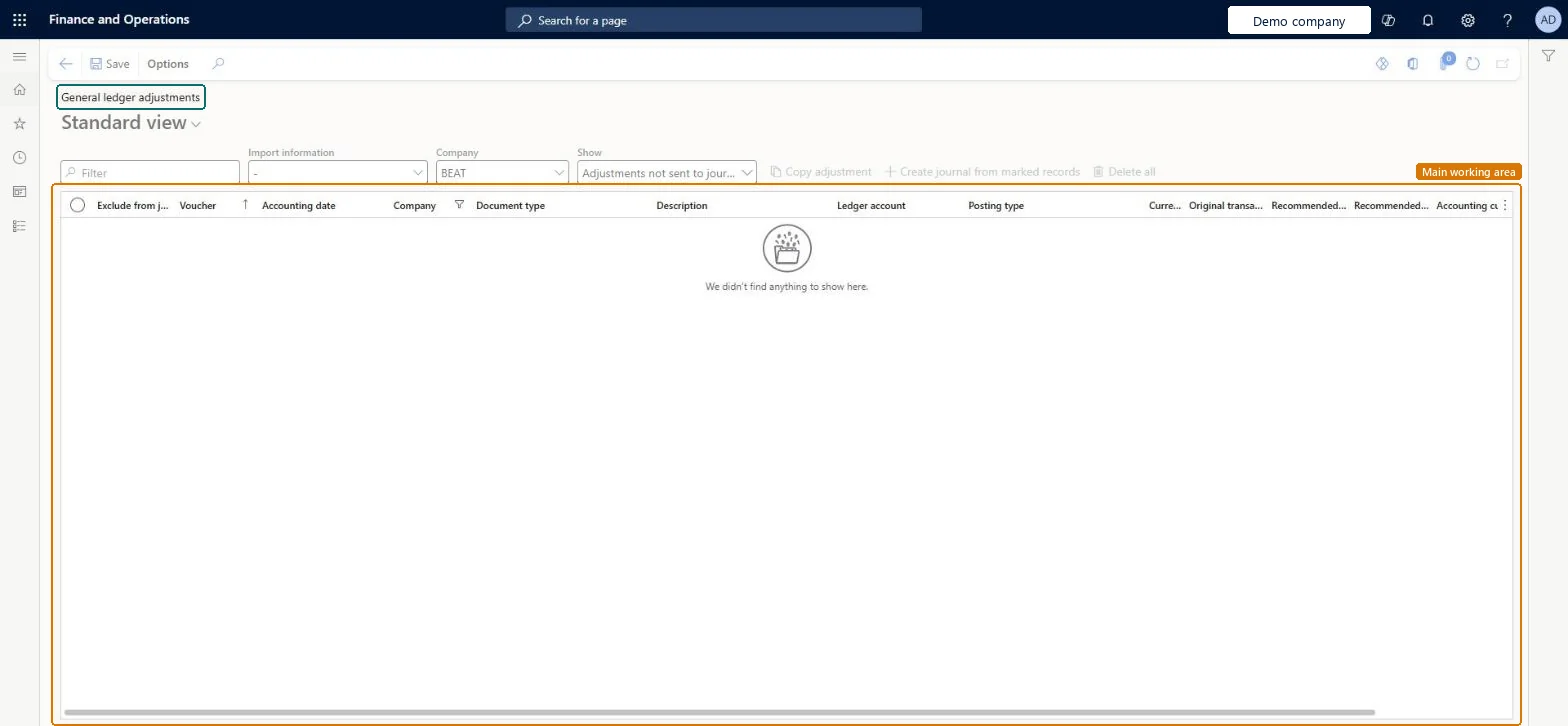
A page that shows suggested general ledger corrections that Microsoft records when its internal checks find inconsistencies.
What you do here
It is used, under direction from Microsoft Support, to review suggested adjustments, mark them, and create a daily journal to review and post.
Example
After a catastrophic failure, mark the suggested adjustments and select Create journal from marked records to bring the general ledger back into balance.
The page in Dynamics 365. page title tab to open what to set or check
About the examples: Examples and screenshots in this guide use BEAT, a demo company in a Dynamics 365 test environment. Use your own company's codes and values instead of copying them.
When to run it
When to run it
Only during a support case, when Microsoft has found inconsistencies and asks you to correct the general ledger.
How often
Rarely; only when Microsoft Support directs you to it.
What the output shows
A daily journal with the marked adjustments, ready for review. Nothing changes in the ledger until you post that journal.
Go to General ledger > Periodic tasks > General ledger adjustments.
Open the page only when Microsoft Support directs you to it for a support case; suggestions appear here only after Microsoft's internal checks recorded inconsistencies.
Review the suggested adjustments for your case. You can copy or delete records before you create a journal.
Mark the adjustments you want to make, and select Create journal from marked records.
Open the daily journal that is created, review its lines with your support contact, and post it.
Yes, before posting: Delete the daily journal to discard the adjustments. Once posted, the adjustments are in the ledger. Microsoft Learn
If you change it later
Creates a daily journal from the marked suggested adjustments; posting it corrects the general ledger. Microsoft Learn
Technical architect
5Technical
Menu item
GeneralLedgerAdjustmentProposedAdjustmentListPageChecked in Dynamics 365
Form
GeneralLedgerAdjustmentProposedAdjustmentListPageChecked in Dynamics 365
Table
GeneralLedgerAdjustmentProposedAdjustmentShown as “Proposed subledger adjustments” in Record infoChecked in Dynamics 365
Who can open it
PrivilegesMaintain general journal transactions LedgerJournalTableMaintainView general journal transactions LedgerJournalTableViewDutiesMaintain journals and transactions LedgerJournalsAndTransactionsMaintainInquire into journals and transaction status LedgerJournalsTransactionStatusInquireMaintain ledger journal transactions RentalLedgerJournalsAndTransMaintain16 security rolesAuditor AuditPolicyManagerBudget manager BudgetBudgetManagerChief executive officer CompanyChiefExecutiveOfficerChief financial officer CompanyChiefFinancialOfficerAccounts receivable clerk CustInvoiceAccountsReceivableClerkAccounts receivable manager CustInvoiceAccountsReceivableManagerTax accountant FBTaxAccountant_BRInventory accountant InventCostAccountantInventory accountant clerk InventCostCostClerkAccountant LedgerAccountantAccounting manager LedgerAccountingManagerAccounting supervisor LedgerAccountingSupervisorFinancial controller LedgerFinancialControllerRental manager RentalManagerAccounts payable clerk VendInvoiceAccountsPayableClerkAccounts payable manager VendInvoiceAccountsPayableManagerChecked in Dynamics 365
Roles to set it up and use it
To set it up or change itAccounting supervisor LedgerAccountingSupervisorRental manager RentalManagerAccountant LedgerAccountantTo use itAccounting manager LedgerAccountingManagerFinancial controller LedgerFinancialControllerChief financial officer CompanyChiefFinancialOfficerBudget manager BudgetBudgetManagerChief executive officer CompanyChiefExecutiveOfficerGive people one of these roles. On this system, 16 roles can open this page.Checked in Dynamics 365