Auditor, Chief financial officer, Inventory accountant and 6 more roles
Business process
Acquire assets
Menu item
InventJournalTableAsset
Main table
InventJournalTable
Data entity
None for this page's own settings
Setup steps
1 on this page
Show what matters for
PAGE GUIDEWhat the page does and how to use it8 sections. Choose a role to highlight what matters to you.
Everyone
1What it is and why
What it is
A journal that records the acquisition of fixed assets that the company builds or puts together itself from inventory items.
What you do here
Use this journal to move the value of on-hand inventory items into fixed assets so the cost is capitalized and the asset is registered.
Example
For example, when inventory items are assembled or repurposed for long-term use, you post them through this journal to capitalize their cost as a fixed asset.
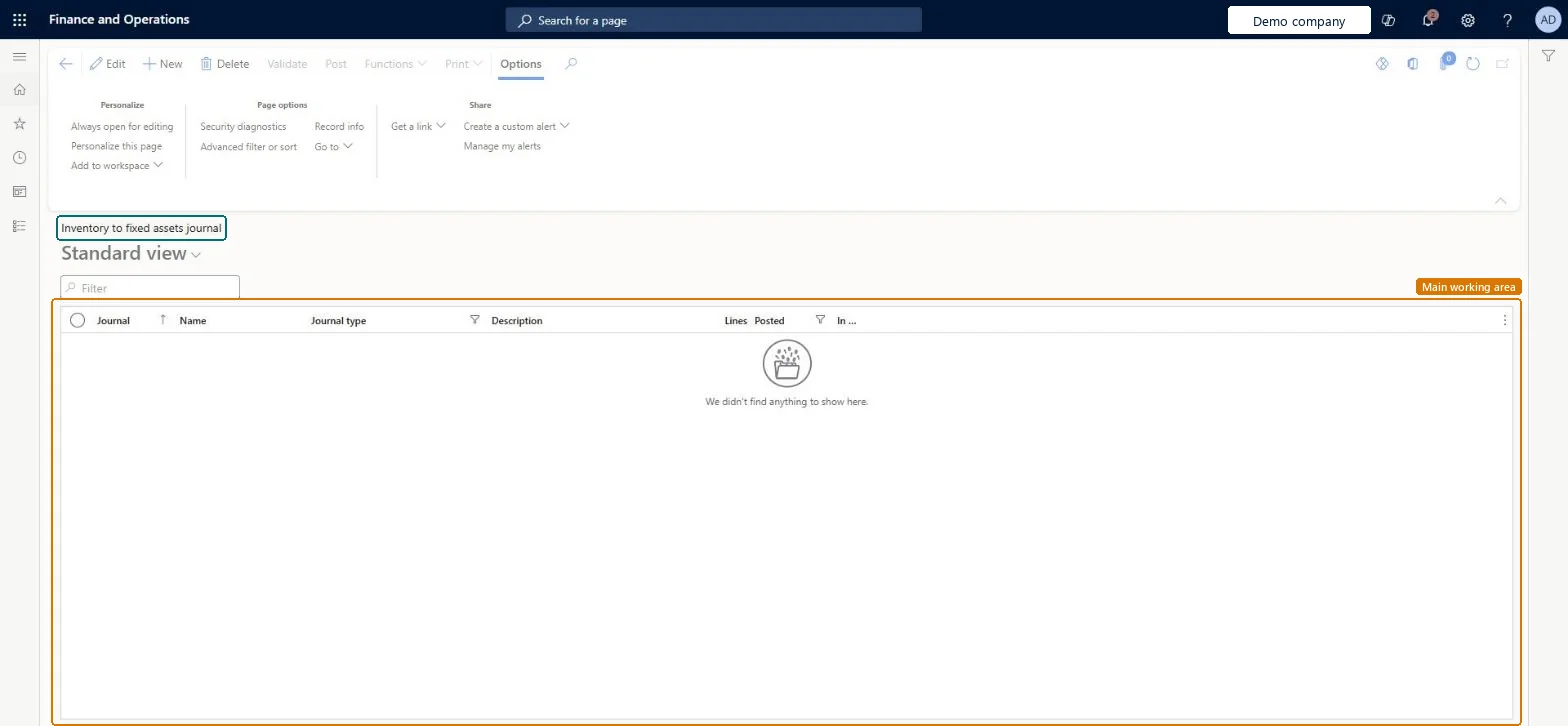
The page in Dynamics 365. page title tab to open what to set or check
About the examples: Examples and screenshots in this guide use BEAT, a demo company in a Dynamics 365 test environment. Use your own company's codes and values instead of copying them.
Setup steps on this page
Capitalize inventory items as a fixed asset
Move items the company builds or uses itself out of inventory into a fixed asset.
Steps from Microsoft
Go to Fixed assets > Journal entries > Inventory to fixed assets journal.
Select New to create a journal.
Select an existing journal, then select Edit to open it.
Check the Journal, Name, Journal type, Description, Lines and Posted columns to see each journal.
Select a journal, then use Validate or Post on the Action Pane.
For a single quantity, enter the item with its tracking dimension, such as serial or batch number, directly on the line.Microsoft Learn
Reservation
On the Inventory tab, assigns several serial or batch numbers to the same asset.Microsoft Learn
Reservation
Common errors and fixes
Message
What to do
Several serial numbers must go to one asset
Assign the serial or batch numbers with the Reservation function on the Inventory tab of the line. Microsoft Learn
The acquisition cost changes after inventory closing
From version 10.0.44 the inventory closing recalculation posts an Acquisition adjustment to the fixed asset book; set up the acquisition adjustment account in the posting profile. Microsoft Learn
Test checklist
Create a journal and a line with the item, quantity, fixed asset and book.
Use Reservation for several serial numbers.
Post the journal.
Check that inventory decreased and the asset book has an acquisition.
Use this journal for assets built or put together from stock, with the item, fixed asset, book and quantity on each line, and the Acquisition transaction type.The journal issues the items from inventory and creates the fixed asset book acquisition; inventory posting rules control the inventory decrease.
Fixed assets is part of Dynamics 365 Finance. Fixed asset accountants post assets built from inventory. On this system the roles that open the page include Accountant, Accounting supervisor, Accounting manager, Auditor. No Feature management feature needs to be turned on for this page.
Hard to reverse: Unposted lines can be deleted. A posted line issues the item from inventory and acquires the asset; correct it with new transactions. Microsoft Learn
If you change it later
Acquiring an asset through this journal reduces the inventory value. Microsoft Learn
Technical architect
6Technical
Menu item
InventJournalTableAssetChecked in Dynamics 365
Form
InventJournalAssetChecked in Dynamics 365
Table
InventJournalTableShown as “Inventory journal table” in Record infoKey field: JournalId, JournalType, JournalNameId, DescriptionChecked in Dynamics 365
Data entities
AssetInventoryFixedAssetTransferJournalNameEntityInventory to fixed asset journal names (only the journal names; the journal lines have no fixed asset data entity) Microsoft data model
Who can open it
PrivilegesMaintain inventory to fixed assets journals InventJournalTableAssetMaintainView inventory to fixed assets journals InventJournalTableAssetViewDutiesMaintain fixed assets AssetFixedAssetsMaintainInquire into general ledger policies LedgerGeneralLedgerPoliciesInquireInquire into general ledger policies RentalLedgerGeneralLedgerPolicieInquire9 security rolesAuditor AuditPolicyManagerChief financial officer CompanyChiefFinancialOfficerInventory accountant InventCostAccountantInventory accountant clerk InventCostCostClerkAccountant LedgerAccountantAccounting manager LedgerAccountingManagerAccounting supervisor LedgerAccountingSupervisorFinancial controller LedgerFinancialControllerRental coordinator agent RentalCoordinatorAgentChecked in Dynamics 365
Roles to set it up and use it
To set it up or change itAccountant LedgerAccountantAccounting supervisor LedgerAccountingSupervisorTo use itAccounting manager LedgerAccountingManagerAuditor AuditPolicyManagerChief financial officer CompanyChiefFinancialOfficerFinancial controller LedgerFinancialControllerRental coordinator agent RentalCoordinatorAgentGive people one of these roles. On this system, 9 roles can open this page.Checked in Dynamics 365
Actions on the page
Options: Personalize, Page options, ShareChecked in Dynamics 365
AssetInventoryFixedAssetTransferJournalNameEntity (Inventory to fixed asset journal names): the journal names only.Load order: The inventory to fixed assets journal has no data entity for its lines in Data management; load the journal names, then enter and post the lines in the new environment.Load first: Inventory journal names, Fixed assetsMicrosoft Learn