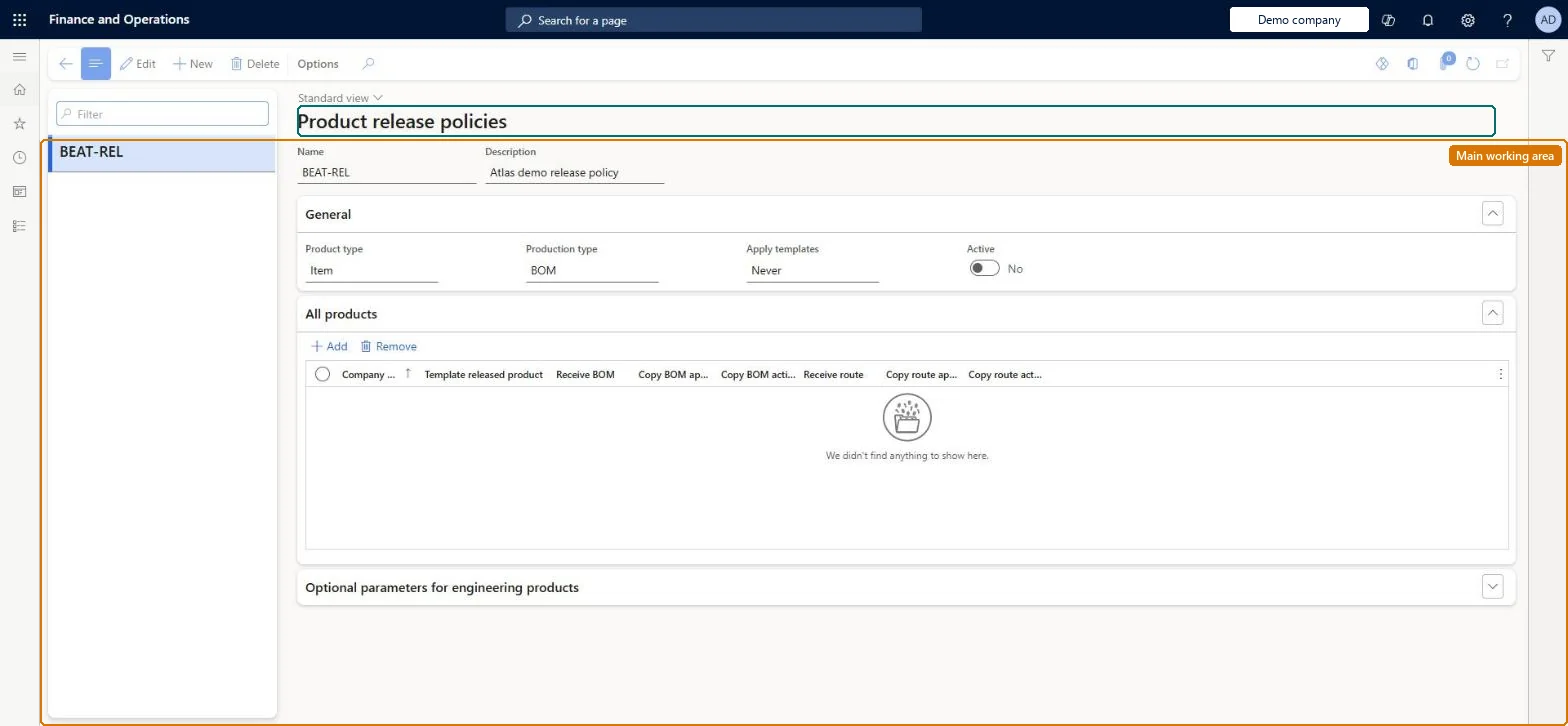
A setup page where you define release policies: the parameters used when products are released to operational companies, including the template released product per company and whether BOM and route approval and activation status are copied.
PAGE GUIDEWhat the page does and how to use it8 sections. Choose a role to highlight what matters to you.
Everyone
1What it is and why
What it is
A setup page where you define release policies: the parameters used when products are released to operational companies, including the template released product per company and whether BOM and route approval and activation status are copied.
What you do here
Use this page to decide, per receiving company, which product data (product, BOM, route, effectivity) is released and which template released product supplies the company-specific field values. Assign the policy to an engineering product category so it applies to all products in that category.
Example
For example, operational companies that manufacture a product usually need the BOM, while companies that only sell it do not, so a release policy can release the BOM only to the manufacturing companies.
The page in Dynamics 365. page title tab to open what to set or check
About the examples: Examples and screenshots in this guide use BEAT, a demo company in a Dynamics 365 test environment. Use your own company's codes and values instead of copying them.
Setup steps on this page
Set up Product release policies
Use this page to decide, per receiving company, which product data (product, BOM, route, effectivity) is released and which template released product supplies the company-specific field values. Assign the policy to an engineering product category so it applies to all products in that category.
Steps from Microsoft
Go to Engineering change management > Setup > Product release policies.
Select New on the Action Pane and enter a Name and Description.
On the General FastTab, set Product type, Apply templates and Active.
On the All products FastTab, add a row for each company you release to, and set the Template released product and the copy BOM/route options.
On the Option parameters for engineering products FastTab, set Template BOM, Template route, Copy effectivity and Automatically add to release proposal for each company.
Assign the policy to an engineering product category on its Release policy FastTab.
Whether the policy applies to items or services; it cannot be changed after saving.Microsoft Learn
ProductType
Production type
Shown only with formula change management enabled; the kind of production (co-product, by-product, none, planning item, BOM or formula) the policy is for.Microsoft Learn
PmfProductType
Apply templates
Whether a template released product is always, optionally or never used when releasing.Microsoft Learn
ApplyTemplates
Active
Marks the policy as in use; a policy assigned to a category cannot be deactivated and only inactive policies can be deleted.Microsoft Learn
IsActive
Company accounts ID
The receiving company that the row on the All products FastTab applies to.Microsoft Learn
CompanyId
Template released product
The released product whose company-specific values are copied to the released product.Microsoft Learn
TemplateItem
Automatically add to release proposal
Whether products in categories using this policy are automatically proposed for release from an engineering change order to this company.Microsoft Learn
AutoRelease
Test checklist
Create a policy with Product type = Item, Apply templates = Always and a row per receiving company with a Template released product.
Try to save with one company row missing a template and check you get an error.
Assign the policy to an engineering product category.
Release a product from the category and check the receiving company's released product takes field values from the template and copies BOM approval and activation as set.
Apply templates = Always, with a Template released product on every receiving company row.The release policy for the receiving company must have a product template, because company-specific fields such as item model group are needed to create a BOM; Always makes the policy refuse to save without a template per company.
Choosing the wrong Product type. It can't be changed after the policy is saved, and a policy assigned to an engineering product category can't be deactivated.Test: Release policy template fills company-specific fields
Feature management and licence
Feature to turn on
Release multiple BOMs/formulas for Engineering Change Management (Mandatory, on by default)
One-way: Warning: Product type can't be changed after saving. To retire a policy, remove it from every engineering product category, set Active to No, then delete it. Microsoft Learn
If you change it later
A release policy that is assigned to an engineering product category cannot be deactivated, and a policy can only be deleted after it is set to inactive; releases of products in the category default to the policy's settings. Microsoft Learn
Technical architect
6Technical
Menu item
EngChgProductReleasePolicyChecked in Dynamics 365
Form
EngChgProductReleasePolicyChecked in Dynamics 365
Table
EngChgProductReleasePolicyShown as “RELEASE POLICY” in Record infoKey field: NameChecked in Dynamics 365
Data entities
EngChgProductReleasePolicyEntityEngChgProductReleasePolicyEntity Checked in Dynamics 365
Who can open it
PrivilegesMaintain product release policies EngChgProductReleasePolicyMaintainView product release policies EngChgProductReleasePolicyViewDutiesInquire into engineering change management policies EngChgEngineeringChangeManagementPoliciesInquireEnable the engineering change management process EngChgEngineeringChangeManagementProcessEnable2 security rolesProduct engineer EngChgProductEngineerProduct engineering manager EngChgProductEngineeringManagerChecked in Dynamics 365
Roles to set it up and use it
To set it up or change itProduct engineering manager EngChgProductEngineeringManagerTo use itProduct engineer EngChgProductEngineerGive people one of these roles. On this system, 2 roles can open this page.Checked in Dynamics 365