Setup page · Budgeting
Budget control configuration
A setup page whose tabs hold the settings that control how budget checks are done and when they're active.
- Used by
- Budget clerk, Budget manager
- Business process
- Configure budget control in Dynamics 365 Finance
- Menu item
BudgetControlConfiguration- Main table
BudgetControlConfiguration- Data entity
BudgetControlConfigurationEntity- Setup steps
- 1 on this page
Show what matters for
Everyone
1What it is and why
| What it is | A setup page whose tabs hold the settings that control how budget checks are done and when they're active. |
|---|---|
| What you do here | Used to manage an organization's financial resources through budget checks on source documents and journals. |
| Example | For example, to control every main account except 600120, you select all main accounts other than 600120 on the Select main accounts tab. |
Functional consultant · Solution architect
2Where it fits
| Business process | Define accounting policies › Develop budgeting strategy › Configure budget control in Dynamics 365 Finance |
|---|---|
| Menu path | Budgeting › Setup › Budget control › Budget control configuration |
| Set up first | Budget cycles Microsoft Learn ↗Dimensions for budgeting Microsoft Learn ↗Budget models Microsoft Learn ↗ |
| Used next by | Budget control statistics Microsoft Learn ↗General budget reservations Microsoft Learn ↗ |
| Related pages | General ledger parameters Microsoft Learn ↗ |
End user · Functional consultant
3How to do it
Step by step, with screenshots
Set up Budget control configuration1 screen
Used to manage an organization's financial resources through budget checks on source documents and journals.
Screen 1
Create the budget control draft
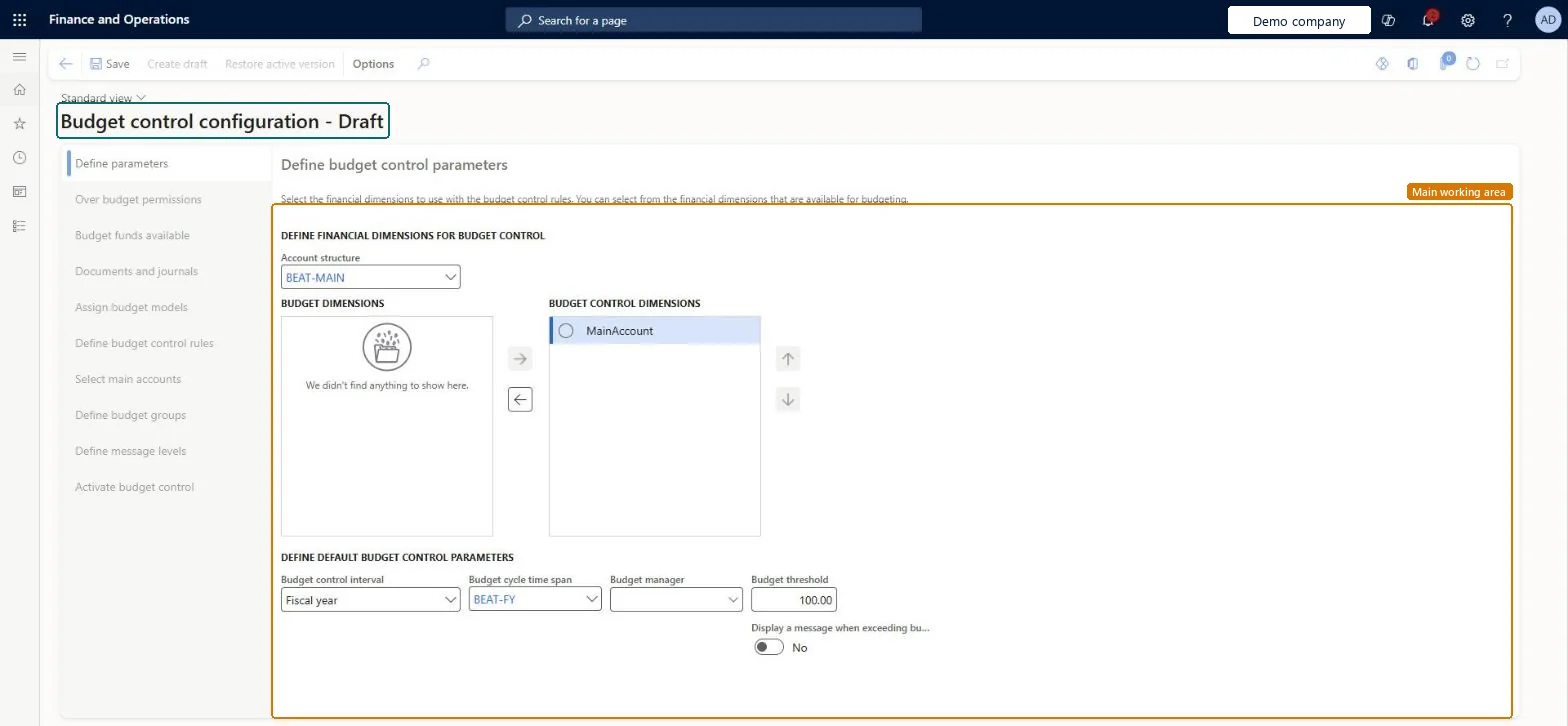
Go to Budgeting > Setup > Budget control > Budget control configuration, Define parameters tab
- Select Create draft
- Select the Account structure and move MainAccount to the Budget control dimensions list
- Select the Budget control interval and Budget cycle time span
- Select Save
1Account structure BEAT-MAIN 2Budget control dimensions MainAccount 3Budget control interval Fiscal year 4Budget cycle time span BEAT-FY 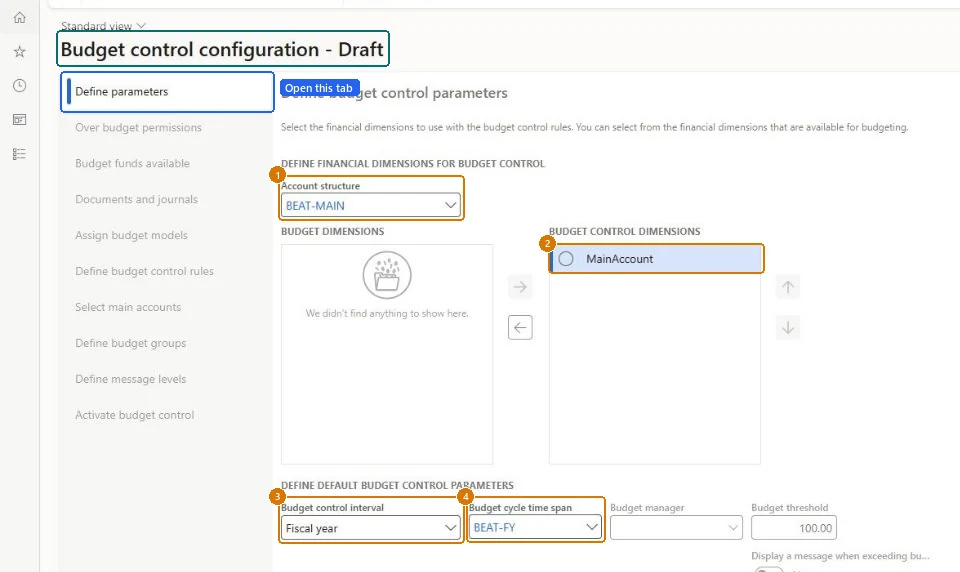
Show the full screen
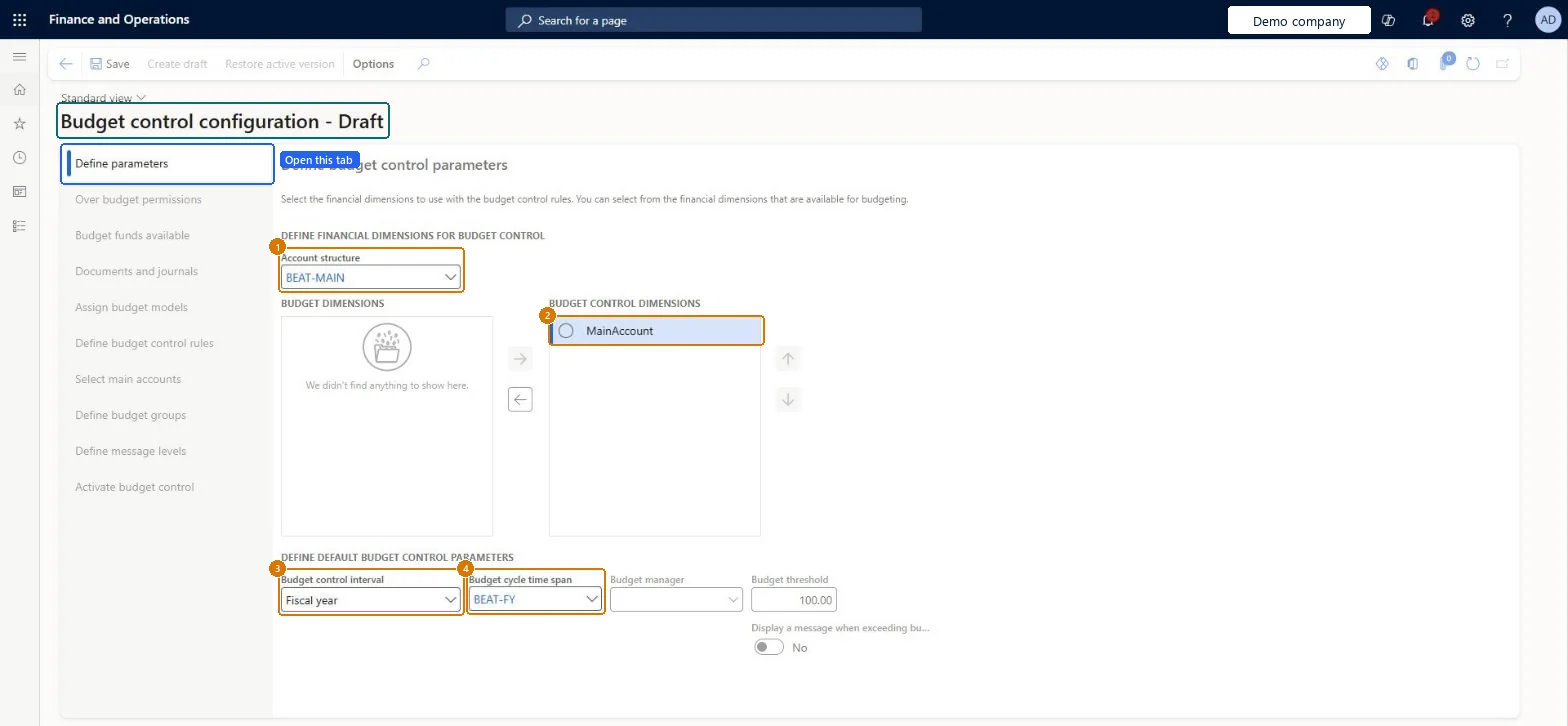
page title tab to open what to set or check
Microsoft's steps
- Go to Budgeting > Setup > Budget control > Budget control configuration.
- Select Create draft, or select an account structure.
- Move the dimensions you want to control to the Budget control dimensions list.
- Set the budget control interval, budget cycle time span, budget manager and budget threshold.
- On the Over budget permissions tab, add user groups and their over budget option.
- On the Budget funds available tab, choose what the available funds calculation includes.
- On the Documents and journals tab, select the documents to check.
- On the Assign budget models tab, add the budget cycle time span, budget cycle and budget model.
- Define budget control rules, and select main accounts if needed.
- On the Activate budget control tab, select Activate, and then select Turn on.
Source: Microsoft Learn ↗
Field guide
| Field | What it means | Worked example | Table column |
|---|---|---|---|
| Budget control interval | The time span, such as fiscal year or fiscal year to date, over which amounts are added up for budget checks.Microsoft Learn ↗ | Fiscal year | — |
| Budget manager | A user who can approve budget workflows.Microsoft Learn ↗ | — | — |
| Budget threshold | The share of the budget user groups can spend before warnings or blocks; it can be over 100 percent.Microsoft Learn ↗ | — | DefaultThresholdPercent |
| Over budget permissions | Decides whether a transaction over budget is allowed, allowed up to a threshold, or blocked.Microsoft Learn ↗ | — | — |
| Budget funds available | The formula that calculates available budget funds.Microsoft Learn ↗ | — | — |
| Documents and journals | Which documents and journals are budget checked, by line or by whole document.Microsoft Learn ↗ | — | — |
| Define budget control rules | The financial dimension combinations that are budget controlled.Microsoft Learn ↗ | — | — |
| Select main accounts | The main accounts to control when main account isn't a budget control dimension.Microsoft Learn ↗ | — | — |
| Define budget groups | Pools of dimension values whose budgets get a second, pooled check.Microsoft Learn ↗ | — | — |
| Define message levels | User groups whose budget control warning messages are hidden.Microsoft Learn ↗ | — | — |
| Activate budget control | Makes the draft configuration active; Turn on starts the checks.Microsoft Learn ↗ | — | — |
| Account structure | — | BEAT-MAIN | DimensionHierarchyAccountStructure |
| Budget control dimensions | — | MainAccount | — |
| Budget cycle time span | — | BEAT-FY | DefaultBudgetCycleTimeSpan |
Functional consultant
4Setup decisions
| Setup step | Recommended value and why | Decision · common mistake · test |
|---|---|---|
| Set up Budget control configuration | — | — |
Solution architect
5Design impact
| Shared or per company | Shared: the same records are used by every legal entity. Microsoft data model ↗ |
|---|---|
| Can it be undone | — |
| Feature or country | — |
| If you change it later | Changing the available funds calculation during a budget cycle doesn't affect documents that already passed budget checks and were posted or completed. Microsoft Learn ↗ |
Technical architect
6Technical
| Menu item | BudgetControlConfiguration Checked in Dynamics 365 |
|---|---|
| Form | BudgetControlConfiguration Checked in Dynamics 365 |
| Table | BudgetControlConfigurationShown as “Budget control configuration” in Record infoKey field: PrimaryLedger, PrimaryLedger_Name, IsActiveChecked in Dynamics 365 |
| Data entities | BudgetControlConfigurationEntityBudget control configuration Microsoft data model ↗ |
| Who can open it | PrivilegesMaintain budget control configuration BudgetControlConfigurationMaintainView budget control configuration BudgetControlConfigurationViewDutiesEnable budget control process BudgetBudgetControlProcessEnableInquire into budget control process policies BudgetBudgetCtrlProcPoliciesInquire2 security rolesBudget clerkBudgetBudgetClerkBudget manager BudgetBudgetManager |
| Actions on the page | Options: Personalize, Page options, Edit, ShareChecked in Dynamics 365 |
Developer
7Developer
| Open it directly | https://<your-environment>/?mi=BudgetControlConfiguration |
|---|---|
| Integrate with | BudgetControlConfigurationEntity data entity Microsoft data model ↗ |
| Table definition | BudgetControlConfiguration columns and relations Microsoft data model ↗ |
Everyone
8Sources and checks
- learn.microsoft.com/dynamics365/finance/budgeting/budget-control-overview-configuration
- learn.microsoft.com/training/modules/setup-use-budget-control-finance/exercise
- learn.microsoft.com/common-data-model/schema/core/operationscommon/tables/finance/budget/group/budgetcontrolconfiguration
- learn.microsoft.com/training/modules/setup-use-budget-control-finance/parameters
- learn.microsoft.com/training/modules/setup-use-budget-control-finance/groups
- learn.microsoft.com/dynamics365/finance/public-sector/rules-reservation-types
- Checked in a working Dynamics 365 system, version 10.0.49: the menu item, form, table and security, the page, the demo records and the values in the screenshots.