BeyondERP.Newsletter
Menu

Transaction page · Asset management

My work order schedule

A list page of scheduled work order maintenance jobs that shows which resource each work order is allocated to.

Used by
Maintenance clerk, Maintenance manager, Maintenance worker
Business process
Schedule maintenance manually in Dynamics 365 Supply Chain Management
Menu item
EntAssetWorkOrderScheduleMyListPage
Main table
EntAssetWorkOrderLineSch
Data entity
EntAssetMaintenanceWorkOrderLineScheduleEntity
Show what matters for
PAGE GUIDEWhat the page does and how to use it6 sections. Choose a role to highlight what matters to you.
Everyone

1What it is and why

What it isA list page of scheduled work order maintenance jobs that shows which resource each work order is allocated to.
What you do hereUse this page to find work orders allocated to a maintenance worker, tool, or machine, add notes, and dispatch a work order to a specific worker.
ExampleFor example, if a maintenance worker calls in sick, a planner finds the work orders allocated to that worker and allocates another worker to the job.
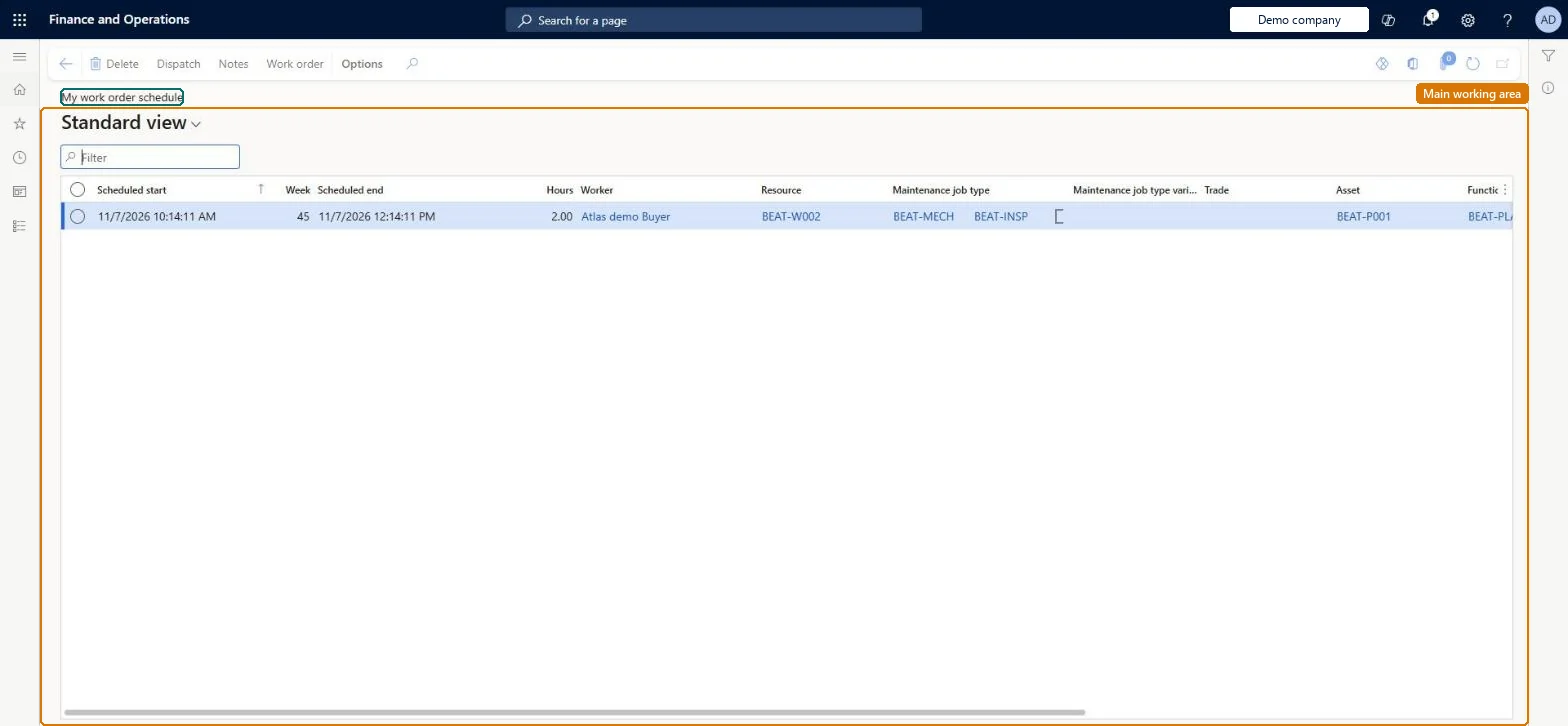
My work order schedule page in Dynamics 365
The page in Dynamics 365. page title tab to open what to set or check
Functional consultant · Solution architect

2Where it fits

End user · Functional consultant

3How to do it

About the examples: Examples and screenshots in this guide use BEAT, a demo company in a Dynamics 365 test environment. Use your own company's codes and values instead of copying them.

Steps from Microsoft

  1. Go to Asset management > Work orders > My work order schedule.
  2. Sort or filter the list, for example by maintenance worker.
  3. To add a note, select the work order job, and then select Notes.
  4. To allocate one worker, select the work order, and then select Work order.
  5. On the Work order page, select Dispatch.

Source: Microsoft Learn

Technical architect

4Technical

Menu itemEntAssetWorkOrderScheduleMyListPage Checked in Dynamics 365
FormEntAssetWorkOrderScheduleListPage Checked in Dynamics 365
TableEntAssetWorkOrderLineSchShown as “WORK ORDER SCHEDULE” in Record infoKey field: WorkOrderLine_WorkOrderTable_WorkOrderId, Worker_HcmWorker_DirPerson_FK_Name, Object_ObjectID, WrkCtrIdChecked in Dynamics 365
Data entitiesEntAssetMaintenanceWorkOrderLineScheduleEntityAsset management work order schedule Checked in Dynamics 365
Who can open itPrivilegesView my work order schedule EntAssetMyWorkOrderCalendarViewDutiesInquire into my work order schedule EntAssetMyWorkOrderCalendarInquire
3 security rolesMaintenance clerk EntAssetMaintenanceClerkMaintenance manager EntAssetMaintenanceManagerMaintenance worker EntAssetMaintenanceWorker
Checked in Dynamics 365
Roles to set it up and use itTo use itMaintenance manager EntAssetMaintenanceManagerMaintenance clerk EntAssetMaintenanceClerkMaintenance worker EntAssetMaintenanceWorkerGive people one of these roles. On this system, 3 roles can open this page.Checked in Dynamics 365
Actions on the page(Action Pane without tabs): Dispatch, Notes, Work orderChecked in Dynamics 365
Developer

5Developer

Open it by URLhttps://<your-environment>/?mi=EntAssetWorkOrderScheduleMyListPage
Integrate withEntAssetMaintenanceWorkOrderLineScheduleEntity data entity Checked in Dynamics 365
Everyone

6Sources