PAGE GUIDEWhat the page does and how to use it8 sections. Choose a role to highlight what matters to you.
Everyone
1What it is and why
What it is
A setup page where you create maintenance checklist variables, which are sets of predefined outcomes used on maintenance checklist lines.
What you do here
Use this page to define the possible results of a check, each marked Pass, Fail, or None, so that workers can record a result without making an exact measurement.
Example
For example, you measure oil level with three values: Level too high, Level too low, and Level within range.
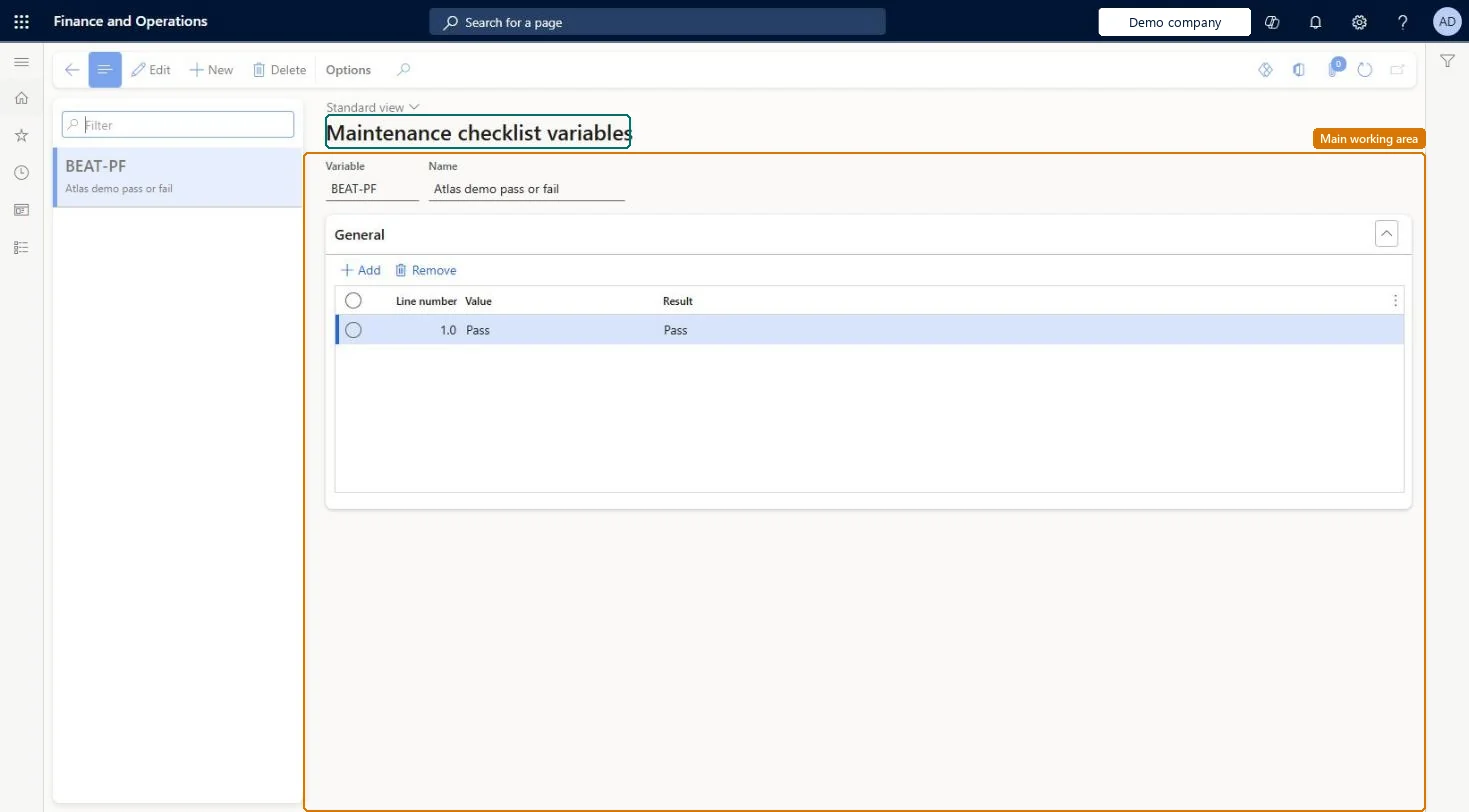
The page in Dynamics 365. page title tab to open what to set or check
About the examples: Examples and screenshots in this guide use BEAT, a demo company in a Dynamics 365 test environment. Use your own company's codes and values instead of copying them.
Setup steps on this page
Set up Maintenance checklist variables
Use this page to define the possible results of a check, each marked Pass, Fail, or None, so that workers can record a result without making an exact measurement.
Steps from Microsoft
Go to Asset management > Setup > Maintenance Checklists > Maintenance checklist variables.
Select New.
In the Variable field, enter an ID, and in the Name field, enter a name.
On the General FastTab, select Add to add a line.
In the Value field, enter a value description.
In the Result field, select a result for the line.
One variable per kind of check, with each value marked Pass, Fail or None (for example oil level: Too high = Fail, Too low = Fail, Within range = Pass)Learn's oil level example shows how a variable gives predefined outcomes without an exact measurement.
Marking an unacceptable value as None: when the checklist is processed, only Pass and Fail lines are evaluated, and one Fail marks the whole checklist Failed.
Solution architect
5Design impact
Can it be undone
Reversible: Variables and values can be edited any time; results are evaluated when a work order reaches a state with Process maintenance checklist = Yes. Microsoft Learn
Technical architect
6Technical
Menu item
EntAssetChecklistVariableChecked in Dynamics 365
Form
EntAssetChecklistVariableChecked in Dynamics 365
Table
EntAssetChecklistVariablShown as “MAINTENANCE CHECKLIST VARIABLE” in Record infoKey field: ChecklistVariableIdChecked in Dynamics 365
Data entities
EntAssetMaintenanceChecklistVariableEntityAsset management maintenance checklist variable Checked in Dynamics 365
To set it up or change itMaintenance manager EntAssetMaintenanceManagerTo use itMaintenance clerk EntAssetMaintenanceClerkGive people one of these roles. On this system, 2 roles can open this page.Checked in Dynamics 365