BeyondERP.Newsletter
Menu

Transaction page · Asset management

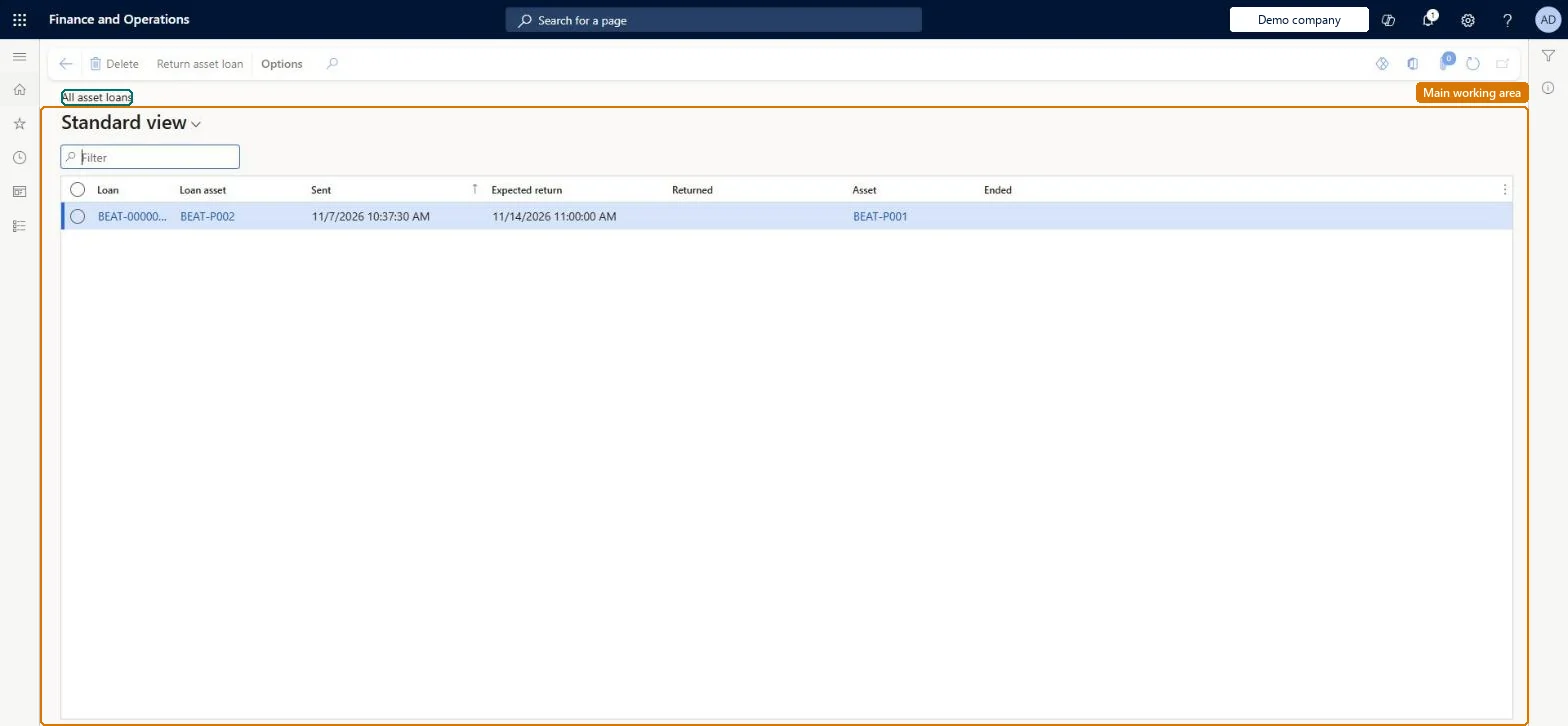
All asset loans

A list page that shows all assets that you have loaned to other locations or customers.

Used by
Maintenance clerk, Maintenance manager, Maintenance worker
Business process
Manage active assets
Menu item
EntAssetObjectLoanListPage
Main table
EntAssetObjectLoan
Show what matters for
PAGE GUIDEWhat the page does and how to use it7 sections. Choose a role to highlight what matters to you.
Everyone

1What it is and why

What it isA list page that shows all assets that you have loaned to other locations or customers.
What you do hereUse this page to track asset loans and to see which loaned assets have been registered as returned.
ExampleFor example, while a customer's asset is in for repair, you loan them an asset of the same asset type and track the loan here until it is returned.
All asset loans page in Dynamics 365
The page in Dynamics 365. page title tab to open what to set or check
Functional consultant · Solution architect

2Where it fits

Business processManage active assets
Menu pathAsset management › Asset loan › All asset loans
Set up firstActive maintenance requests Microsoft Learn Asset lifecycle states Microsoft Learn
Related pagesActive asset loans Microsoft Learn
End user · Functional consultant

3How to do it

About the examples: Examples and screenshots in this guide use BEAT, a demo company in a Dynamics 365 test environment. Use your own company's codes and values instead of copying them.

Fields on the page

FieldWhat it meansTable column
EndedWhen selected, the loaned asset has been registered as returned.Microsoft Learn Ended
Solution architect

4Design impact

If you change it laterWhen a loan is registered, the loaned asset's lifecycle state is updated automatically, for example to OnLoan. Microsoft Learn
Technical architect

5Technical

Menu itemEntAssetObjectLoanListPage Checked in Dynamics 365
FormEntAssetObjectLoanListPage Checked in Dynamics 365
TableEntAssetObjectLoanShown as “LOAN ASSETS” in Record infoKey field: ObjectLoanIDChecked in Dynamics 365
Who can open itPrivilegesMaintain asset loan EntAssetObjectLoanMaintainView asset loan EntAssetObjectLoanViewDutiesInquire into asset loan EntAssetObjectLoanInquireMaintain asset loan EntAssetObjectLoanMaintain
3 security rolesMaintenance clerk EntAssetMaintenanceClerkMaintenance manager EntAssetMaintenanceManagerMaintenance worker EntAssetMaintenanceWorker
Checked in Dynamics 365
Roles to set it up and use itTo set it up or change itMaintenance manager EntAssetMaintenanceManagerMaintenance clerk EntAssetMaintenanceClerkTo use itMaintenance worker EntAssetMaintenanceWorkerGive people one of these roles. On this system, 3 roles can open this page.Checked in Dynamics 365
Actions on the page(Action Pane without tabs): Return asset loanChecked in Dynamics 365
Developer

6Developer

Open it by URLhttps://<your-environment>/?mi=EntAssetObjectLoanListPage
Everyone

7Sources