Accounts receivable clerk, Accounts receivable manager, Auditor and 13 more roles
Business process
Use netting agreements to settle customer balances with vendor balances in Dynamics 365 Finance
Menu item
CustVendNettingOverview
Main table
CustVendNettingBalanceTmp
Show what matters for
PAGE GUIDEWhat the page does and how to use it7 sections. Choose a role to highlight what matters to you.
Everyone
1What it is and why
What it is
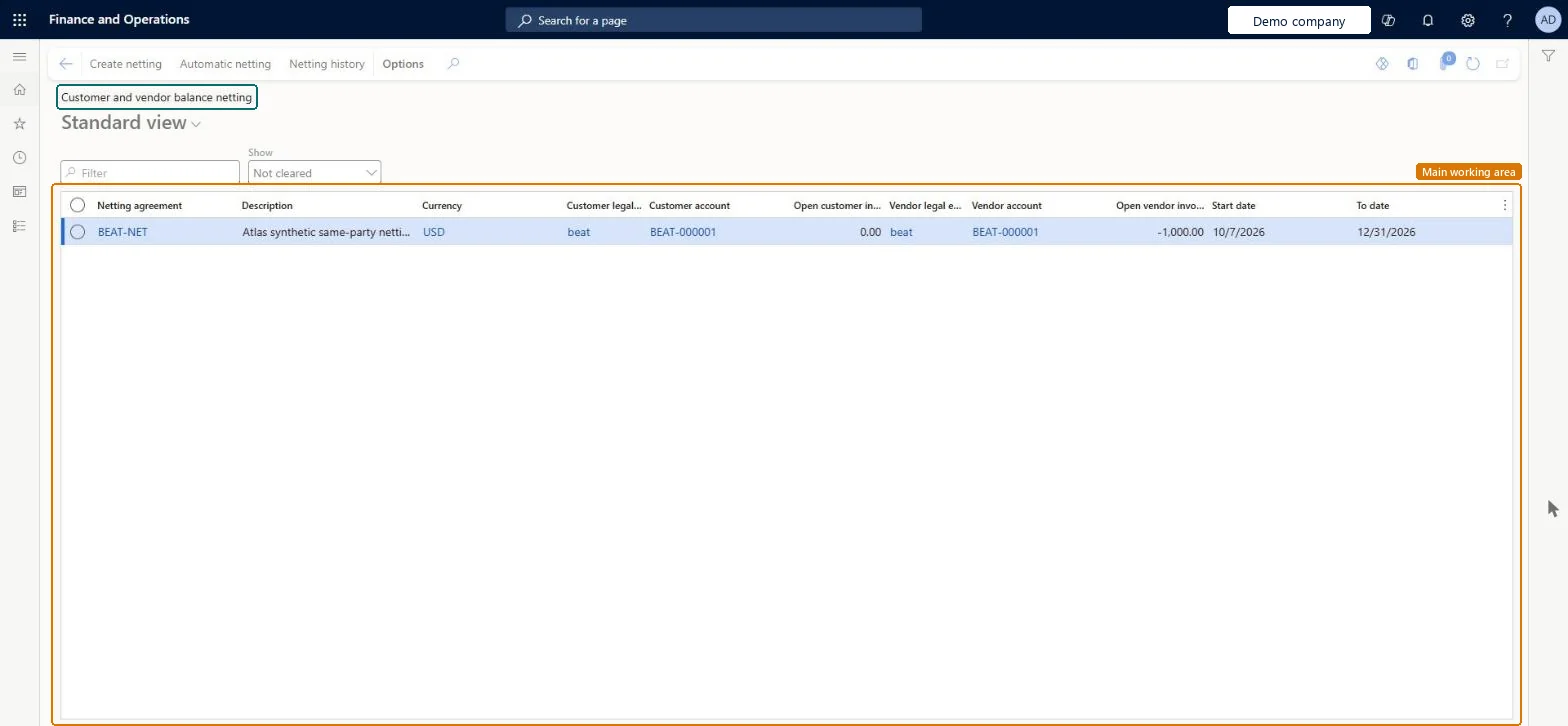
A page that shows the pairs of customer and vendor accounts that are available for netting.
What you do here
Use this page for manual netting: select a pair, select Create netting, choose the open customer and vendor invoices and post; netting history, reversal and automatic netting are also started here.
Example
When a vendor and a customer are the same party, net their open invoices against each other so less money is exchanged and fewer payments are made.
The page in Dynamics 365. page title tab to open what to set or check
About the examples: Examples and screenshots in this guide use BEAT, a demo company in a Dynamics 365 test environment. Use your own company's codes and values instead of copying them.
Steps from Microsoft
Go to Customer and vendor balance netting.
Select a customer and vendor pair, and then select Create netting.
Select the open customer invoices and open vendor invoices to net.
A posted netting can be reversed from Netting history; this unsettles the invoices and reverses the netting journal. Microsoft Learn
Technical architect
5Technical
Menu item
CustVendNettingOverviewChecked in Dynamics 365
Form
CustVendNettingOverviewChecked in Dynamics 365
Table
CustVendNettingBalanceTmpShown as “Custvendnettingbalancetmp” in Record infoChecked in Dynamics 365
Who can open it
PrivilegesView customer and vendor netting CustVendNettingTransViewDutiesInquire into invoice and cash policies CustInvoiceInvoiceAndCashPoliciesInquirInquire into customer payments status PaymCustomerPaymentsStatusInquireInquire into vendor payment status PaymVendorPaymentStatusInquireInquire into invoice and payment policies VendInvoiceInvoicePaymentPoliciesInquir16 security rolesAuditor AuditPolicyManagerCollections agent CollectionLetterCollectionsAgentCollections manager CollectionLetterCollectionsManagerChief financial officer CompanyChiefFinancialOfficerAccounts receivable clerk CustInvoiceAccountsReceivableClerkAccounts receivable manager CustInvoiceAccountsReceivableManagerAccountant LedgerAccountantAccounting manager LedgerAccountingManagerAccounting supervisor LedgerAccountingSupervisorFinancial controller LedgerFinancialControllerAccounts payable centralized payments clerk PaymAccountsPayableCentralPaymClerkAccounts payable payments clerk PaymAccountsPayablePaymentsClerkAccounts receivable centralized payments clerk PaymAccountsReceivableCentralPaymClerkAccounts receivable payments clerk PaymAccountsReceivablePaymentsClerkAccounts payable clerk VendInvoiceAccountsPayableClerkAccounts payable manager VendInvoiceAccountsPayableManagerChecked in Dynamics 365
Roles to set it up and use it
To use itAccounts receivable manager CustInvoiceAccountsReceivableManagerAccounts receivable clerk CustInvoiceAccountsReceivableClerkAccounting manager LedgerAccountingManagerCollections manager CollectionLetterCollectionsManagerAccounts receivable payments clerk PaymAccountsReceivablePaymentsClerkGive people one of these roles. On this system, 16 roles can open this page.Checked in Dynamics 365
Actions on the page
Buttons: Create netting, Automatic netting, Netting historyChecked in Dynamics 365