Workspace page · Accounts payable
Vendor payments
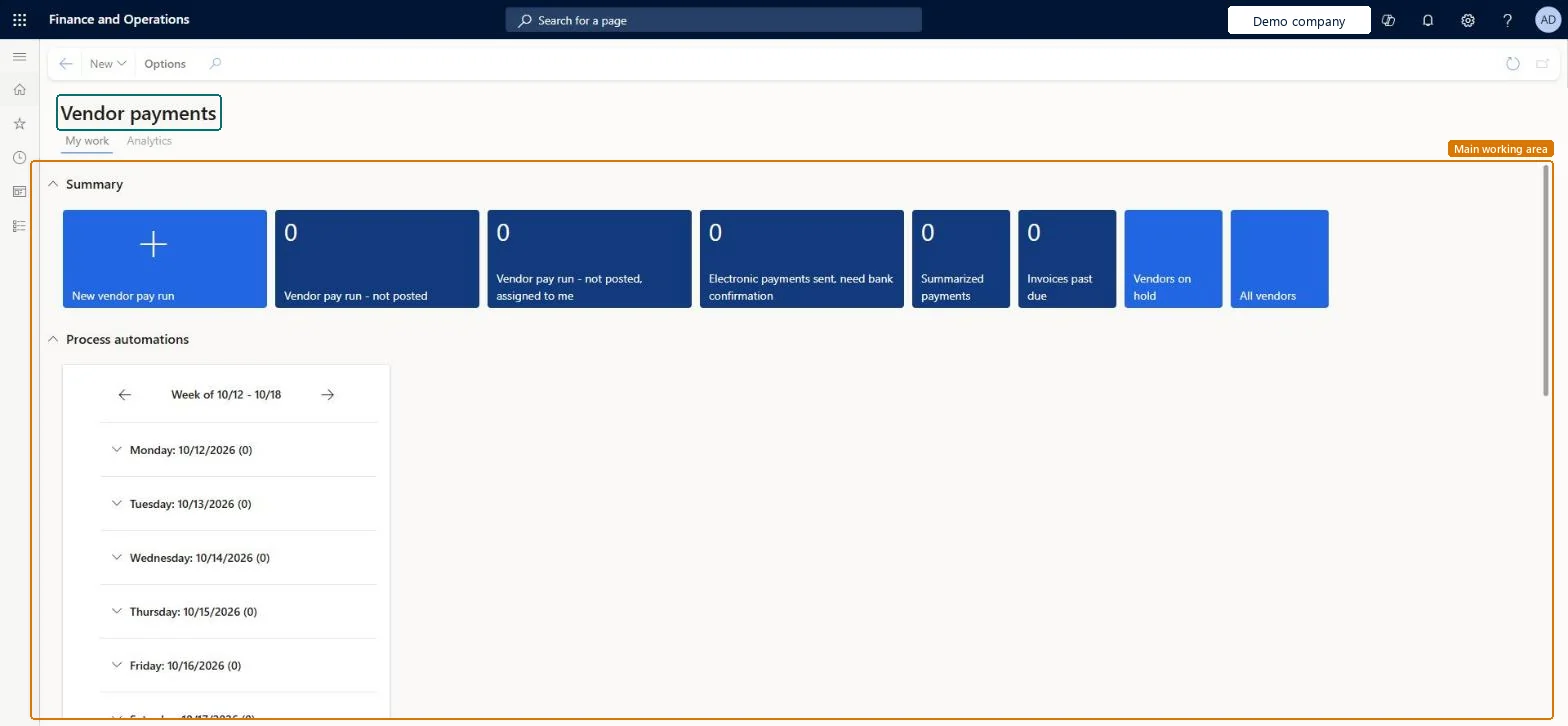
A workspace that shows information about vendor payment processing, with a My work view (summary tiles, vendor transaction grids, related links) and an Analytics page that uses Power BI.
- Used by
- Accounts payable manager, Accounts payable centralized payments clerk, Accounts payable payments clerk
- Business process
- —
- Menu item
VendPaymentWorkspace- Main table
- —
- Data entity
- —
- Setup steps
- —
Show what matters for
Everyone
1What it is and why
| What it is | A workspace that shows information about vendor payment processing, with a My work view (summary tiles, vendor transaction grids, related links) and an Analytics page that uses Power BI. |
|---|---|
| What you do here | Used to see unposted payment journals, past-due invoices, all vendors and vendors on hold, create a new pay run, view settlement history and settle invoices, and analyze payment metrics. |
| Example | From the Payments not settled grid, view the settlement history for a selected invoice and settle the invoice. |
Functional consultant · Solution architect
2Where it fits
| Business process | — |
|---|---|
| Menu path | Accounts payable › Workspaces › Vendor payments |
| Set up first | Fiscal calendars Microsoft Learn ↗Ledger Microsoft Learn ↗Currency exchange rates Microsoft Learn ↗ |
| Used next by | — |
| Related pages | Vendor aging report Microsoft Learn ↗Vendor invoice entry Microsoft Learn ↗ |
End user · Functional consultant
3How to do it
Microsoft's steps
- In System parameters, set the System currency and System exchange rate.
- In Fiscal calendars, check the dates assigned to the active period.
- On the Ledger page, set the Accounting currency and Exchange rate type.
- In Currency exchange rates, enter rates between the transaction, accounting and system currencies.
- In Entity store, refresh the latest Vendor payment measure.
Source: Microsoft Learn ↗
Field guide
| Field | What it means | Worked example | Table column |
|---|---|---|---|
| Summary | Tiles showing unposted payment journals, invoices past due, all vendors and vendors on hold; a new pay run can be started here.Microsoft Learn ↗ | — | — |
| Invoices past due | A grid of overdue invoices where you can view the settlement history of a selected invoice.Microsoft Learn ↗ | — | — |
| Payments not settled | A grid of payments not yet settled, where you can view history and settle an invoice.Microsoft Learn ↗ | — | — |
| Find transactions | A tab for searching vendor transactions.Microsoft Learn ↗ | — | — |
Functional consultant
4Setup decisions
| Setup step | Recommended value and why | Decision · common mistake · test |
|---|---|---|
| — No setup is made on this page. | ||
Solution architect
5Design impact
| Shared or per company | — |
|---|---|
| Can it be undone | — |
| Feature or country | — |
| If you change it later | — |
Technical architect
6Technical
| Menu item | VendPaymentWorkspace Checked in Dynamics 365 |
|---|---|
| Form | VendPaymentWorkspace Checked in Dynamics 365 |
| Table | — |
| Data entities | — |
| Who can open it | PrivilegesVendPaymentWorkspaceView VendPaymentWorkspaceViewDutiesVendPaymentWorkspaceInquire VendPaymentWorkspaceInquire3 security rolesAccounts payable centralized payments clerkPaymAccountsPayableCentralPaymClerkAccounts payable payments clerk PaymAccountsPayablePaymentsClerkAccounts payable manager VendInvoiceAccountsPayableManager |
| Actions on the page | Options: Personalize, Page options, ShareChecked in Dynamics 365 |
Developer
7Developer
| Open it directly | https://<your-environment>/?mi=VendPaymentWorkspace |
|---|---|
| Integrate with | — |
| Table definition | — |
Everyone
8Sources and checks
- learn.microsoft.com/dynamics365/finance/accounts-payable/vendor-payments-workspace
- learn.microsoft.com/dynamics365/finance/accounts-payable/vendor-payments-workspace
- learn.microsoft.com/dynamics365/supply-chain/procurement/purchase-order-overview
- Checked in a working Dynamics 365 system, version 10.0.49: the menu item, form, table and security, the page.