Job page · Accounts payable
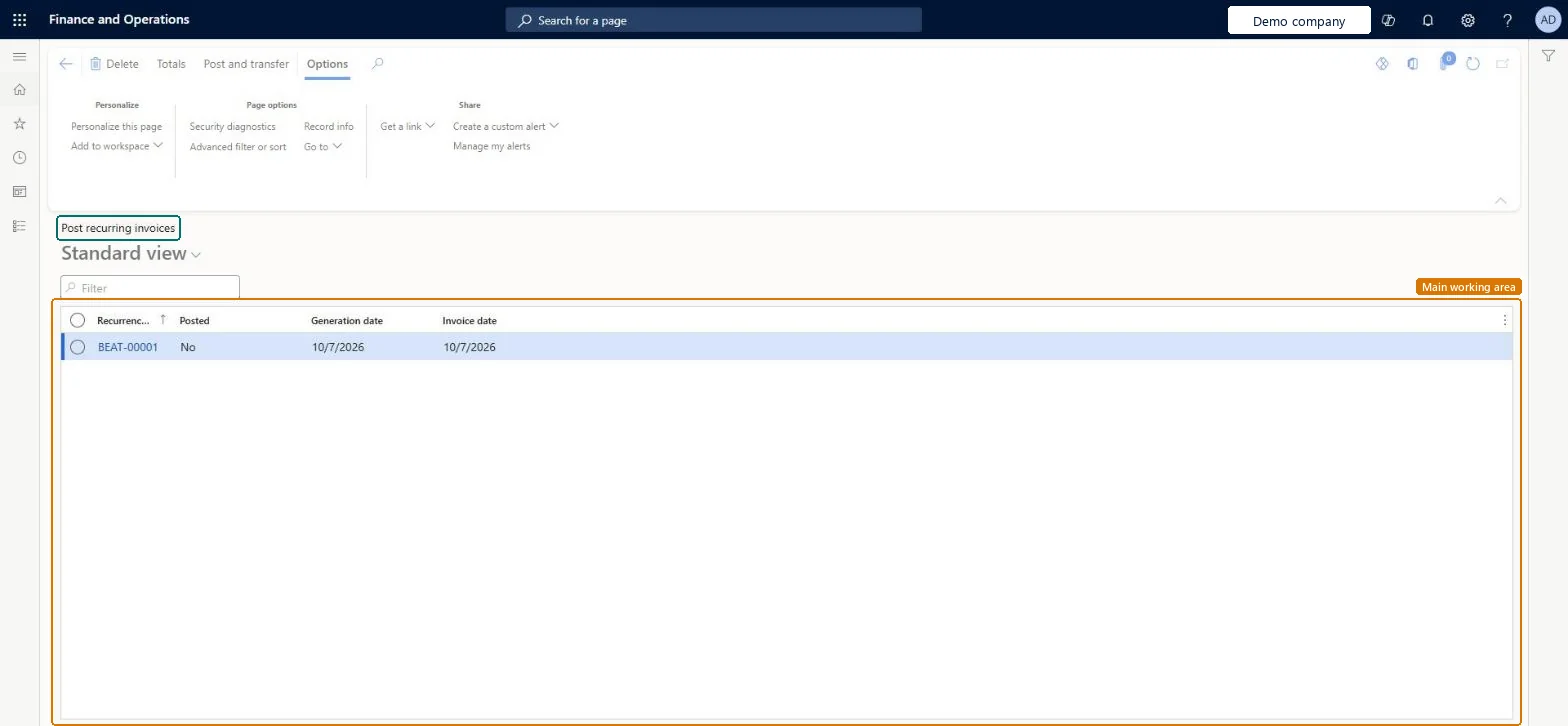
Post pending vendor recurring invoices
The posting task for generated recurring vendor invoices, which lists invoice recurrence IDs.
- Used by
- Accounts payable clerk, Accounts payable manager, Auditor and 13 more roles
- Business process
- —
- Menu item
VendRecurrenceInvoiceGroup- Main table
VendRecurrenceInvoiceGroup- Data entity
- —
- Setup steps
- —
Show what matters for
Everyone
1What it is and why
| What it is | The posting task for generated recurring vendor invoices, which lists invoice recurrence IDs. |
|---|---|
| What you do here | Used to view the invoices for a recurrence ID, delete individual invoices if needed, and post one, many, or all of them (after submitting them to workflow if workflows are enabled). |
| Example | Use recurring vendor invoices when you regularly receive vendor invoices that have the same services, quantity, and price. |
Functional consultant · Solution architect
2Where it fits
| Business process | — |
|---|---|
| Menu path | Accounts payable › Invoices › Recurring invoices › Post pending vendor recurring invoices |
| Set up first | Generate vendor recurring invoices Microsoft Learn ↗ |
| Used next by | — |
| Related pages | — |
End user · Functional consultant
3How to do it
Microsoft's steps
- Go to Accounts payable > Invoices > Recurring invoices > Post pending vendor recurring invoices.
- Select the recurring vendor invoice to post.
- Select Post and transfer.
Source: Microsoft Learn ↗
Field guide
| Field | What it means | Worked example | Table column |
|---|---|---|---|
| Recurrence ID | Groups the invoices made in one run; select it to see all its invoices.Microsoft Learn ↗ | — | — |
Functional consultant
4Setup decisions
| Setup step | Recommended value and why | Decision · common mistake · test |
|---|---|---|
| — No setup is made on this page. | ||
Solution architect
5Design impact
| Shared or per company | — |
|---|---|
| Can it be undone | — |
| Feature or country | — |
| If you change it later | Deleting a generated invoice resets the vendor's recurrence settings for that template so it can be generated again. With workflow on, invoices must be submitted before posting. Microsoft Learn ↗ |
Technical architect
6Technical
| Menu item | VendRecurrenceInvoiceGroup Checked in Dynamics 365 |
|---|---|
| Form | VendRecurrenceInvoiceGroup Checked in Dynamics 365 |
| Table | VendRecurrenceInvoiceGroupShown as “Post recurring vendor invoices” in Record infoKey field: RecurrenceInvoiceIdChecked in Dynamics 365 |
| Data entities | — |
| Who can open it | PrivilegesView recurring vendor invoice groups VendInvoiceVendRecurInvGroupViewMaintain recurring vendor invoice groups VendInvoiceVendRecurInvGrpMaintainMaintain recurring vendor invoices VendRecurringInvoiceMaintainDutiesEnable invoice and payment process VendInvoiceInvoicePaymentProcessEnableReview invoice and payment process performance VendInvoiceInvoicePaymentProcPerfReviewMaintain vendor recurring invoices VendInvoiceRecurringInvoiceMaintainMaintain vendor invoices VendInvoiceVendorInvoicesMaintainInquire into vendor invoice status VendInvoiceVendorInvoiceStatusInquire16 security rolesAuditorAuditPolicyManagerChief executive officer CompanyChiefExecutiveOfficerChief financial officer CompanyChiefFinancialOfficerLanded cost agent ITMAgentAccountant LedgerAccountantAccounting manager LedgerAccountingManagerAccounting supervisor LedgerAccountingSupervisorFinancial controller LedgerFinancialControllerAccounts payable centralized payments clerk PaymAccountsPayableCentralPaymClerkAccounts payable payments clerk PaymAccountsPayablePaymentsClerkRental coordinator agent RentalCoordinatorAgentRental manager RentalManagerRental purchasing manager RentalPurchasingManagerRental sales manager RentalSalesManagerAccounts payable clerk VendInvoiceAccountsPayableClerkAccounts payable manager VendInvoiceAccountsPayableManager |
| Actions on the page | Buttons: Totals, Post and transferChecked in Dynamics 365 |
Developer
7Developer
| Open it directly | https://<your-environment>/?mi=VendRecurrenceInvoiceGroup |
|---|---|
| Integrate with | — |
| Table definition | — |
Everyone
8Sources and checks
- learn.microsoft.com/dynamics365/finance/accounts-payable/recurring-invoice
- learn.microsoft.com/training/modules/purchase-order-invoices-finance/periodically-recurring-invoices
- learn.microsoft.com/dynamics365/finance/accounts-payable/recurring-invoice
- Checked in a working Dynamics 365 system, version 10.0.49: the menu item, form, table and security, the page.