Establish royalty commissions in Dynamics 365 Supply Chain Management
Menu item
MCRRoyaltyTable
Main table
MCRRoyaltyContract
Data entity
MCRRoyaltyAgreementHeaderEntity
Setup steps
1 on this page
Show what matters for
PAGE GUIDEWhat the page does and how to use it8 sections. Choose a role to highlight what matters to you.
Everyone
1What it is and why
What it is
The page where royalty contracts are registered; a royalty contract records an agreement with an asset or intellectual property owner.
What you do here
Use this page to set up the qualifying products, the period for cumulating sales, whether claim approval is required, the accrual and expense accounts, and the royalty rates or tiers, and then validate the agreement.
Example
When a sales order line for a product covered by a valid royalty contract is invoiced, a royalty claim is created.
The page in Dynamics 365. page title tab to open what to set or check
About the examples: Examples and screenshots in this guide use BEAT, a demo company in a Dynamics 365 test environment. Use your own company's codes and values instead of copying them.
Step by step, with screenshots
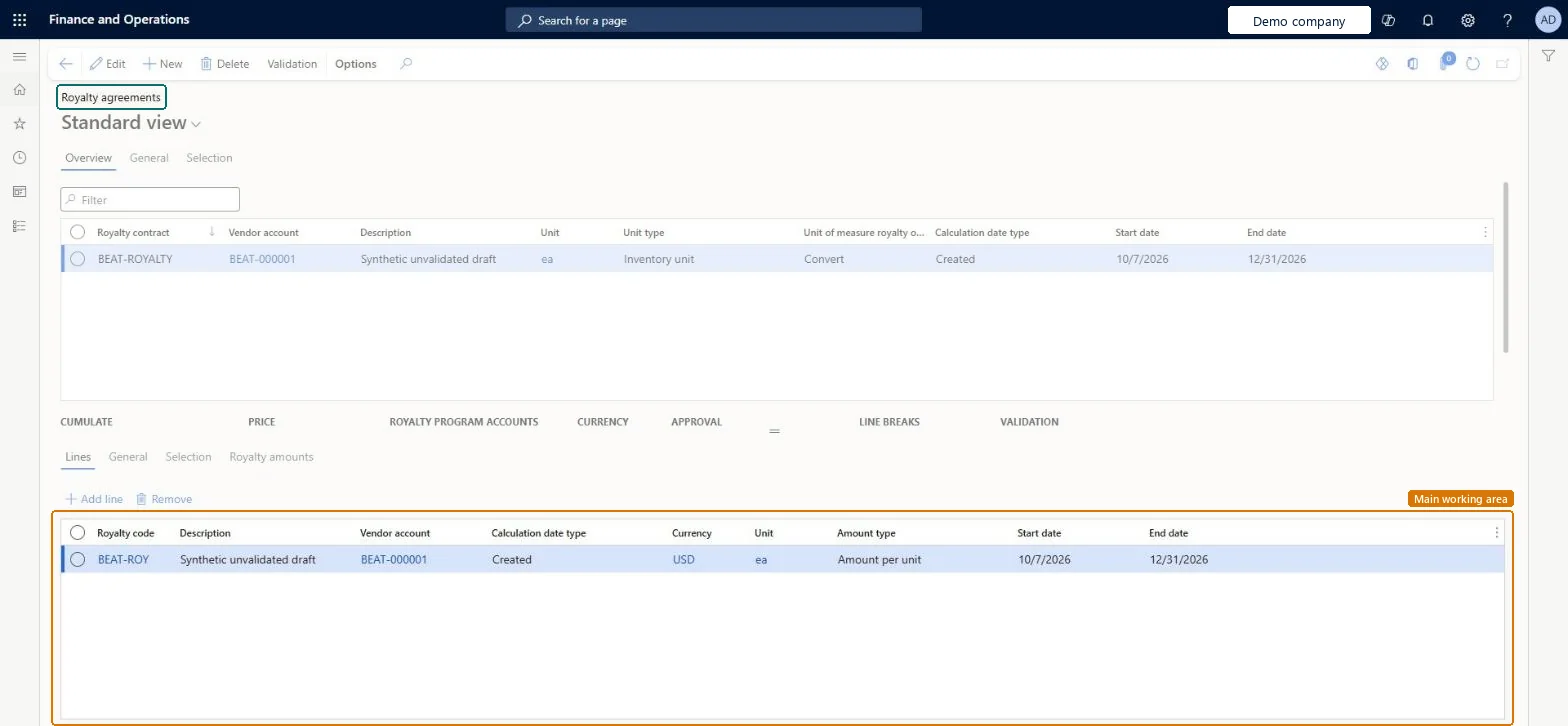
Set up Royalty agreements1 screen
Registers agreements with licensors that define which products, accumulation periods, approval needs and tiered rates generate royalty fees to be accrued and paid.
Screen 1
Create the royalty agreement and its line
Go to Accounts payable > Broker and royalties > Royalty agreements, Overview tab
Select New and fill in the agreement row
On the Lines tab, select Add line
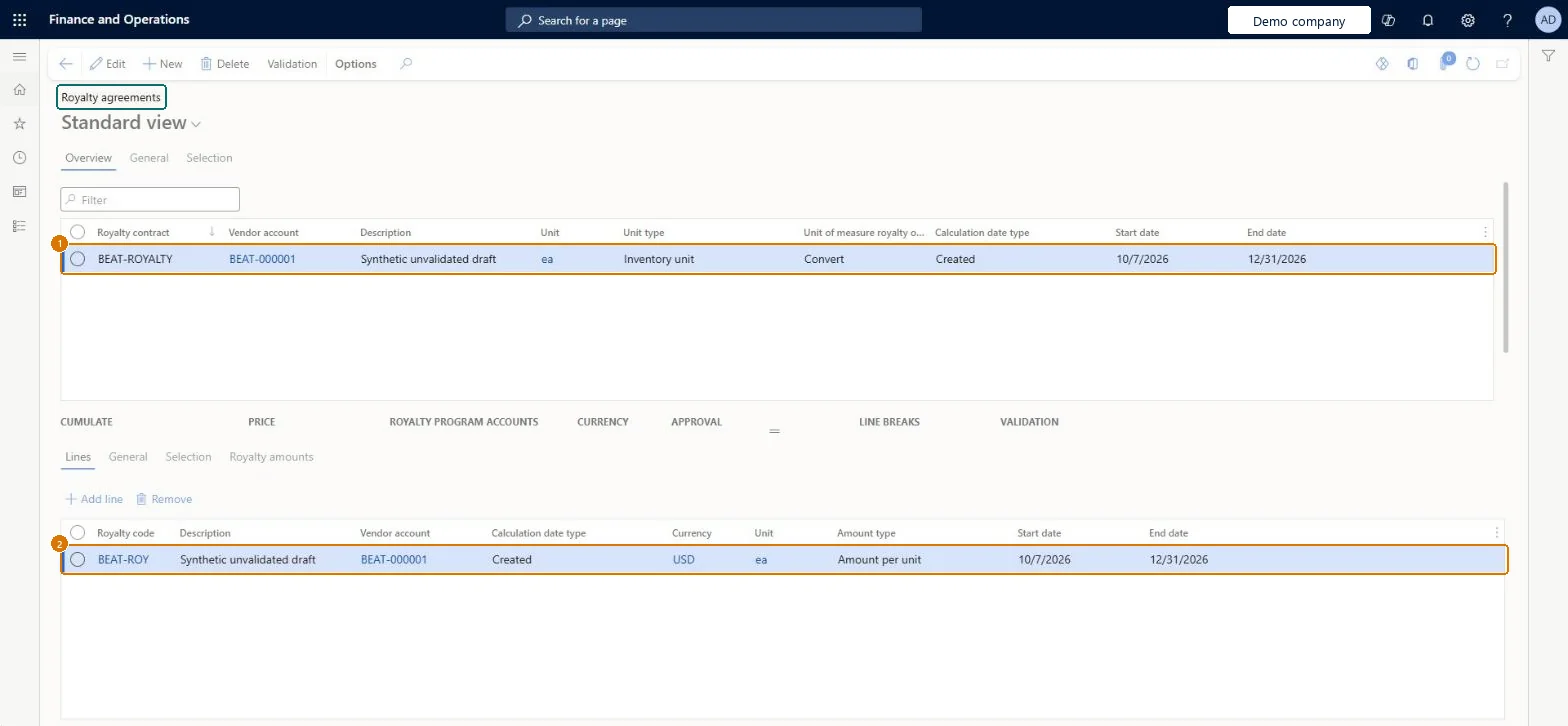
Fill in the royalty line
1Royalty contract
BEAT-ROYALTY
2Line code
BEAT-ROY
Vendor account
BEAT-000001
Description
Unvalidated draft
Unit
ea
Unit type
Inventory unit
Unit of measure royalty
Convert
Calculation date type
Created
Start date
10/7/2026
End date
12/31/2026
Currency
USD
Amount type
Amount per unit
Show the full screen page title tab to open what to set or check
How to use it
Go to Accounts payable > Broker and royalties > Royalty agreements.
Select New to add an agreement, then fill in the Royalty contract, Vendor account, Description and Unit.
Enter the Calculation date type, Start date and End date.
In the Lines tab, select Add line and fill in the Royalty code, Vendor account, Currency, Unit and Amount type.
Use the Cumulate, Price, Royalty program accounts, Currency, Approval, Line breaks and Validation sections to complete the agreement.
Select Validation on the Action Pane, then Save.
Source: Checked in Dynamics 365
Fields on the page
Field
What it means
Example
Table column
Cumulate sales by
The period the royalty is calculated over, or Invoice to calculate on each invoiced line.Microsoft Learn
CumulateSalesBy
Approval required
When Yes, claims must be approved before they become a payable invoice.Microsoft Learn
ApprovalRequired
Accrual account
Receives accrued royalty amounts between approval and processing, with the Expense account.Microsoft Learn
LedgerDimension
Royalty amounts
The royalty rates, which can be set in tiers using From value and To value.Microsoft Learn
Cumulate sales by the period the licence agreement uses (or Invoice to calculate per invoiced line), Approval required per company policy, then select ValidationCumulate sales by sets the period the royalty is calculated for, and an agreement is valid only after Validation sets Validated to Yes.
Not running Validation: the agreement isn't valid, so sales of qualifying products don't generate royalty claims.
Hard to reverse: The agreement can be edited, but claims already generated and accrual journals already posted by Cumulate stay as they are. Microsoft Learn
Technical architect
6Technical
Menu item
MCRRoyaltyTableChecked in Dynamics 365
Form
MCRRoyaltyTableChecked in Dynamics 365
Table
MCRRoyaltyContractShown as “Royalty contract” in Record infoChecked in Dynamics 365
To set it up or change itSales clerk TradeSalesClerkTo use itSales manager TradeSalesManagerGive people one of these roles. On this system, 2 roles can open this page.Checked in Dynamics 365
Checked in a working Dynamics 365 system, version 10.0.49: the menu item, form, table and security, the page, the demo records and the values in the screenshots.