Dynamics 365
Touchless AP Still Needs an Exception Architecture
Dynamics 365 Finance 10.0.49 advances Invoice Capture with AI-assisted derivation, improved exception validation and better charge handling. Here is what Finance and AP teams should design, test and measure before relying on higher automation rates.
Dynamics 365 Finance 10.0.49 moves Invoice Capture further toward touchless accounts payable. The architecture challenge is ensuring that invoices which cannot safely flow straight through are controlled, resolved and learned from.
Key takeaway: Touchless processing is not the absence of controls. It is the automatic execution of controls, with deliberate routing when confidence, matching or business rules are not satisfied.
What Microsoft is changing
Microsoft currently lists a cohesive set of Invoice Capture enhancements for public preview in Dynamics 365 Finance 10.0.49 during September 2026. The release-plan page does not list a general availability date and explicitly warns that planned delivery dates can change.
The update has three main elements. Microsoft enhancement plan.
First, AI-based header-level derivation is intended to improve how invoice headers are matched to purchase orders and procurement categories using vendor data. Microsoft says continuous learning applies user corrections to future invoices. That can reduce repeated corrections, but it also means correction quality and governance matter. A hurried workaround by one reviewer should not become an unexamined operating rule.
Second, the updated side-by-side experience brings invoice lines, the source PDF and purchase-order details together. This is valuable for the cases that cannot be automated safely. Reducing context switching can improve exception resolution without changing the underlying purchase-order structure.
Third, enhanced charge recognition identifies and classifies charges at header and line level. Defined allocation rules are then applied during transfer to Finance. Charges are a common source of total mismatches and downstream correction, so this is more important than it may initially appear.
Invoice Capture 2.9.x also includes AI Recognition in preview. Microsoft describes this as OCR combined with an LLM to identify fields, interpret document context and convert unstructured invoice content into structured data. Microsoft's September release notes invite organizations to participate in a private preview of AI Recognition. That is a separate availability statement from the 10.0.49 enhancement package's planned public preview. Neither establishes general availability or access in your tenant. AI Recognition release notes.
| Capability | Published availability as checked on 9 September 2026 |
|---|---|
| Finance 10.0.49 Invoice Capture enhancement package | Public preview planned for September 2026; no GA date listed |
| Invoice Capture 2.9.x AI Recognition | Preview feature with private-preview participation described in its release notes |
| Existing capture, transfer and Finance controls | Validate your installed version, configuration and roles; do not infer new-feature access |
Better recognition does not complete the AP process
Extracting an invoice accurately is not the same as producing a valid accounting document.
An invoice may be read correctly and still fail because the purchase order is wrong, the receipt has not been recorded, a tolerance is exceeded, the legal entity is unclear, the vendor is blocked, the tax treatment is invalid, the accounting dimensions are incomplete, or the document is a duplicate.
Invoice Capture is not the Finance posting engine. Its operator role covers derivation, validation and transfer to Finance. Microsoft solution overview.
Dynamics 365 Finance therefore remains part of the control architecture. Matching policies, workflow approval, vendor controls, posting validation and accounting rules still determine whether the invoice should be accepted and posted.
| Layer | Core question | Typical control |
|---|---|---|
| Recognition | What does the document say? | Extracted-field confidence and required-field checks |
| Derivation | Which business records apply? | Vendor, legal entity, PO and category derivation |
| Matching | Does the invoice agree with the transaction? | Price, quantity, receipt and charge tolerances |
| Accounting | Is the coding valid? | Tax, ledger account and financial-dimension validation |
| Approval | Is the spend authorized? | Workflow, delegation and segregation of duties |
| Posting | Can Finance create a valid transaction? | Posting profiles, period status and posting validation |
A touchless invoice should pass these controls automatically. It should not bypass them.
The exception architecture
The target process should contain an explicit decision point rather than a vague promise of automation.
From there, the invoice follows one of two paths:
- Straight-through path: transfer to Finance → configured matching and workflow approval → posting validation → posting → monitoring.
- Exception path: classified exception queue → human validation or correction → revalidation → transfer to Finance → configured matching and workflow approval → posting → monitoring and feedback.
The exception queue should be designed as an operating capability. At minimum, each exception needs a reason, priority, owner, age and resolution outcome. Useful reason groups include recognition uncertainty, missing master data, PO mismatch, missing receipt, charge variance, tax issue, dimension failure, duplicate suspicion, transfer failure and posting failure.
Do not send every failure into one undifferentiated AP worklist. Recognition exceptions may belong with AP operations; missing receipts may require the requester or warehouse; commercial discrepancies may need procurement; tax issues may require specialist review. Routing should reflect who can actually resolve the condition.
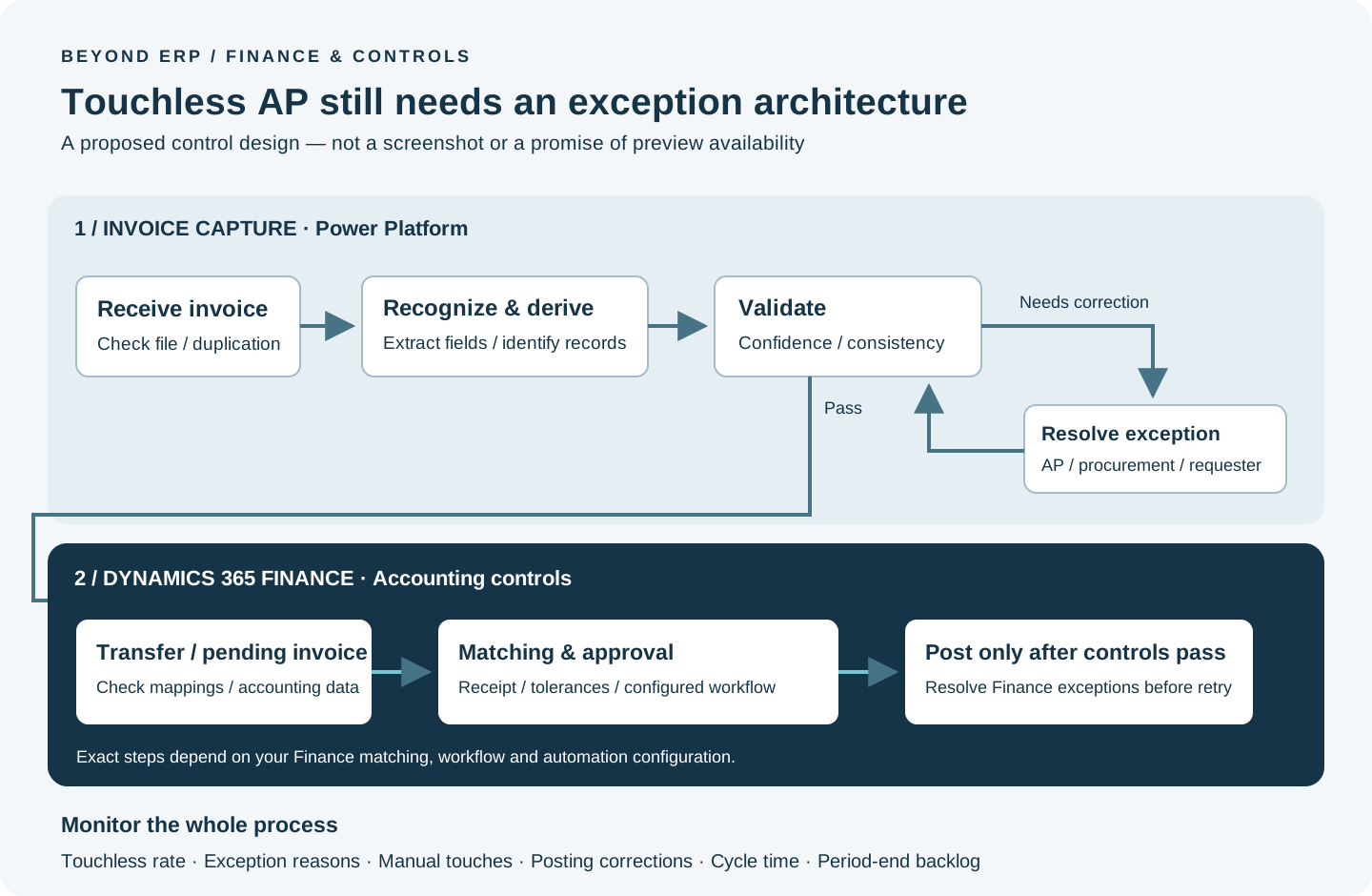
Original Beyond ERP control-design diagram. It illustrates a proposed implementation pattern, not a product screenshot. Finance workflow and matching configuration determine the detailed sequence.
A concrete exception to test
Suppose a vendor invoice matches the purchase order lines, but includes an unexpected freight charge. Accurate OCR does not make that charge acceptable. Your configured tolerance and charge rules decide whether the invoice can proceed. If review is required, procurement should resolve the commercial discrepancy; AP should not alter recognized amounts merely to force a match. Retest the corrected invoice, retain the reason for the correction and verify the final Finance posting. This is an illustrative test scenario, not a claim about a default Microsoft threshold.
Design the straight-through rules deliberately
Confidence should be combined with business context. A high-confidence invoice number does not compensate for a failed three-way match. Equally, a low-confidence optional field should not necessarily block an otherwise valid invoice.
Define blocking rules by invoice type and field criticality. PO invoices, non-PO cost invoices and credit notes have different control needs. Consider whether selected vendors, legal entities, currencies or document types need stricter review during rollout.
Continuous learning also needs ownership. Decide which corrections are suitable learning inputs, who can make them and how poor results are detected. The goal is not simply to record corrections. It is to improve future processing without embedding inconsistent decisions.
Implementation guidance
Use a representative invoice corpus
Testing with twenty clean invoices from one cooperative vendor proves little. Build a corpus that reflects production variation: major vendors, low-volume vendors, different layouts, scans, native PDFs, multiple currencies, credit notes, multi-page documents and invoices with many lines.
Include difficult but legitimate documents. These reveal where the exception process and ownership model need work.
Separate PO and non-PO scenarios
PO invoices depend on purchase-order and receipt quality. Non-PO invoices depend more heavily on coding, dimensions and approval. Test and measure them separately so that one strong scenario does not hide weakness in another.
Test charges and tax explicitly
Create cases for freight, handling, insurance, environmental fees and other charges at both header and line level. Confirm how each charge is classified, allocated, transferred and posted. Include tax-inclusive and tax-exclusive scenarios relevant to each legal entity.
Verify dimensions and custom fields end to end
Microsoft documentation supports header- and line-level financial-dimension handling and defaulting when values are absent. Invoice Capture also supports additional custom fields, although custom mappings into Finance can require an extension.
Test extraction or entry, mapping, transfer, workflow use and final posting. A value visible in Invoice Capture is not enough. It must arrive correctly in Finance and participate in the intended accounting and approval logic.
Include failure and recovery testing
Test duplicate files, repeated invoices, invalid vendors, missing purchase orders, closed periods, failed transfers, workflow rejection and posting errors. Validate retry behaviour, audit history and prevention of duplicate posting.
Regression testing should use the same controlled corpus after Invoice Capture service updates, Finance updates and configuration changes. The solution follows Microsoft's Modern Lifecycle Policy, so staying current must be part of the operating model.

Microsoft's published Invoice Capture preview screenshot, linked from the official enhancement plan. This is Microsoft documentation imagery, not a screenshot of a Beyond ERP customer environment; preview UI may change.
Measure outcomes, not feature adoption
| KPI | What it reveals |
|---|---|
| Touchless rate | Share completing without manual intervention |
| Exception rate by reason | Where the process or data is failing |
| Manual touches per invoice | Actual AP effort, including repeated handling |
| Recognition accuracy | Quality of extracted invoice data |
| Matching accuracy | Reliability of PO, receipt and category linkage |
| Time to resolution | Effectiveness of exception ownership |
| Rework or posting-correction rate | Whether automation is creating downstream defects |
| End-to-end cycle time | Time from receipt to validated posting |
| Period-end backlog | Operational resilience at peak demand |
A rising touchless rate alongside rising posting corrections is not success. Review the measures together and segment them by vendor, invoice type, legal entity and exception reason.
Preview readiness checklist
Before evaluating the 10.0.49 preview, confirm that the team can answer yes to the following:
- ☐ The preview timeline and status have been rechecked against current Microsoft documentation.
- ☐ A representative, sanitized invoice corpus is available.
- ☐ PO, non-PO, credit-note, charge, tax and dimension scenarios are covered.
- ☐ Straight-through eligibility and blocking rules are documented.
- ☐ Matching tolerances and workflow approvals have named owners.
- ☐ Exception categories, routing and service targets are defined.
- ☐ Continuous-learning corrections have governance and monitoring.
- ☐ Custom-field and dimension mappings are tested through posting.
- ☐ Duplicate, transfer and posting failures are included in testing.
- ☐ Baseline KPIs exist for comparison with preview results.
- ☐ The rollout can be limited by vendor, entity or invoice population.
- ☐ A rollback or pause decision has clear criteria.
A pragmatic conclusion
The 10.0.49 direction is useful because it addresses both automation and the manual work that remains. Improved derivation, a better validation experience and enhanced charge handling can remove genuine AP friction. AI Recognition may extend that further, but it remains preview functionality as of September 9, 2026.
The implementation objective should not be the highest possible touchless percentage. It should be the highest sustainable rate of correctly controlled, accurately posted invoices, backed by an exception process that finance teams can operate and improve.
Microsoft sources
Evidence
Microsoft lists a cohesive Invoice Capture update in Finance 10.0.49 for public preview in September 2026, with no GA date. It includes AI-based header derivation with continuous learning, side-by-side invoice/PO validation and enhanced charge recognition and allocation.
Enhancements to Invoice capture · 2026-08-27
Invoice Capture 2.9.x includes AI Recognition in preview, combining OCR with an LLM to understand invoice context and extract structured data for downstream processing. The September release notes describe private-preview participation; this is distinct from the enhancement package's planned public preview.
What's new or changed in Invoice capture · 2026-09-01
Invoice Capture creates vendor invoices from digital images and retains AP review, validation, derivation and transfer responsibilities. Microsoft identifies the InvoiceCaptureOperator role as necessary for derivation, validation and transfer, including touchless flows.
Invoice capture solution overview · 2026-08-04
Invoice Capture supports header- and line-level financial-dimension handling, with defaulting during transfer when values are not supplied.
Invoice capture financial dimensions · 2026-08-04
Additional header and line fields can be supported in Invoice Capture; values can be extracted or manually entered, and custom mapping to Finance may require an extension.
Invoice capture custom fields · 2026-06-11