Designing the global and local vendor model
A supplier operating across US and German companies wants one onboarding journey, while procurement needs separate vendor accounts, payment controls and transaction settings in USMF and DEMF. That requirement creates a master data and process ownership decision before it creates a portal decision.
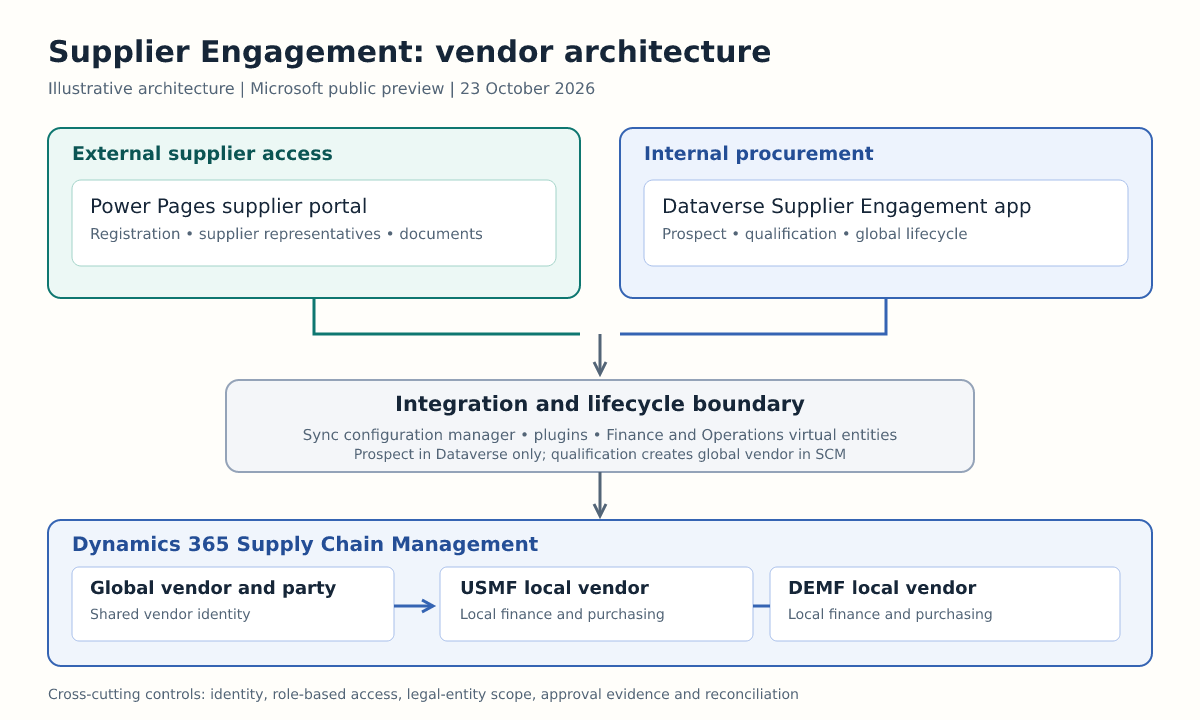
Microsoft Dynamics 365 Supplier Engagement introduces an architecture with three components: a model-driven Supplier Engagement app for internal teams, a Power Pages supplier portal for external representatives, and Dynamics 365 Supply Chain Management for procurement and operational transactions. Microsoft describes the solution as a public preview that is not intended for production use. It can operate in parallel with the older Vendor collaboration experience during transition. Microsoft Learn: Supplier Engagement overview
The appropriate response is therefore assessment, not production adoption. Licensing remains under review, important RFQ capabilities are absent, and preview behaviour can change.
What actually changes
Vendor collaboration is embedded in Supply Chain Management. It concentrates on exchanges such as purchase orders, invoices, RFQs and consignment inventory, with supplier records maintained at legal entity level.
Supplier Engagement extends that boundary. Internal supplier management moves into a model-driven Dataverse application. External interaction uses Power Pages. Supply Chain Management remains responsible for ERP transactions and company-specific vendor operation. Microsoft also introduces a global vendor lifecycle above the local vendor accounts used by each legal entity. Microsoft Learn: Supplier Engagement comparison
This is not evidence that every vendor field or transaction is copied into Dataverse. Native Dataverse tables store Supplier Engagement data, while Finance and Operations virtual entities expose selected Supply Chain Management data without duplicating its original storage. Microsoft documents a sync configuration manager, plugin triggers, mappings, portal Web API and OData as parts of the integration. Microsoft Learn: data synchronization
Global vendor and local vendor are different responsibilities
Microsoft documents the global vendor as a shared master profile across legal entities. Local vendors remain company-specific accounts. The internal app supports global vendor management and release into legal entities, while Supply Chain Management exposes shared global vendor data and the associated released vendors. Microsoft Learn: Supplier Engagement app Microsoft Learn: data in Supply Chain Management
Example: supplier onboarding in USMF and DEMF
This is a worked example for design discussion, not a customer case.
A supplier registers once and initially exists as a prospect in Dataverse. The organisation validates its identity, capabilities, contacts and onboarding evidence. When qualified, a global vendor party is created in Supply Chain Management and supported data synchronizes. Procurement can then release that global vendor into USMF and DEMF as separate local vendor accounts.
The shared profile can support common identity and relationship information. Each local vendor still needs legal entity decisions such as vendor group, payment configuration, tax requirements, purchasing policies and transaction readiness. The global record does not remove company accountability.
A useful ownership model is:
| Decision | Suggested owner | System boundary |
|---|---|---|
| Supplier identity and duplicate prevention | Central vendor governance | Global vendor and party |
| Qualification evidence | Procurement and compliance | Supplier Engagement app |
| Release to USMF or DEMF | Local procurement and finance | Local vendor account |
| Payment and bank detail approval | Finance control owner | Controlled local process |
| Purchase and invoice processing | Operational teams | Supply Chain Management |
The ownership assignments above are design recommendations, not Microsoft product promises.
Lifecycle gates define when ERP data appears
At Prospect status, Microsoft states that no vendor record exists in Supply Chain Management and the data is stored only in Dataverse. Qualification creates a global vendor party in Supply Chain Management and transfers supported information, including selected identity, address and contact data. Approval indicates readiness for transactional use and release to legal entities. Disqualification prevents an SCM vendor record, while termination blocks the relationship and portal access. Microsoft Learn: global vendor lifecycle
These gates should become explicit control points in the solution design:
- Prospect controls data collection and preliminary review.
- Qualification controls creation of the shared party in Supply Chain Management.
- Approval establishes organisational acceptance.
- Legal entity release creates the local vendor context needed for transactions.
- Holds, disapproval and termination control continued access and use.
Teams should define who can move a record through each gate, what evidence is mandatory and how rejected or duplicate suppliers are handled.
Coexistence is a functional requirement
Microsoft intends Supplier Engagement to replace the older Vendor collaboration experience, but supports both solutions in parallel during transition. The decision cannot be based on interface preference alone. Microsoft Learn: Supplier Engagement overview
Supplier Engagement adds global vendor management, lifecycle processes, anonymous registration, Power Platform extensibility and an aggregated cross-company view. However, its supplier portal does not currently support sealed bidding or public RFQs. Vendor collaboration supports both. Microsoft Learn: comparison
If either RFQ pattern is operationally important, retain Vendor collaboration for that scope. Document which supplier groups, legal entities and document types use each channel. Parallel operation without routing rules will create confusion, duplicate invitations and fragmented support.
There is no documented mandatory switch date or automatic migration promise in the reviewed material.
Security spans three control planes
The design crosses three security boundaries.
First, internal users access the Dataverse model-driven app through Dataverse roles. Second, external supplier representatives reach the Power Pages portal through external identity and web role configuration. Third, Supply Chain Management roles and vendor scope govern ERP access and legal entity operations. Microsoft also documents role changes and workflow configuration required during deployment. Microsoft Learn: configure SCM
A non-production security test should cover:
- A supplier user seeing only authorised supplier organisations.
- Separation between global profile maintenance and local vendor release.
- Legal entity isolation for USMF and DEMF operations.
- Joiner, mover and leaver handling for supplier contacts.
- Lifecycle termination and portal access removal.
- Audit evidence for role assignment and status changes.
Bank detail changes deserve a separate maker and approver control, notification, audit trail and reconciliation to the approved local vendor. This is an architectural recommendation. It must not be represented as a verified, standard Supplier Engagement approval feature unless the implemented design and current documentation prove it.
Plan for synchronization failures and reconciliation
Documented product behaviour includes virtual entities, mappings, plugin triggers and configurable synchronization. The architecture team must add operating controls around those mechanisms.
Create a field-level ownership catalogue. Mark each important attribute as mastered in Dataverse, mastered in Supply Chain Management, exposed virtually or synchronized. Avoid assuming that dual-write is the underlying design, or that all vendor and transaction data is copied into Dataverse.
Define reconciliation around each lifecycle gate. Compare prospects qualified in Dataverse with global vendor parties created in Supply Chain Management. Compare approved global vendors with intended USMF and DEMF releases. Monitor missing contacts, addresses, portal mappings and failed local vendor creation.
Microsoft documents asynchronous global vendor creation logging, failure reasons and a resynchronization action. Use that as one input to operations, not as the whole control framework. Microsoft Learn: configure SCM
Recommended operational measures include queue age, failed synchronization count, duplicate global vendor candidates, unreconciled releases and access removal failures. These measures are design advice.
Prerequisites and licensing constrain the assessment
The documented minimum is Supply Chain Management 10.0.48, build 10.0.2645.52, with the Finance and Operations Virtual Entity app at version 2.20.3385.8 or later. Supply Chain Management must be connected to Dataverse. Installation requires a dedicated standard service account with elevated roles across Dataverse, Supply Chain Management and Power Platform administration. Microsoft Learn: deployment overview
Microsoft states that the licensing model remains under review and that the supplier portal offers a trial lasting 30 days. These values were checked on 23 October 2026 and can change. They are not a production cost model or evidence of general availability.
The Power Platform app must be installed, the portal activated, and the Supplier Engagement feature enabled in Supply Chain Management. Workflow batch processing and relevant security duties also require review. Microsoft Learn: Power Platform installation Microsoft Learn: SCM configuration
Five steps to assess the preview
- Map process scope. List supplier registration, qualification, local release, RFQ, purchase order, invoice and consignment scenarios. Flag sealed bidding and public RFQs immediately.
- Build the data ownership model. Identify global and local attributes, systems of record, duplicate matching rules and release ownership for each legal entity.
- Configure an isolated preview environment. Validate versions, Dataverse connectivity, service account privileges, app installation, portal activation and feature configuration.
- Test controls and failure paths. Test supplier isolation, legal entity scope, lifecycle termination, role separation, failed synchronization and master data reconciliation.
- Run a go or no-go review. Proceed only if critical processes fit the preview, gaps have controlled coexistence paths, licensing uncertainty is accepted for evaluation and support ownership is clear.
A no-go result is appropriate if the assessment requires production use, sealed bidding, public RFQs or confirmed long-term external user costs, or relies on an unsupported migration assumption.
The next architecture decisions
Supplier Engagement should be assessed as a new vendor operating model across Power Pages, Dataverse and Supply Chain Management.
Solution architects should now decide:
- Which data belongs to the global vendor and which remains local.
- Who qualifies, approves and releases suppliers into each legal entity.
- Which processes must remain on Vendor collaboration during coexistence.
- How external identity, role separation and supplier isolation will be tested.
- Which synchronization and reconciliation failures will block adoption.
The main architecture change is a supplier lifecycle spanning companies, with new ownership, integration and control responsibilities.
Sources
Evidence
Supplier Engagement combines an internal model-driven app, an external Power Pages portal and Supply Chain Management, while allowing parallel operation with Vendor collaboration.
Supplier Engagement overview · 2026-07-31
Supplier Engagement lacks sealed bidding and public RFQs, both of which Vendor collaboration supports.
Supplier Engagement comparison · 2026-07-31
The internal Supplier Engagement app is model driven, uses Dataverse and supports global profiles plus legal entity specific local vendors.
Work with the Supplier Engagement app · 2026-07-31
A prospect remains in Dataverse until qualification creates the global vendor party in Supply Chain Management and transfers supported data.
Global vendor onboarding lifecycle · 2026-07-31
Integration uses a sync configuration manager, plugin triggers, mappings, virtual entities, portal Web API and OData. It does not imply wholesale replication of ERP data.
Synchronize Supplier Engagement data · 2026-07-31
Supply Chain Management introduces shared global vendors while local vendor records remain legal entity specific.
Work with Supplier Engagement data in Supply Chain Management · 2026-07-31
Deployment requires SCM 10.0.48 build 10.0.2645.52 or later, Finance and Operations Virtual Entity app 2.20.3385.8 or later, Dataverse connectivity and a privileged service account. Licensing is pending and the portal has a 30 day trial.
Supplier Engagement deployment overview · 2026-08-17
The Power Platform installation adds the model-driven app and portal components, after which the Power Pages site must be activated and configured.
Install Supplier Engagement on Power Platform · 2026-07-31
Supply Chain Management requires feature enablement, workflow batch processing and role review. Microsoft also documents a global vendor creation log with resynchronization for errors.
Configure Supplier Engagement in Supply Chain Management · 2026-07-31