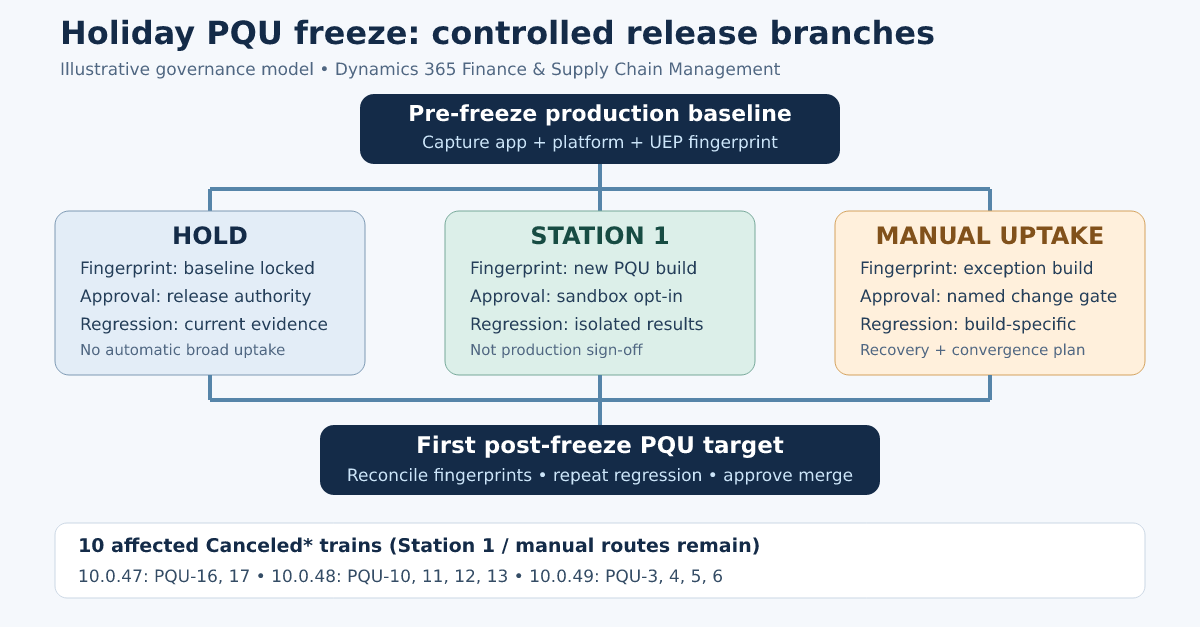
Microsoft has marked ten forthcoming Finance and Operations PQU trains Canceled* for wider rollout during the holiday freeze. The builds still go to Station 1 and remain available for manual installation. (Microsoft Learn)
ERP teams need to know which environments may move to a different build, who approves the change, which tests apply and when those environments will return to normal servicing.
What Microsoft has scheduled
The affected trains span three supported application versions:
| Application version | Canceled* trains | Scheduled starts |
|---|---|---|
| 10.0.47 | PQU-16 and PQU-17 | 4 and 25 November |
| 10.0.48 | PQU-10 to PQU-13 | 11 November to 23 December |
| 10.0.49 | PQU-3 to PQU-6 | 4 November to 16 December |
During the freeze, Microsoft still deploys these builds to Station 1 and permits manual installation. Its documentation explains how customers can obtain PQU packages through Lifecycle Services. (Microsoft Learn)
The PQU FAQ states that customers can install cumulative builds before their scheduled rollout. It also says that a PQU cannot be rolled back after application. (Microsoft Learn)
Where the release paths diverge
Microsoft normally deploys PQUs in stages, starting with a limited group and expanding after the earlier stage provides sufficient confidence. (Microsoft Learn) During the holiday freeze, wider rollout stops. Station 1 and manual updates remain possible.
During the freeze, an estate may have three release paths:
| Branch | Likely purpose | Required control |
|---|---|---|
| Hold | Preserve the approved production baseline | Record the current environment fingerprint (build and configuration record) and first intended post-freeze target |
| Station 1 | Early evidence from an opted-in sandbox | Keep findings separate from approval for broader environments |
| Manual installation | Address a justified defect, regulatory need or testing dependency | Require explicit approval, build-specific regression and a convergence plan |
Test results depend on the build being tested. A defect found in an updated sandbox may not reproduce in production. The same issue affects extension tests, integrations and ERP MCP tools. Include the application and platform build with every defect and test result.
Record the actual build
For each environment, record:
- Application build
- Platform build
- Unified Environment Provisioning application version
- Environment purpose and station
- Installed deployable packages and extension versions
- Date and route of update
- Regression evidence identifier
- Approval owner and business justification
- Intended post-freeze target
Microsoft publishes application, platform and UEP build details for active trains. (Microsoft Learn) Put those values in the release register alongside extension and test references.
Example: a warehouse execution defect
Consider a warehouse execution defect discovered in late November. Production stays on the approved build while a newer PQU is available for manual installation and may contain the required correction.
Testing only the original warehouse failure in UAT would miss the wider regression impact. Recording the environment simply as “10.0.49” would also hide the PQU build.
Before installing the PQU, confirm the build and the applicable Microsoft notification or support advice. Record the current UAT build, obtain change approval and prepare the recovery route. Test the defect, then cover the related procurement, inventory, warehouse, transportation, batch and integration processes. Include any shared extensions or data entities.
Microsoft states that an installed PQU cannot be rolled back. Plan recovery through a supported restore or replacement environment, rather than assuming the update can be uninstalled. (Microsoft Learn)
If ERP agents use the environment, include Dynamics 365 ERP MCP in the tests. Check the available data, form and action tools, the relevant metadata and permissions, and the results of controlled read and write operations. Record the exact build. Microsoft documents the tool categories and version prerequisites. (Microsoft Learn)
Approve manual updates
Record five items before approving a manual update:
- Reason: Record the business, regulatory or service risk that justifies an update during the freeze.
- Scope: Identify the environments allowed to receive the build and those remaining on hold.
- Evidence: Specify required Finance, Supply Chain, integration, reporting, batch and agent tests.
- Recovery: Document the available restore or replacement route if validation fails.
- Convergence (return to a common build): Name the common target train and the regression that must be repeated before the branches merge.
Record the approval owner and the people responsible for testing and recovery. Depending on the impact, involve the application owner, release manager, technical architect, test lead or change authority. Consult Microsoft Support where the issue requires product guidance.
Trade-offs
Keeping environments on the approved build simplifies support but may delay an important fix. Station 1 can provide early test evidence; it does not replace production validation. Manual installation may resolve an urgent issue, but it creates another baseline that needs its own testing and recovery plan.
Support teams, partners and ISVs need the exact build to reproduce issues. The application version alone, such as “10.0.48”, is not enough when PQUs differ by environment.
Release checklist
- Register all ten Canceled* trains as conditional builds rather than deleting them.
- Capture each environment’s full pre-freeze fingerprint.
- State which environments are authorised for Station 1 participation.
- Define the evidence and approvers required for manual uptake.
- Keep regression, extension and defect records build-specific.
- Include integrations and ERP MCP tools in compatibility testing where applicable.
- Record the recovery route before applying an exception build.
- Name the first intended post-freeze target for every branch.
- Reconcile all manually advanced environments before normal servicing resumes.
What I would do now
Record each environment's baseline before the freeze. Agree which environments may receive Station 1 or manual builds, the tests required and who approves an exception. Name the first post-freeze target for each branch. Keep this with the release plan so support teams can identify every change.
Sources
Evidence
Ten forthcoming PQU trains are marked Canceled*. Other stations are frozen, while Station 1 continues and builds remain available manually.
Release schedule for proactive quality updates · 2026-10-19
Customers can manually apply or proactively install published PQUs, and an applied PQU cannot be rolled back.
Proactive quality updates FAQ · 2026-08-10
The normal PQU process is a staged safe-deployment rollout intended to detect issues before broader deployment.
Proactive quality updates overview · 2026-03-28