# Dynamics 365 ERP MCP: Why agent access is an architecture decision
Dynamics 365 ERP MCP exposes supported Finance and Supply Chain Management data and business operations to compatible agent clients. That access deserves the same architectural discipline as any other transaction-capable integration.
The key design task is to classify each tool operation by its business impact. Retrieval, preparation, record updates, business actions and deletion require different permissions, safeguards and evidence.
Microsoft's dynamic Dynamics 365 ERP MCP server exposes data, form and action tools for finance and operations apps. Data tools support create, read, update and delete operations through data entities. Form tools interact with application forms through server APIs. Action tools can invoke eligible Finance and Operations classes. Microsoft documents these tool categories and their mechanics here.
The design decision is therefore larger than whether an agent can connect. Architects must decide which identity is acting, what that identity may see, which operations it may perform and where a business-changing request must stop for approval.
Start with the actual product boundary
The Dynamics 365 ERP MCP server connects compatible agent clients to Dynamics 365 Finance and Dynamics 365 Supply Chain Management data and business logic. Microsoft Copilot Studio is one supported client. In Copilot Studio, a maker can add the Dynamics 365 ERP MCP server from the agent's Tools page and create a connection. The agent then receives access to server tools according to its security role and environment context. Microsoft provides the current Copilot Studio connection flow.
This is not direct database access. Microsoft states that operations pass through supported Finance and Operations APIs. Existing validations, workflows and server-side business rules continue to run. A transaction that the application would reject should also be rejected when attempted through MCP. The ERP MCP security model is documented here.
Existing ERP permissions establish what an identity can do. An implementation-specific business decision determines whether an agent should execute a permitted operation autonomously, require approval or remain read-only.
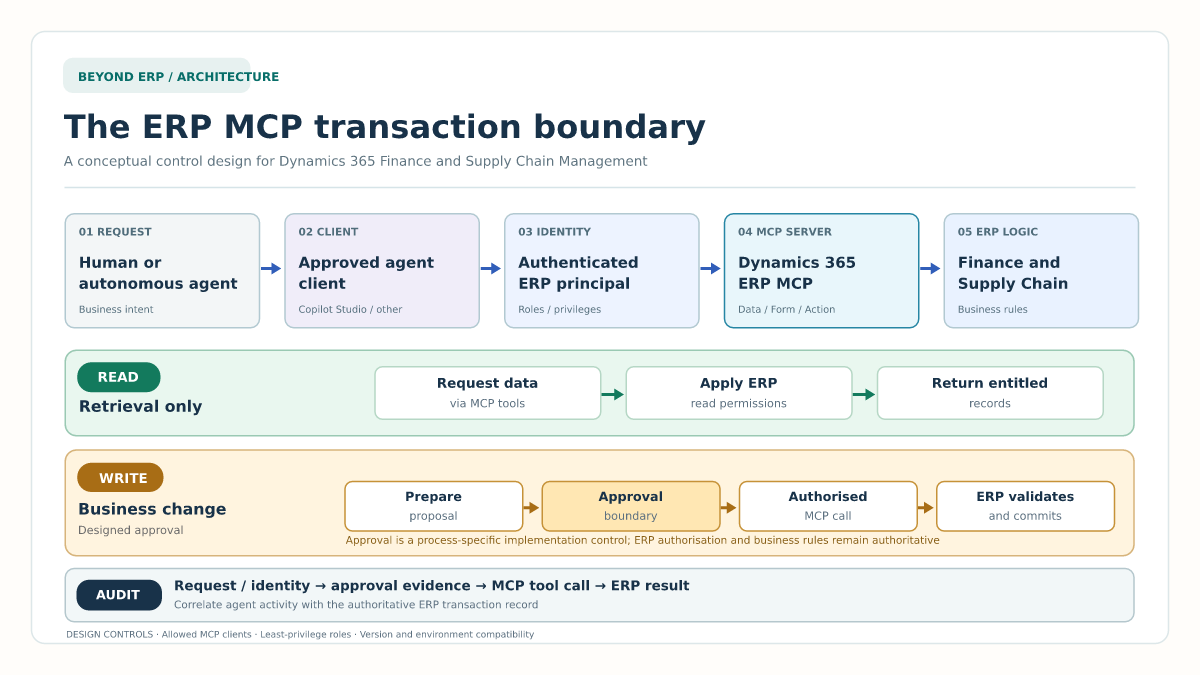
Separate retrieval from business-changing actions
A useful first step is to classify every proposed agent capability.
| Capability | Example | Required control |
|---|---|---|
| Read | Retrieve a vendor, purchase order or inventory balance | Confirm the user or agent is entitled to see the requested data. |
| Prepare | Draft proposed changes without committing them | Give the responsible reviewer the complete proposed change. |
| Write | Create or update an ERP record | Justify direct execution, constrain its scope and define recovery. |
| Business action | Submit, approve, post, release or invoke custom logic | Preserve authoritative workflow, segregation of duties and approval controls. |
| Delete | Remove a record through a data tool | Confirm deletion is necessary and explicitly permitted, and document recovery limits. |
Microsoft documents CRUD data tools, form interactions and action invocation. It does not say that a human approval gate is automatically added before every write. Approval design is therefore the responsibility of the implementation team.
A safe initial scope will often favour retrieval and preparation. Direct writes should be introduced operation by operation, with named owners and measurable controls.
Identity determines the effective ERP boundary
Every MCP request requires an authenticated identity. Microsoft distinguishes delegated agents, which act on behalf of the person using them, from autonomous agents, which use their own identity. Finance and Operations applies roles, duties, privileges, record-level security and data policies to that authenticated context. The MCP server does not elevate privilege. Microsoft explains this identity and authorisation model in its security guidance.
For a delegated purchasing assistant, the user's own identity can preserve familiar accountability and access boundaries. For an autonomous agent, a dedicated identity can make ownership and scope clearer, but it also creates a non-human principal that requires lifecycle management.
In either case, avoid a broad service identity shared by unrelated agent scenarios. It weakens attribution and makes least privilege difficult to demonstrate.
The architecture record should identify:
- The agent owner.
- The executing identity pattern.
- The permitted legal entities and data scope.
- The assigned ERP roles, duties and privileges.
- The allowed MCP client.
- The credential and access-review lifecycle.
- The response when the owner, purpose or environment changes.
Copilot Studio also has its own authentication and sharing controls. Microsoft recommends authentication for organisational agents accessing restricted resources. Current Copilot Studio authentication options are described here. These controls govern entry to the agent. Finance and Operations security still governs ERP execution.
Example: controlled vendor maintenance
A procurement agent receives a request to update a vendor's payment terms.
The agent first uses a read operation to retrieve the vendor, current terms, company and status. It presents the proposed change and its source to the requester. No ERP data has changed at this point.
The request then enters a controlled write boundary. The design could require a named vendor-maintenance approver to confirm the vendor, legal entity, old value, new value and business reason. Only after approval does a narrowly authorised identity submit the update.
Dynamics 365 validates the transaction under the executing identity. The solution records the original request, retrieved context, proposed change, approval result, MCP tool call, ERP result and correlation identifier.
If the agent cannot identify one vendor confidently, the approval expires, validation fails or the environment is unavailable, it stops. It must not select a likely record or convert a failed write into a different operation.
The same approach can apply to a purchase order. Reading order status is retrieval. Preparing a proposed line change is preparation. Saving the change is a write. Submitting, confirming or approving an order can involve a separate business-action boundary.
Enforce approval through system controls
Instructions such as “ask before changing data” are useful, but they are not a complete transaction control. Agent instructions can be changed, misunderstood or bypassed by another execution path.
For higher-risk operations, approval should be represented in a durable system control. Depending on the process, that might be an existing Dynamics 365 workflow, a controlled orchestration step or a custom service that verifies approval before invoking a specific action. The right pattern depends on whether the operation already has an authoritative ERP workflow.
Do not assume MCP bypasses business logic. Microsoft states that Finance and Operations validation and workflows are preserved. Equally, do not assume a workflow exists for every entity update. The process owner must confirm the control for each operation.
Custom X++ actions require additional care. Microsoft documents AI tools that expose Finance and Operations business logic through classes implementing ICustomAPI, but that extension feature is currently preview. The preview status and security requirements are explicit in the documentation. Preview custom actions should not be treated as an unrestricted production shortcut.
Auditability must span both sides of the boundary
ERP history alone might show that a record changed. It might not explain the prompt, the agent's selected tool, the context supplied to the model or an external approval decision.
Agent telemetry alone might show reasoning and tool activity. It is not the authoritative record of the committed ERP transaction.
Design a correlated evidence chain across:
- User or autonomous agent identity.
- Agent and published version.
- Prompt or triggering event.
- MCP server and selected tool.
- Target environment and legal entity.
- Approval record where applicable.
- ERP transaction result.
- Failure, retry and cancellation events.
Microsoft documents Copilot Studio governance controls for authentication, actions, connectors, publication and audit integrations. The current governance overview is available here. These controls complement the Finance and Operations security and transaction record. They do not replace it.
Also review what the agent client retains. Microsoft states that ERP MCP does not itself store customer data, while movement or retention outside Finance and Operations depends on the selected client and connected services. This makes client-side data policy part of the architecture review.
Check version and environment compatibility
As of 23 October 2026, Microsoft lists minimum supported Finance and Operations versions as 10.0.47, 10.0.46 PQU-2 or 10.0.45 PQU-7. The environment must be Tier 2 or above, or a Unified Developer Environment. Cloud Hosted Environments are not supported. The dynamic MCP feature is enabled by default but can be checked in Feature Management, and the agent platform must be permitted through Allowed MCP Clients. These prerequisites are maintained in the ERP MCP overview.
The earlier static ERP MCP server, which exposed 13 specific tools, was retired on 1 October 2026. Designs and test scripts should therefore target the dynamic server, not the retired static contract.
Known limitations also matter. Current documentation identifies unsupported controls, restrictions around attachments and advanced filters, downtime behaviour and lack of supported use in the in-app Copilot sidecar. Compatibility should be tested against the precise application version, environment type and agent client.
Architecture decision checklist
Before expanding an agent beyond read-only operations:
- Classify each capability as read, prepare, write, business action or delete.
- Choose delegated or autonomous identity and document the accountable owner.
- Constrain ERP permissions to the agent's documented purpose.
- Allow only approved MCP clients.
- Confirm which ERP workflows and validation rules apply.
- Document and technically enforce approval for identified high-risk operations.
- Correlate each committed change with the request, identity and approval evidence.
- Protect retries against duplicate execution.
- Stop safely on ambiguity, failure or expired approval.
- Test version, environment and known control limitations.
- Review client-side data handling and retention.
- Assign an operational owner and an effective disablement mechanism.
Recommended starting scope
Dynamics 365 ERP MCP provides a standard route from agent reasoning into Dynamics 365 Finance and Dynamics 365 Supply Chain Management. A design may start with inquiry and later add selected business-changing actions. Each expansion needs a documented identity, permission, approval, execution and evidence model.
Treat retrieval as the starting point. Introduce writes deliberately. Keep ERP business logic authoritative, and require a clear approval and audit design before an agent can change the books, suppliers, orders or inventory.
Microsoft sources
- Use Model Context Protocol for finance and operations apps
- Security for Dynamics 365 ERP MCP
- Build an agent with Dynamics 365 ERP MCP
- Extend your agent with Model Context Protocol
- Configure user authentication in Copilot Studio
- Copilot Studio security and governance
- Create AI tools with finance and operations business logic, preview
Evidence
The dynamic ERP MCP server exposes data, form and action tools. Minimum supported versions are 10.0.47, 10.0.46 PQU-2 or 10.0.45 PQU-7. It requires Tier 2 or above, or a Unified Developer Environment, and is unsupported on Cloud Hosted Environments. The feature is enabled by default but remains controllable through Feature Management. The static server retired on 1 October 2026.
Use Model Context Protocol for finance and operations apps · 2026-08-19
MCP requests require an authenticated identity and remain subject to Finance and Operations roles, duties, privileges, record-level controls, validations and workflows. Administrators can restrict allowed MCP clients. The MCP server does not itself store customer data.
Security for Dynamics 365 ERP MCP · 2026-08-19
Copilot Studio can add the Dynamics 365 ERP MCP server as a tool. The resulting access is limited by the agent security role and environment context. The page distinguishes the dynamic server from the retired 13-tool static server.
Build an agent with Dynamics 365 ERP MCP · 2026-03-11
Copilot Studio's standard harness can connect agents to MCP servers. Published tools and resources become available to the agent, and generative orchestration must be enabled.
Extend your agent with Model Context Protocol · 2026-08-26
Copilot Studio supports Microsoft Entra ID and manual OAuth authentication options. Microsoft recommends authentication for organisational agents, particularly where restricted resources are involved.
Configure user authentication in Copilot Studio · 2026-10-22
Copilot Studio provides governance controls covering authentication, actions, connectors, publication, triggers and audit integrations. This supports governance of the agent layer but does not replace Finance and Operations transaction controls.
Key concepts: Copilot Studio security and governance · 2026-10-07
Custom X++ AI tools that expose Finance and Operations business logic through ICustomAPI remain preview functionality. They require explicit security configuration and must not be presented as a generally available production extension pattern.
Create AI tools with finance and operations business logic (preview) · 2026-03-05