About the examples: Examples and screenshots in this guide use BEAT, a demo company in a Dynamics 365 test environment. Use your own company's codes and values instead of copying them.
Setup steps on this page
Set up Foreign currency revaluation automation
Schedules the Accounts receivable foreign currency revaluation to run automatically as a recurring process automation series.
How to use it
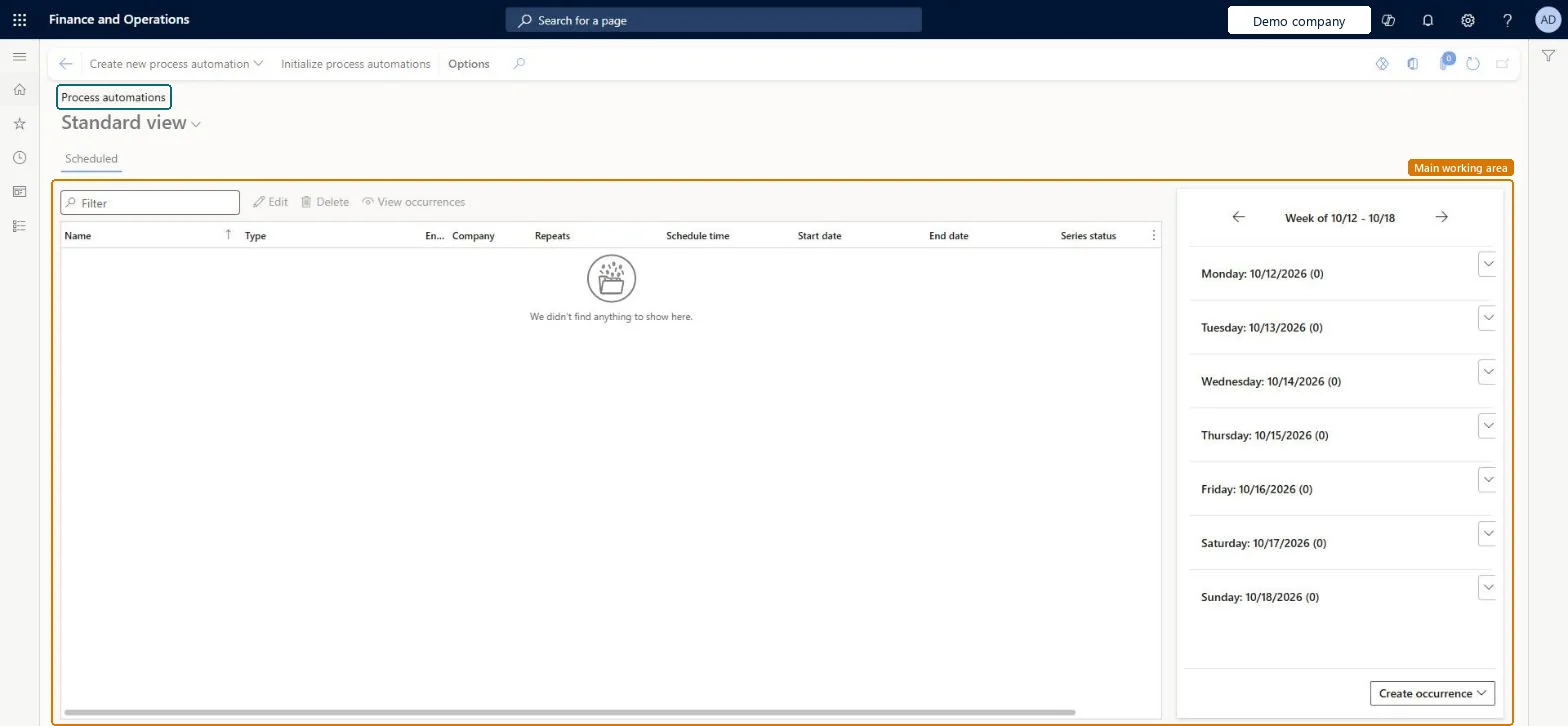
Go to Accounts receivable > Periodic tasks > Foreign currency revaluation automation.
Select Create new process automation.
Select Initialize process automations if you need to set them up.
Use the Scheduled list to review each automation, then use Edit, Delete or View occurrences.
Use the weekly list on the right, or Create occurrence, to work with a day.
Source: Checked in Dynamics 365
Test checklist
Post a customer invoice in a foreign currency and add a month-end exchange rate.
Run Simulation for month end with the Standard method.
Run the revaluation for the same date.
Check the unrealized gain or loss voucher under Transactions on the revaluation record.
Run the Simulation report for the same date and method first, then schedule the revaluation through process automation for each period endLearn recommends a simulation before revaluing open customer transactions. Process automation needs the Enable process automation for accounts receivable and accounts payable foreign currency revaluation feature.
Choosing Financial dimensions = None when dimensions are required: entries post without dimensions after a warning, and the revaluation report can't be reprinted later.
Feature management and licence
Feature to turn on
Enable process automation for accounts receivable and accounts payable foreign currency revaluation (Must be on)
Hard to reverse: Each run posts unrealized gain or loss to the ledger. It is reversed per transaction at settlement or cancelled by a later Invoice date run; it can't be deleted.
Technical architect
6Technical
Menu item
CustExchRateAdjAutomationScheduleSeriesChecked in Dynamics 365
Form
ProcessScheduleSeriesChecked in Dynamics 365
Table
ProcessScheduleSeriesShown as “Schedule series” in Record infoChecked in Dynamics 365
Who can open it
PrivilegesAdjust exchange rate for customer transactions CustExchRateAdjustmentProcessDutiesEnable invoice and cash process CustInvoiceInvoiceAndCashProcessEnableEnable invoice and cash process RentalCustInvoiceInvAndCashProcEnable6 security rolesCollections manager CollectionLetterCollectionsManagerAccounts receivable manager CustInvoiceAccountsReceivableManagerAccounting manager LedgerAccountingManagerAccounting supervisor LedgerAccountingSupervisorRental coordinator agent RentalCoordinatorAgentRental manager RentalManagerChecked in Dynamics 365
Roles to set it up and use it
To set it up or change itRental manager RentalManagerAccounts receivable manager CustInvoiceAccountsReceivableManagerRental coordinator agent RentalCoordinatorAgentCollections manager CollectionLetterCollectionsManagerAccounting supervisor LedgerAccountingSupervisorGive people one of these roles. On this system, 6 roles can open this page.Checked in Dynamics 365
Actions on the page
Buttons: Create new process automation, Initialize process automationsChecked in Dynamics 365
Checked in a working Dynamics 365 system, version 10.0.47: the menu item, form, table and security, the page.
To cite this step: AR-PERIODIC-020, Set up Foreign currency revaluation automation. Beyond ERP Atlas Hub, 2026-11-11. https://www.beyonderp.cloud/atlas/step/AR-PERIODIC-020