About the examples: Examples and screenshots in this guide use BEAT, a demo company in a Dynamics 365 test environment. Use your own company's codes and values instead of copying them.
Steps from Microsoft
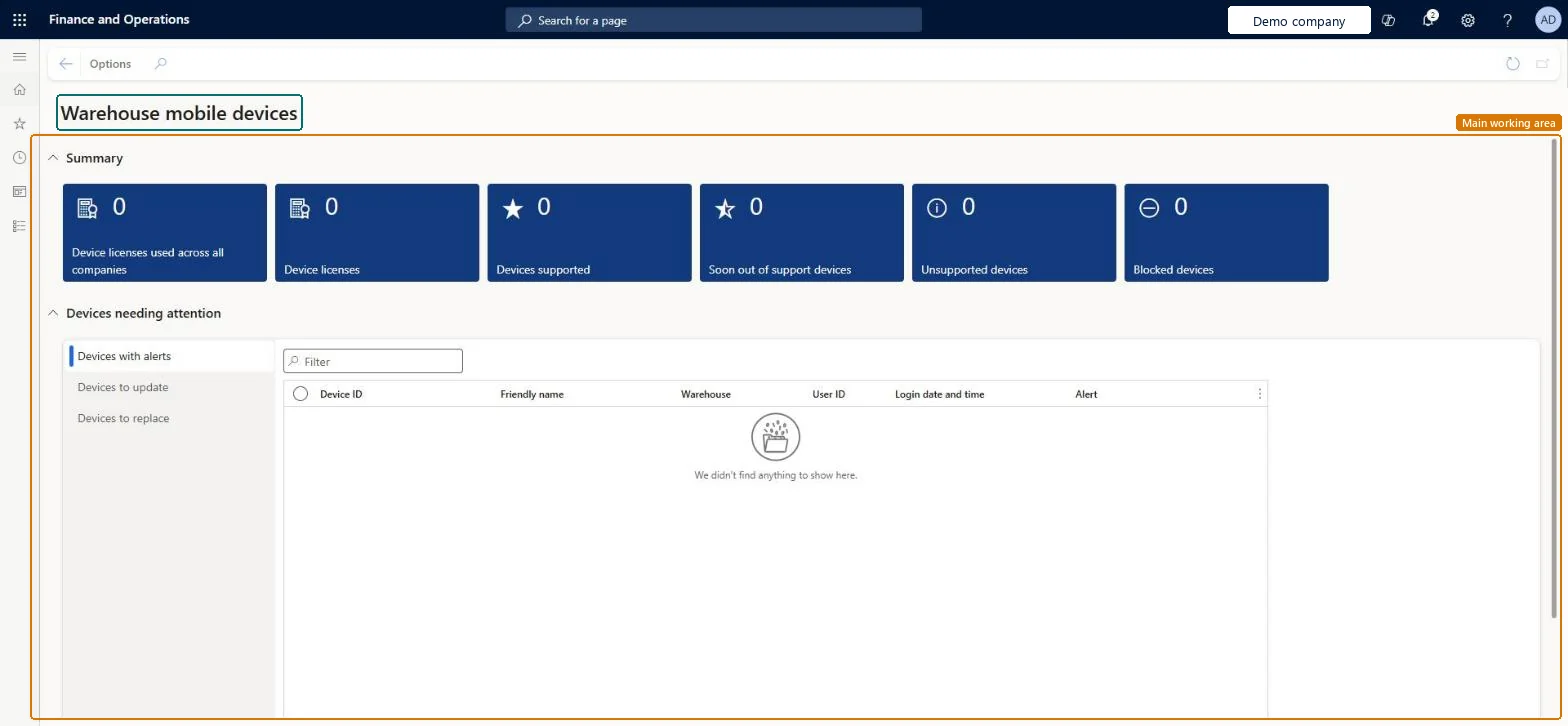
Go to Warehouse management > Workspaces > Warehouse mobile devices.
On the Summary FastTab, select a tile to open the relevant device list, such as Device licenses or Devices supported.
Find the device in the list and select it.
On the Action Pane, select Change device licensing, and then select a new licence state.
Under Devices needing attention, use the Devices to update and Devices to replace tabs to see devices that need action.
The number of device licences needed to cover every device in use across all companies. A device used in several companies is counted once.Microsoft Learn
Device licenses
The number of device licences needed to cover the devices used in the current company.Microsoft Learn
Devices supported
The number of devices that run a current version of the mobile app on a fully supported operating system.Microsoft Learn
Soon out of support devices
The number of devices that are healthy now but will soon become unsupported.Microsoft Learn
Unsupported devices
The number of devices that are no longer supported and might not work correctly.Microsoft Learn
Blocked devices
The number of devices that Microsoft has blocked.Microsoft Learn
Devices to update
A list of devices that run an old version of the Warehouse Management mobile app.Microsoft Learn
Devices to replace
A list of devices that run an operating system that is no longer supported.Microsoft Learn
Solution architect
4Design impact
If you change it later
Deleting a device from the workspace releases its device licence so that it can be used with another device. Microsoft Learn
Technical architect
5Technical
Menu item
WHSMobileDeviceWorkspaceChecked in Dynamics 365
Form
WHSMobileDeviceWorkspaceChecked in Dynamics 365
Who can open it
PrivilegesMaintain mobile devices WHSMobileDeviceMaintainView mobile devices WHSMobileDeviceViewDutiesEnable warehouse operation process WMSWarehouseOperationProcessEnableInquire into warehouse operation progress WMSWarehouseOperationProgressInquire7 security rolesMaterials manager InventMaterialsManagerQuality control clerk InventQualityControlClerkQuality control manager InventQualityControlManagerReceiving clerk InventReceivingClerkShipping clerk InventShippingClerkWarehouse manager WMSWarehouseManagerWarehouse worker WMSWarehouseWorkerChecked in Dynamics 365
Roles to set it up and use it
To set it up or change itWarehouse manager WMSWarehouseManagerTo use itWarehouse worker WMSWarehouseWorkerShipping clerk InventShippingClerkReceiving clerk InventReceivingClerkMaterials manager InventMaterialsManagerQuality control clerk InventQualityControlClerkGive people one of these roles. On this system, 7 roles can open this page.Checked in Dynamics 365