Receiving clerk, Shipping clerk, Warehouse planner and 2 more roles
Business process
Process inventory movements
Menu item
WHSWorkTableListPageOpenInventMov
Main table
WHSWorkTable
Data entity
WHSWarehouseWorkHeaderEntity
Show what matters for
PAGE GUIDEWhat the page does and how to use it7 sections. Choose a role to highlight what matters to you.
Everyone
1What it is and why
What it is
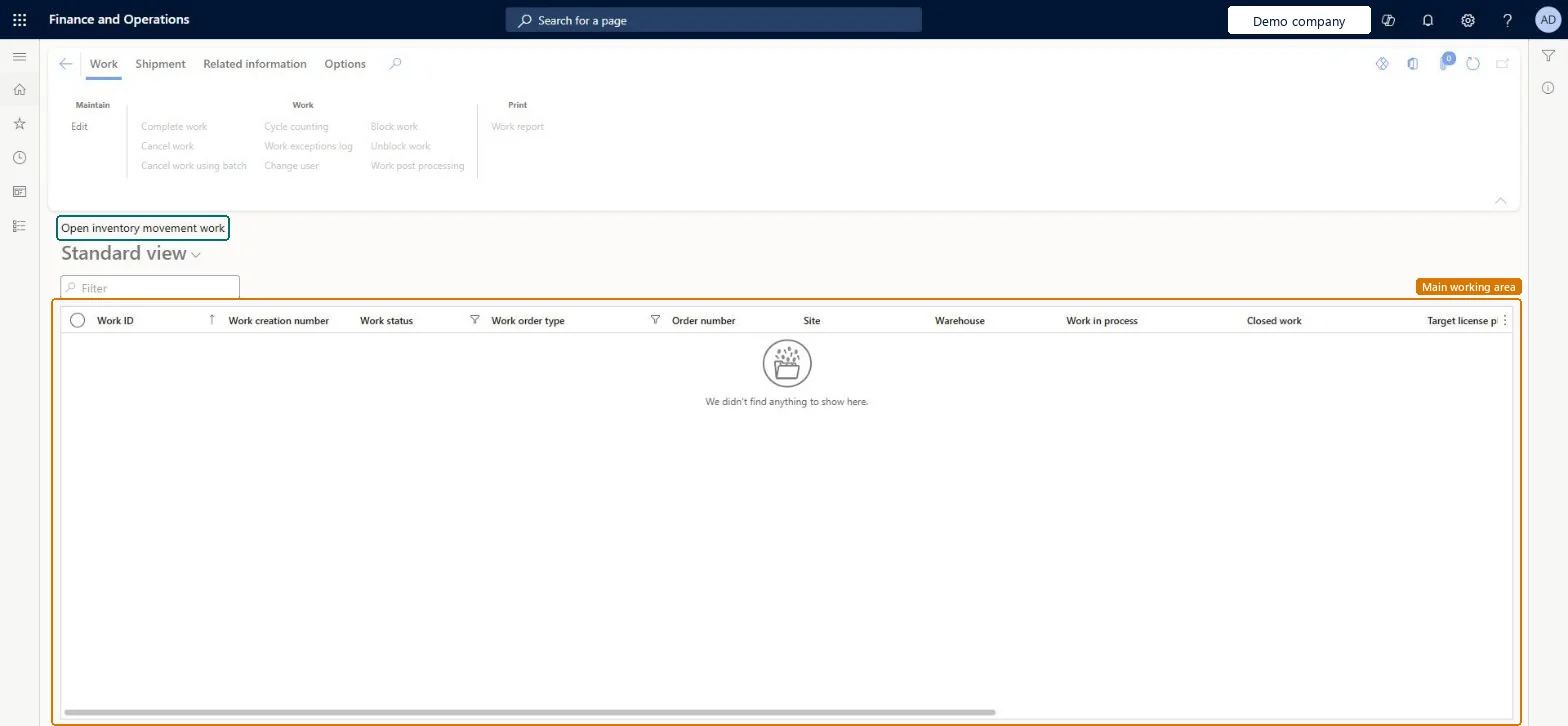
A list page that shows the open inventory movement work, with columns such as Work ID, Work status, Work order type, Site and Warehouse.
What you do here
Use this page to find open inventory movement work and to act on a selected record with the Action Pane buttons, such as Complete work, Cancel work, Change user, Block work and Work report.
The page in Dynamics 365. page title tab to open what to set or check
Warehouse management › Work › Warehouse › Open inventory movement work
End user · Functional consultant
3How to do it
About the examples: Examples and screenshots in this guide use BEAT, a demo company in a Dynamics 365 test environment. Use your own company's codes and values instead of copying them.
How to use it
Go to Warehouse management > Work > Warehouse > Open inventory movement work.
Type in the Filter box, or use the filters on the Work status and Work order type columns, to narrow the list.
Select a work record.
Use the buttons on the Work tab of the Action Pane, such as Complete work, Cancel work, Change user, Block work or Unblock work, to act on the selected work.
Source: Checked in Dynamics 365
Common errors and fixes
Message
What to do
Work %1 cannot be cancelled because it is blocked by reason type %2. The work must be unblocked before it can be cancelled.
Open the Blocking reasons tab. For Undefined reason, select Unblock work. For Processing wave, open the wave and select Cleanup wave data. Then cancel again. Microsoft Learn
The last closed work line must be a put.
The regular Cancel needs the last closed line to be a put. Use Periodic tasks > Clean up > Cancel work for this work ID instead. Microsoft Learn
Test checklist
Select an open inventory movement work record and select Block work; check Blocked wave shows a check mark and the Blocking reasons tab shows Undefined reason.
Select Unblock work and check the block is removed.
Try Unblock work on unblocked work and check the 'is not blocked' message.
Process the work on the mobile app and check it moves out of the open list.
Hard to reverse: Block work and Unblock work are reversible (manual unblock works for Held wave, Undefined reason and Replenishment overflow capacity; other reasons clear themselves). Cancel is not: the regular Cancel accepts only Open or In progress work, and the exception route (Periodic tasks > Clean up > Cancel work) covers only Sales, Transfer issue, Raw material picking and Replenishment work. Microsoft Learn
Technical architect
5Technical
Menu item
WHSWorkTableListPageOpenInventMovChecked in Dynamics 365
Form
WHSWorkTableListPageChecked in Dynamics 365
Table
WHSWorkTableShown as “WORK” in Record infoKey field: WorkIdChecked in Dynamics 365
PrivilegesMaintain open replenishment work by using a list page WHSWorkTableListPageMaintainView work tables using a list page WHSWorkTableListPageViewDutiesMaintain warehouse planning WHSWarehousePlanningMaintainInquire into warehouse planning status WHSWarehousePlanningStatusInquire5 security rolesReceiving clerk InventReceivingClerkShipping clerk InventShippingClerkWarehouse planner WHSWarehousePlannerWarehouse manager WMSWarehouseManagerWarehouse worker WMSWarehouseWorkerChecked in Dynamics 365
Roles to set it up and use it
To set it up or change itWarehouse planner WHSWarehousePlannerTo use itWarehouse manager WMSWarehouseManagerWarehouse worker WMSWarehouseWorkerShipping clerk InventShippingClerkReceiving clerk InventReceivingClerkGive people one of these roles. On this system, 5 roles can open this page.Checked in Dynamics 365
Actions on the page
Work: Maintain, Work, PrintShipment: ShipmentRelated information: Related informationChecked in Dynamics 365