BeyondERP.Newsletter
Menu

Setup page · Warehouse management

Item load mapping

A setup page that maps each item group to a load template.

Used by
Logistics manager, Transportation coordinator, Warehouse planner and 1 more role
Business process
Manage warehouse operations
Menu item
WHSItemGroupLoadTemplate
Main table
InventItemGroup
Data entity
InventProductGroupEntity
Setup steps
1 on this page
Show what matters for
PAGE GUIDEWhat the page does and how to use it8 sections. Choose a role to highlight what matters to you.
Everyone

1What it is and why

What it isA setup page that maps each item group to a load template.
What you do hereUse this page to set which load template is inserted on a load for each item group.
Item load mapping page in Dynamics 365
The page in Dynamics 365. page title tab to open what to set or check
Functional consultant · Solution architect

2Where it fits

Business processManage warehouse operations
Menu pathWarehouse management › Setup › Load › Item load mapping
End user · Functional consultant

3How to do it

About the examples: Examples and screenshots in this guide use BEAT, a demo company in a Dynamics 365 test environment. Use your own company's codes and values instead of copying them.

Setup steps on this page

Set up Item load mapping

Use this page to set which load template is inserted on a load for each item group.

How to use it

  1. Go to Warehouse management > Setup > Load > Item load mapping.
  2. Review the Item group and Load template ID columns to see the mappings that exist.
  3. Select New to add a mapping, then choose the item group and the load template ID.
  4. Select Edit to change an existing mapping.

Source: Checked in Dynamics 365

Test checklist

  1. Set warehouse parameters so loads are created automatically for transfer orders.
  2. Map an item group to a standard load template.
  3. Create a transfer order for an item in that group.
  4. Check that the load created for the transfer order carries the mapped load template.

Source: Microsoft Learn

Functional consultant

4Setup decisions

Setup stepRecommended value and whyDecision, common mistake and test
Set up Item load mappingMap each item group that ships on transfer orders to its standard load templateThe mapping inserts the load template on the load automatically when a transfer order is created, and a load is a prerequisite for cross-docking to transfer orders.Not mapping the item group, so automatically created transfer order loads have no load template.
Solution architect

5Design impact

Shared or per companyPer company: each legal entity has its own records. Microsoft data model
Can it be undoneReversible: Mappings can be changed at any time; loads already created keep their template. Microsoft Learn
Technical architect

6Technical

Menu itemWHSItemGroupLoadTemplate Checked in Dynamics 365
FormWHSItemGroupLoadTemplate Checked in Dynamics 365
TableInventItemGroupShown as “ITEM GROUPS” in Record infoKey field: ItemGroupIdChecked in Dynamics 365
Data entitiesInventProductGroupEntityItem groups Microsoft data model DimAttributeInventItemGroupEntityItem groups Microsoft data model
Who can open itPrivilegesMaintain load item tables WHSItemGroupLoadTemplateMaintainView load item table details WHSItemGroupLoadTemplateViewDutiesMaintain load planning WHSLoadPlanningMaintainInquire into load planning progress WHSLoadPlanningProgressInquire
4 security rolesLogistics manager TMSLogisticsManagerTransportation coordinator TMSTransportationCoordinatorWarehouse planner WHSWarehousePlannerWarehouse manager WMSWarehouseManager
Checked in Dynamics 365
Roles to set it up and use itTo set it up or change itTransportation coordinator TMSTransportationCoordinatorTo use itWarehouse planner WHSWarehousePlannerWarehouse manager WMSWarehouseManagerLogistics manager TMSLogisticsManagerGive people one of these roles. On this system, 4 roles can open this page.Checked in Dynamics 365
Developer

7Developer

Open it by URLhttps://<your-environment>/?mi=WHSItemGroupLoadTemplate
Integrate withInventProductGroupEntity data entity Microsoft data model
Data migrationInventProductGroupEntity (Item groups): loaded for each company, in Microsoft's default template 300 - Inventory.Load order: Microsoft's default template 300 - Inventory loads Item groups at execution unit 1, level 40, sequence 10. Lower levels load first, and entities at the same level load in sequence order.Load first: the default templates at lower levels (System setup to dependency bands 30 to 90)Microsoft Learn
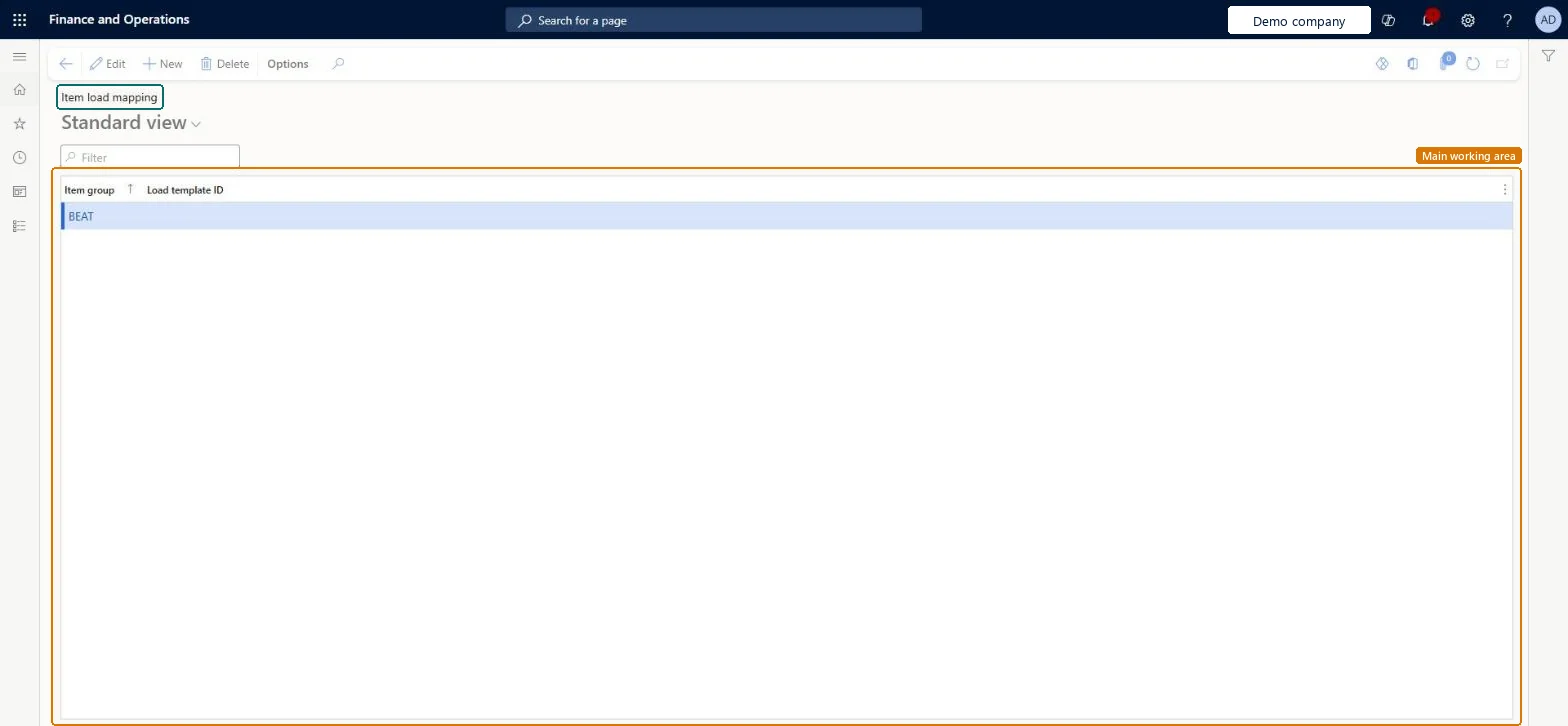
Table definitionInventItemGroup columns and relations Microsoft data model
Everyone

8Sources