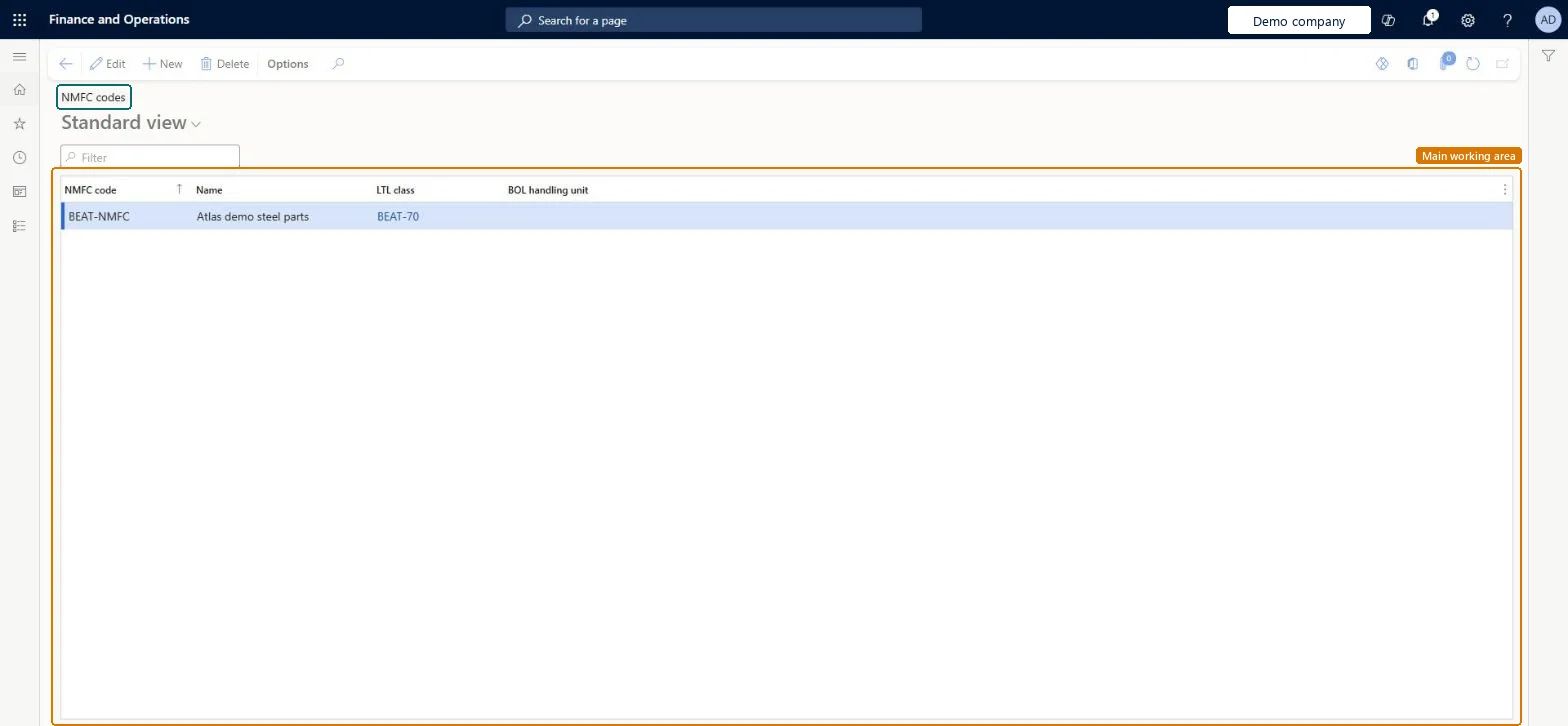
A list page that shows the National Motor Freight Classification (NMFC) codes used to classify items for shipment, each with its name, LTL class and BOL handling unit.
Field Service Integration User, Production supervisor, Process engineer and 5 more roles
Business process
Manage warehouse operations
Menu item
WHSNMFC
Main table
WHSNMFC
Data entity
WHSUSNationalMotorFreightClassificationCodeEntity
Setup steps
1 on this page
Show what matters for
PAGE GUIDEWhat the page does and how to use it8 sections. Choose a role to highlight what matters to you.
Everyone
1What it is and why
What it is
A list page that shows the National Motor Freight Classification (NMFC) codes used to classify items for shipment, each with its name, LTL class and BOL handling unit.
What you do here
Use this page to set up the NMFC codes that group commodities for freight shipping and link each code to a less than truckload (LTL) class.
Example
For example, a laptop might be assigned one NMFC code and electrical cords another, each with its own freight class.
The page in Dynamics 365. page title tab to open what to set or check
About the examples: Examples and screenshots in this guide use BEAT, a demo company in a Dynamics 365 test environment. Use your own company's codes and values instead of copying them.
Setup steps on this page
Set up NMFC codes
Use this page to set up the NMFC codes that group commodities for freight shipping and link each code to a less than truckload (LTL) class.
Steps from Microsoft
Go to Warehouse management > Setup > Inventory > NMFC codes.
Select New to create an NMFC code.
In the NMFC code field, enter the code for the commodity type, and enter a name in the Name field.
In the LTL class field, select the LTL class that is associated with the code.
In the BOL handling unit field, define the default handling type for the shipment.
Set up the LTL classes first, then one NMFC code per commodity group mapped to its LTL class, with a BOL handling unitEach NMFC code must be linked to an LTL freight class, so the classes must exist before you create the codes.
Creating NMFC codes before the LTL classes they map to exist, which leaves codes that can't be linked to a class.
Reversible: NMFC codes are shared reference data assigned to products; edits affect every legal entity that uses them. Microsoft Learn
Technical architect
6Technical
Menu item
WHSNMFCChecked in Dynamics 365
Form
WHSNMFCChecked in Dynamics 365
Table
WHSNMFCShown as “NMFC CODES” in Record infoKey field: NMFCCodeChecked in Dynamics 365
Data entities
WHSUSNationalMotorFreightClassificationCodeEntityUS national motor freight classification codes Microsoft data model
Who can open it
PrivilegesMaintain NMFC rate records WHSNMFCMaintainView NMFC rate details WHSNMFCViewDutiesInquire into carrier master and network planning information TMSCarrierMasterInquireMaintain carrier and network planning master TMSCarrierMasterMaintainInquire into warehouse operation master WMSWarehouseOperationMasterInquireMaintain warehouse operation master WMSWarehouseOperationMasterMaintain8 security rolesField Service Integration User FieldServiceIntegrationUserProduction supervisor ProdProductionSupervisorProcess engineer RouteProcessEngineerProcess engineering manager RouteProcessEngineeringManagerLogistics manager TMSLogisticsManagerTransportation coordinator TMSTransportationCoordinatorWarehouse planner WHSWarehousePlannerWarehouse manager WMSWarehouseManagerChecked in Dynamics 365
Roles to set it up and use it
To set it up or change itWarehouse manager WMSWarehouseManagerProcess engineer RouteProcessEngineerLogistics manager TMSLogisticsManagerTo use itWarehouse planner WHSWarehousePlannerProduction supervisor ProdProductionSupervisorProcess engineering manager RouteProcessEngineeringManagerField Service Integration User FieldServiceIntegrationUserTransportation coordinator TMSTransportationCoordinatorGive people one of these roles. On this system, 8 roles can open this page.Checked in Dynamics 365
WHSUSNationalMotorFreightClassificationCodeEntity (US national motor freight classification codes): shared by all companies, in Microsoft's default template 310 - Product information management.Load order: Microsoft's default template 310 - Product information management loads US national motor freight classification codes at execution unit 1, level 40, sequence 10. Lower levels load first, and entities at the same level load in sequence order.Load first: Less than truckload classes, the default templates at lower levels (System setup to dependency bands 30 to 90)Microsoft Learn