PAGE GUIDEWhat the page does and how to use it8 sections. Choose a role to highlight what matters to you.
Everyone
1What it is and why
What it is
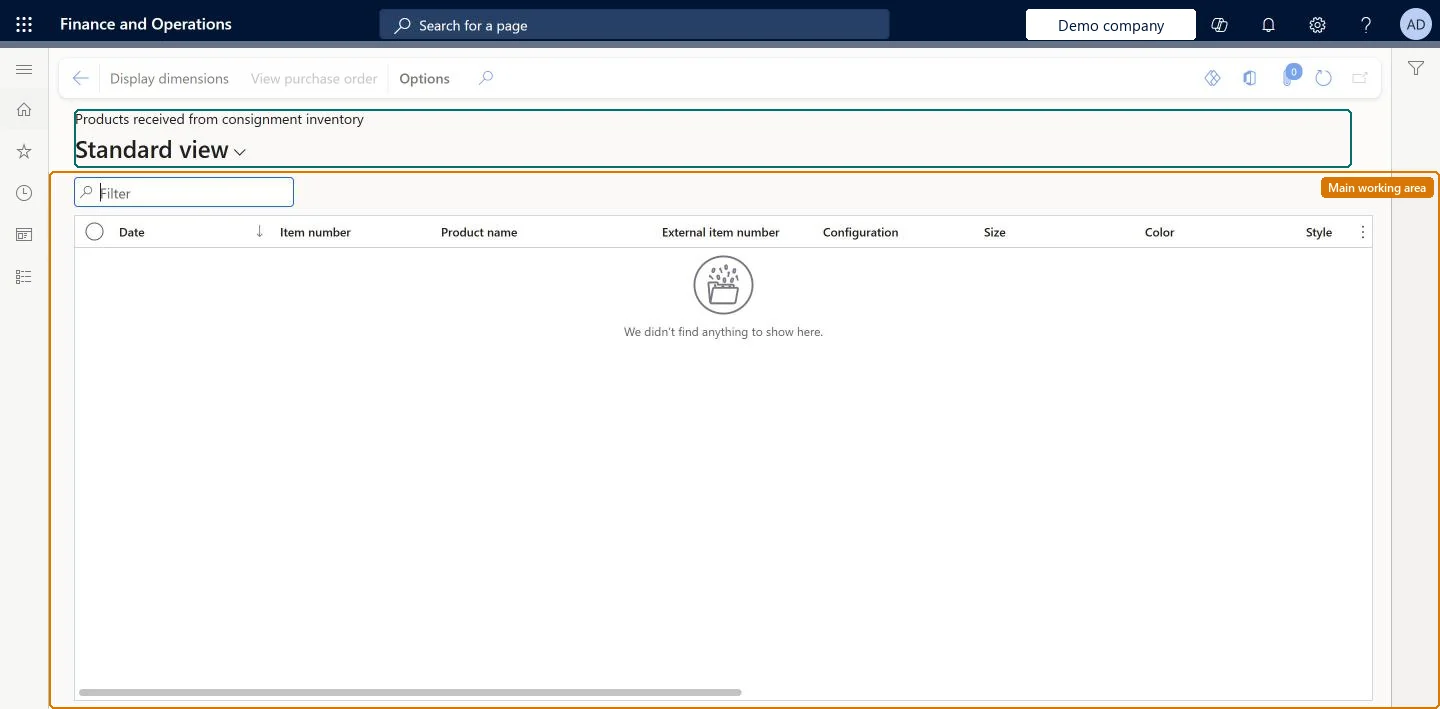
A list page of the product receipt lines created when ownership of consignment inventory moved from the vendor to the customer.
What you do here
Use this page to see what the customer has consumed from your consignment stock and to use that information to invoice the customer.
Example
For example, at month end the vendor of BEAT-000001 exports the receipt lines to Excel, sees that BEAT took ownership of 120.00 pieces of BEAT-ITEM-001 in October in three receipts, and invoices BEAT for 120.00 pieces.
The page in Dynamics 365. page title tab to open what to set or check
About the examples: Examples and screenshots in this guide use BEAT, a demo company in a Dynamics 365 test environment. Use your own company's codes and values instead of copying them.
Setup steps on this page
Invoice from products received from consignment
Use the receipt lines of consumed consignment stock to invoice the customer.
Steps from Microsoft
Go to Vendor collaboration > Consignment inventory > Products received from consignment inventory.
Scroll to the right to see quantities and other information.
Select View purchase order.
Expand the Line details section to see that the line is marked as Consignment.
One line per receipt posted when ownership of consignment stock moved to the customer, with item and quantity.Microsoft Learn
BEAT-ITEM-001, 40.00
View purchase order
Action that opens the consignment purchase order; its line is marked Consignment and the order status is Received.Microsoft Learn
Display dimensions
Action that shows or hides dimension columns such as site and warehouse.Checked in Dynamics 365
Common errors and fixes
Message
What to do
The quantity on a receipt line is wrong
The quantity comes from the customer's posted ownership change. It can't be changed on the purchase order; the customer corrects it with further inventory transactions. Microsoft Learn
Test checklist
In the customer company, post an Inventory ownership change journal (journal name with Journal type Ownership change) for a consignment item.
Sign in as a vendor collaboration user for that vendor and open Products received from consignment inventory.
Check that a product receipt line shows for the item and quantity that changed owner.
Select View purchase order and check that the line is marked Consignment and the order status is Received.
Export the list to Excel and check that it gives the vendor what they need to invoice the customer.
Filter on the invoice period and export the lines to Excel before invoicingEach ownership change creates its own receipt line, so the period total is the sum of several lines.
Microsoft provides two external roles for vendor collaboration: Vendor admin (external), for contacts and user requests, and Vendor (external), for purchase orders, invoices, consignment inventory, RFQs and vendor information. External users created through a user request also get the SystemExternalUser role. On the live system, Vendor contact (external) can open this page.
Receipt lines of the vendor account from every customer legal entity where the contact has vendor collaboration access. Microsoft Learn
Can it be undone
Hard to reverse: This page only shows data. Each line comes from a posted Inventory ownership change journal, which creates a purchase order with Origin set to Consignment and posts a product receipt that sets it to Received. You can't update the quantity on consignment purchase order lines after the order is created, so a wrong ownership change has to be corrected with further inventory transactions rather than edited here. Microsoft Learn
If you change it later
Each line is created when the customer posts an inventory ownership change journal; the vendor uses the lines to invoice the customer. Microsoft Learn
Technical architect
6Technical
Menu item
ConsignmentVendorPortalProductReceiptLinesChecked in Dynamics 365
Form
ConsignmentProductReceiptLinesChecked in Dynamics 365
Table
PurchProductReceiptLinesShown as “PRODUCT RECEIPT LINES” in Record infoChecked in Dynamics 365
Who can open it
PrivilegesView products received from consignment inventory ConsignmentVendorPortalProductReceiptLinesViewDutiesView consignment inventory ConsignmentVendorPortalInventoryInquire1 security roleVendor contact (external) VendVendorContactChecked in Dynamics 365
Roles to set it up and use it
To use itVendor contact (external) VendVendorContactGive people one of these roles. On this system, 1 role can open this page.Checked in Dynamics 365
Actions on the page
(Action Pane without tabs): Display dimensions, View purchase orderChecked in Dynamics 365
Load order: Products received from consignment inventory has no data entity in Data management. The lines are product receipts posted by inventory ownership change journals in the customer company; they are not migrated.Checked in Dynamics 365