BeyondERP.Newsletter
Menu

Page · Transportation management

Shipments ready to ship

A list page that shows the shipments that are ready to ship, with the lines of the selected shipment listed below.

Used by
Logistics manager, Transportation coordinator, Warehouse planner and 1 more role
Business process
Plan loads
Menu item
WHSShipPlanningListPageLoaded
Main table
WHSShipmentTable
Data entity
WHSInboundShipmentHeaderEntity
Show what matters for
PAGE GUIDEWhat the page does and how to use it7 sections. Choose a role to highlight what matters to you.
Everyone

1What it is and why

What it isA list page that shows the shipments that are ready to ship, with the lines of the selected shipment listed below.
What you do hereUse this page to review shipments that are ready to ship and the load details of each one.
Shipments ready to ship page in Dynamics 365
The page in Dynamics 365. page title tab to open what to set or check
Functional consultant · Solution architect

2Where it fits

Business processManage freight and transportation › Plan loads
Menu pathTransportation management › Planning › Shipments › Shipments ready to ship
End user · Functional consultant

3How to do it

About the examples: Examples and screenshots in this guide use BEAT, a demo company in a Dynamics 365 test environment. Use your own company's codes and values instead of copying them.

How to use it

  1. Go to Transportation management > Planning > Shipments > Shipments ready to ship.
  2. Review the shipments in the upper grid, which shows the shipment ID, shipment status, wave ID, load ID, direction, shipment lines, containers, bill of lading ID, volume, weight and site.
  3. Select a shipment to see its order number, item number, quantity and unit in the Load details grid.
  4. Select the Display label printing details check box to include label printing details.

Source: Checked in Dynamics 365

Solution architect

4Design impact

Shared or per companyPer company: each legal entity has its own records. Microsoft data model
Technical architect

5Technical

Menu itemWHSShipPlanningListPageLoaded Checked in Dynamics 365
FormWHSShipPlanningListPage Checked in Dynamics 365
TableWHSShipmentTableShown as “SHIPMENTS” in Record infoKey field: ShipmentIdChecked in Dynamics 365
Data entitiesWHSInboundShipmentHeaderEntityInbound shipment header Microsoft data model WHSOutboundShipmentHeaderEntityOutbound shipment headers Microsoft data model
Who can open itPrivilegesMaintain loaded shipping plan by using a list page WHSShipPlanningListPageLoadedMaintainView loaded shipping plan by using a list page WHSShipPlanningListPageLoadedViewDutiesReview transportation management process performance TMSTransportationMgmtProcessPerfReviewMaintain load planning WHSLoadPlanningMaintainInquire into load planning progress WHSLoadPlanningProgressInquire
4 security rolesLogistics manager TMSLogisticsManagerTransportation coordinator TMSTransportationCoordinatorWarehouse planner WHSWarehousePlannerWarehouse manager WMSWarehouseManager
Checked in Dynamics 365
Roles to set it up and use itTo set it up or change itTransportation coordinator TMSTransportationCoordinatorTo use itLogistics manager TMSLogisticsManagerWarehouse manager WMSWarehouseManagerWarehouse planner WHSWarehousePlannerGive people one of these roles. On this system, 4 roles can open this page.Checked in Dynamics 365
Actions on the pageShipments: Shipments, Actions, Generate, Work, Related information, Print, Hazardous material documentTransportation: Transportation, ContainersChecked in Dynamics 365
Developer

6Developer

Open it by URLhttps://<your-environment>/?mi=WHSShipPlanningListPageLoaded
Integrate withWHSInboundShipmentHeaderEntity data entity Microsoft data model
Data migrationWHSInboundShipmentHeaderEntity (Inbound shipment header): loaded for each company.WHSOutboundShipmentHeaderEntity (Outbound shipment headers): loaded for each company.Microsoft Learn
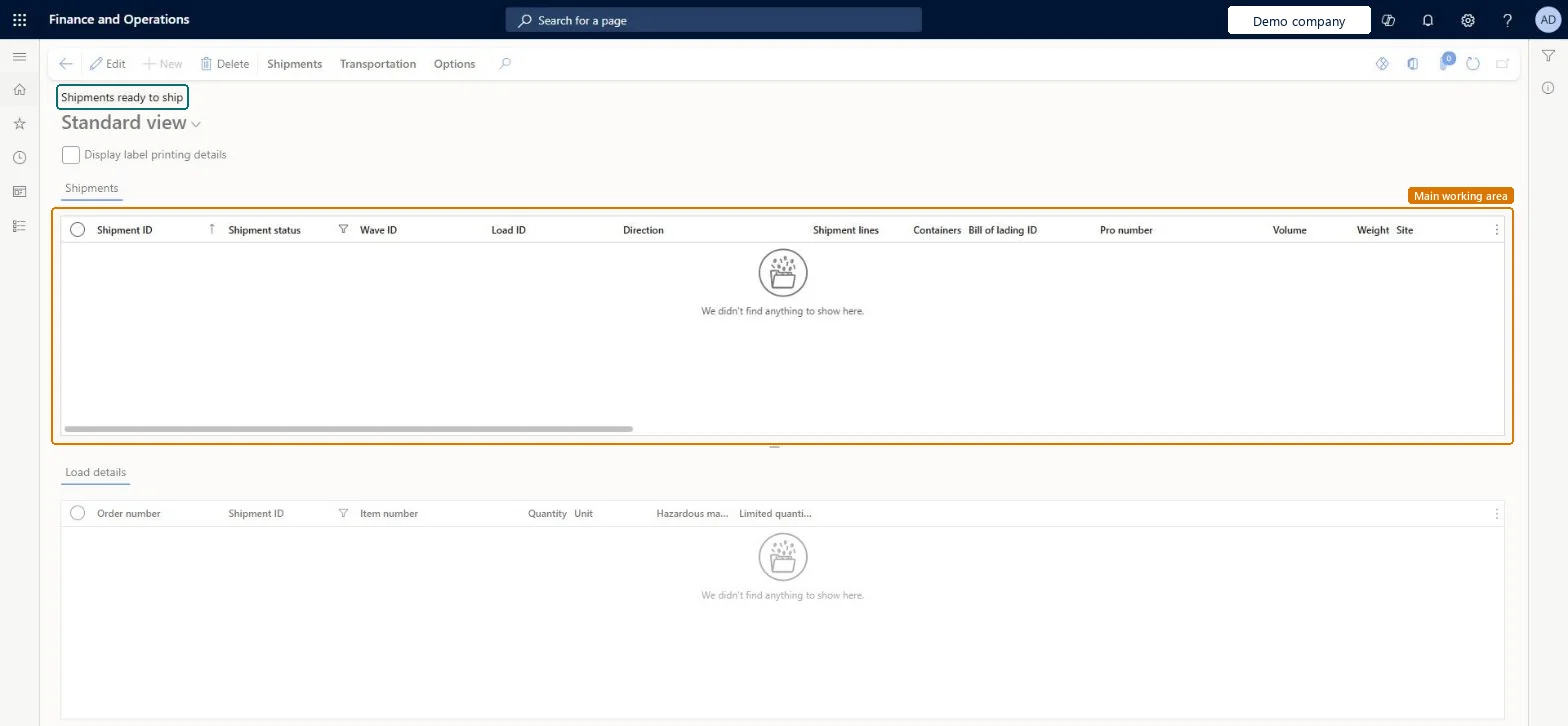
Table definitionWHSShipmentTable columns and relations Microsoft data model
Everyone

7Sources