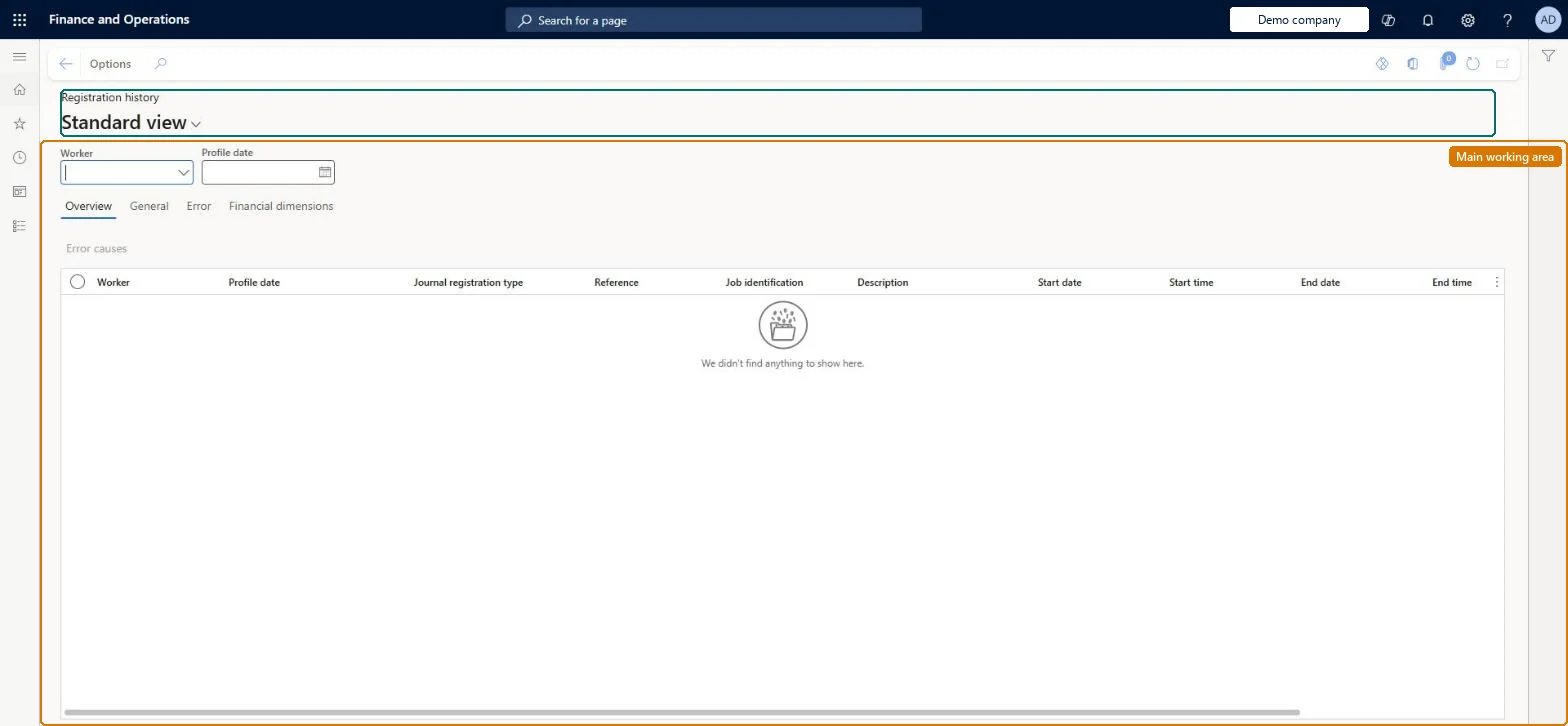
An inquiry page that lists workers' journal registrations, the lines produced when registrations are calculated, with their job, start and end times, and any calculation errors, before they are transferred.
Time and attendanceInquiries and reportsRegistrations
JmgStampJournalTrans
Used by
Shop supervisor, Production manager, Production supervisor and 1 more role
Business process
Record employee time
Menu item
JmgStampJournalTrans
Main table
JmgStampJournalTrans
Data entity
JmgTimeAndAttendanceActivityRegistrationEntity
Setup steps
1 on this page
Show what matters for
PAGE GUIDEWhat the page does and how to use it8 sections. Choose a role to highlight what matters to you.
Everyone
1What it is and why
What it is
An inquiry page that lists workers' journal registrations, the lines produced when registrations are calculated, with their job, start and end times, and any calculation errors, before they are transferred.
What you do here
Use this page to look up a worker's calculated registrations for a profile date and to see the errors that stop approval.
Example
For example, after calculating a day, a supervisor filters on a worker and the profile date and opens the Error tab of a line to see that an absence registration is missing for 07:00 to 09:00.
The page in Dynamics 365. page title tab to open what to set or check
About the examples: Examples and screenshots in this guide use BEAT, a demo company in a Dynamics 365 test environment. Use your own company's codes and values instead of copying them.
Setup steps on this page
Find why a calculated line is in error
Read the page to answer one question about registrations or pay.
How to use it
Go to Time and attendance > Inquiries and reports > Registrations > Registration history.
Select a Worker and enter a Profile date to narrow the list.
On the Overview tab, review Journal registration type, Reference, Job identification, Description, Start date, Start time, End date and End time.
Use the General, Error and Financial dimensions tabs for more detail on a selected registration.
Source: Checked in Dynamics 365
Common errors and fixes
Message
What to do
The calculation shows an error for a missing absence registration
Add the absence on the Absence tab of the Calculate page for the worker, then select Calculated again. A calculation with an error can't be approved. Microsoft Learn
Filter on the worker and profile date, and open the Error tab of the line.Calculated lines carry the error that stops approval, such as a missing absence registration.
Time and attendance roles come from the security read in the Technical section. On this system the page is opened with roles such as Shop supervisor, Production manager, Production supervisor and 1 more. The Microsoft Learn article for this page names no Feature management feature to turn on.
The lines are corrected on Calculate; after approval and transfer they move to Transferred registrations. Microsoft Learn
Technical architect
6Technical
Menu item
JmgStampJournalTransChecked in Dynamics 365
Form
JmgStampJournalTransChecked in Dynamics 365
Table
JmgStampJournalTransShown as “LOGBOOK” in Record infoChecked in Dynamics 365
Data entities
JmgTimeAndAttendanceActivityRegistrationEntityTime and attendance activity registrations Microsoft data model
Who can open it
PrivilegesView indirect activities costs JmgIPCStatusViewView production status JmgProdStatusViewView project status JmgProjStatusViewDutiesInquire into indirect activity costs master data JmgIndirectActivityCostMasterInquireMaintain indirect activity costs master JmgIndirectActivityCostMasterMaintainMaintain job assignments JmgJobAssignmentsMaintainMaintain job corrections JmgJobCorrectionsMaintainInquire into manufacturing execution progress JmgManufacturingExecutionProgressInquir4 security rolesShop supervisor JmgShopSupervisorProduction manager ProdProductionManagerProduction supervisor ProdProductionSupervisorProduction planner ReqProductionPlannerChecked in Dynamics 365
Roles to set it up and use it
To use itProduction supervisor ProdProductionSupervisorProduction manager ProdProductionManagerShop supervisor JmgShopSupervisorProduction planner ReqProductionPlannerGive people one of these roles. On this system, 4 roles can open this page.Checked in Dynamics 365
JmgTimeAndAttendanceActivityRegistrationEntity (Time and attendance activity registrations): per company.Load order: Not usually migrated: registrations are made and calculated in the new system. Load the workers and setup first if history is needed.Load first: JmgTimeAndAttendanceTimeRegistrationWorkerEntityChecked in Dynamics 365