Setup page · Tax
Sales tax codes
A setup page where you create a sales tax code for each indirect tax or duty that the legal entity must calculate, collect and pay to sales tax authorities.
- Used by
- Auditor, Chief executive officer, Accounts receivable manager and 5 more roles
- Business process
- Configure tax rates in Dynamics 365 Finance
- Menu item
TaxTable- Main table
TaxTable- Data entity
TaxCodeEntity- Setup steps
- 1 on this page
Show what matters for
Everyone
1What it is and why
| What it is | A setup page where you create a sales tax code for each indirect tax or duty that the legal entity must calculate, collect and pay to sales tax authorities. |
|---|---|
| What you do here | Used to hold the tax rates and calculation rules for each sales tax, and to link the tax to a settlement period and a ledger posting group. |
| Example | For example, with a 25 percent sales tax code that uses Percentage of net amount, an invoice line of 10 items at 1.00 each with a 10 percent line discount has a net amount of 9.00 and sales tax of 2.25. |
Functional consultant · Solution architect
2Where it fits
| Business process | Define accounting policies › Develop tax strategy › Configure tax rates in Dynamics 365 Finance |
|---|---|
| Menu path | Tax › Indirect taxes › Sales tax › Sales tax codes |
| Set up first | Sales tax settlement periods Microsoft Learn ↗Ledger posting groups Microsoft Learn ↗Sales tax reporting codes Microsoft Learn ↗ |
| Used next by | Sales tax groups Microsoft Learn ↗Item sales tax groups Microsoft Learn ↗Posted sales tax Microsoft Learn ↗ |
| Related pages | Sales tax codes report Microsoft Learn ↗ |
End user · Functional consultant
3How to do it
Step by step, with screenshots
Set up Sales tax codes1 screen
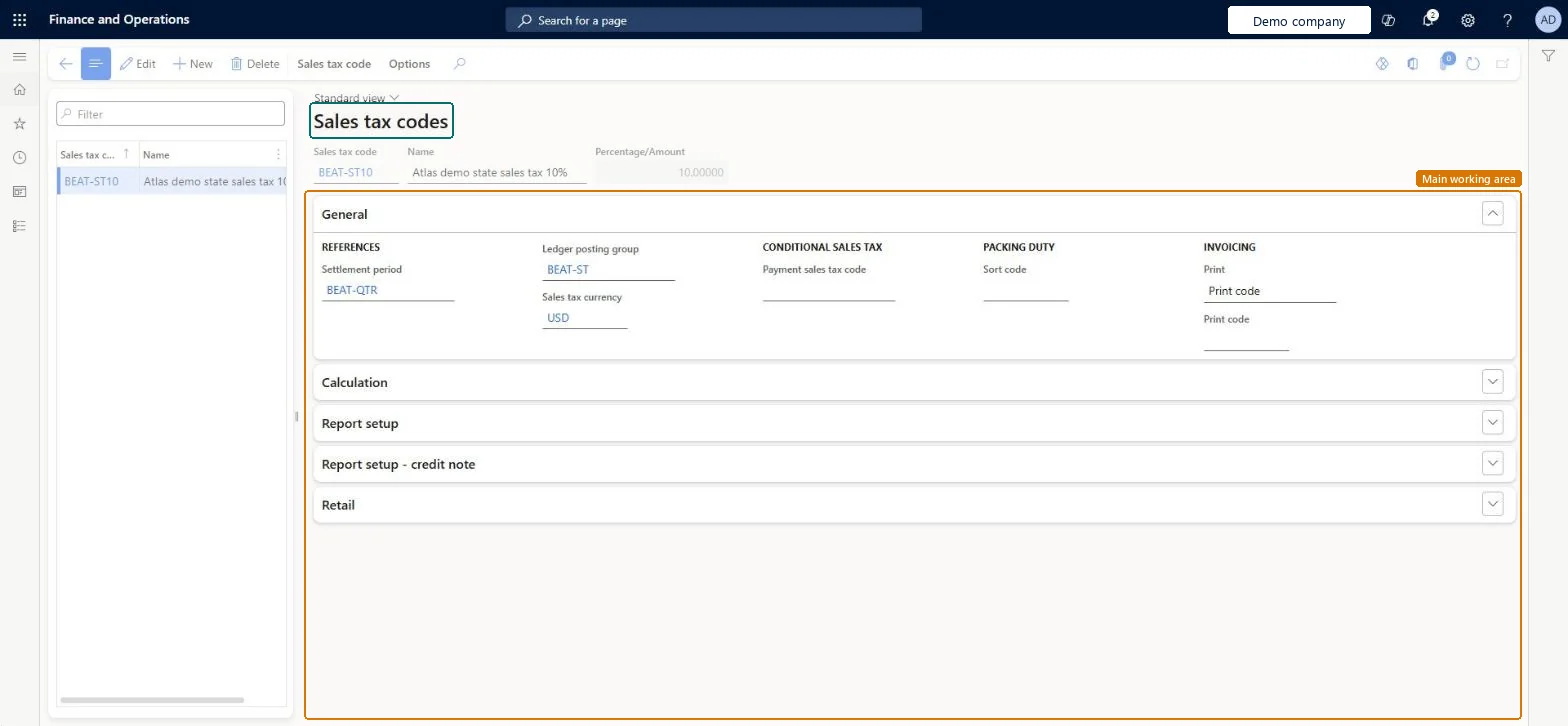
Used to hold the tax rates and calculation rules for each sales tax, and to link the tax to a settlement period and a ledger posting group.
Screen 1
Create the sales tax code
Go to Tax > Indirect taxes > Sales tax > Sales tax codes
- Select New, and enter the Sales tax code and Name
- On the General section, select the Settlement period and Ledger posting group, then save
- On the Action Pane, select Sales tax code > Values
- Enter the From date, To date and Value, then save and close
1Sales tax code BEAT-ST10 2Settlement period BEAT-QTR 3Ledger posting group BEAT-ST 4Percentage/Amount 10.00000 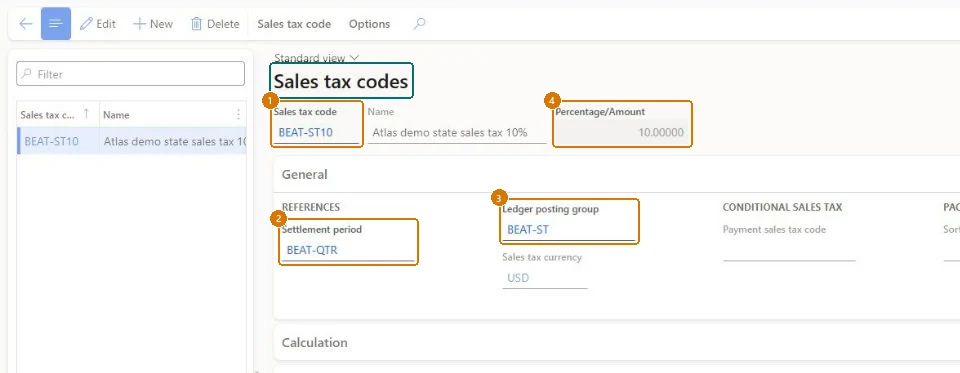
Show the full screen
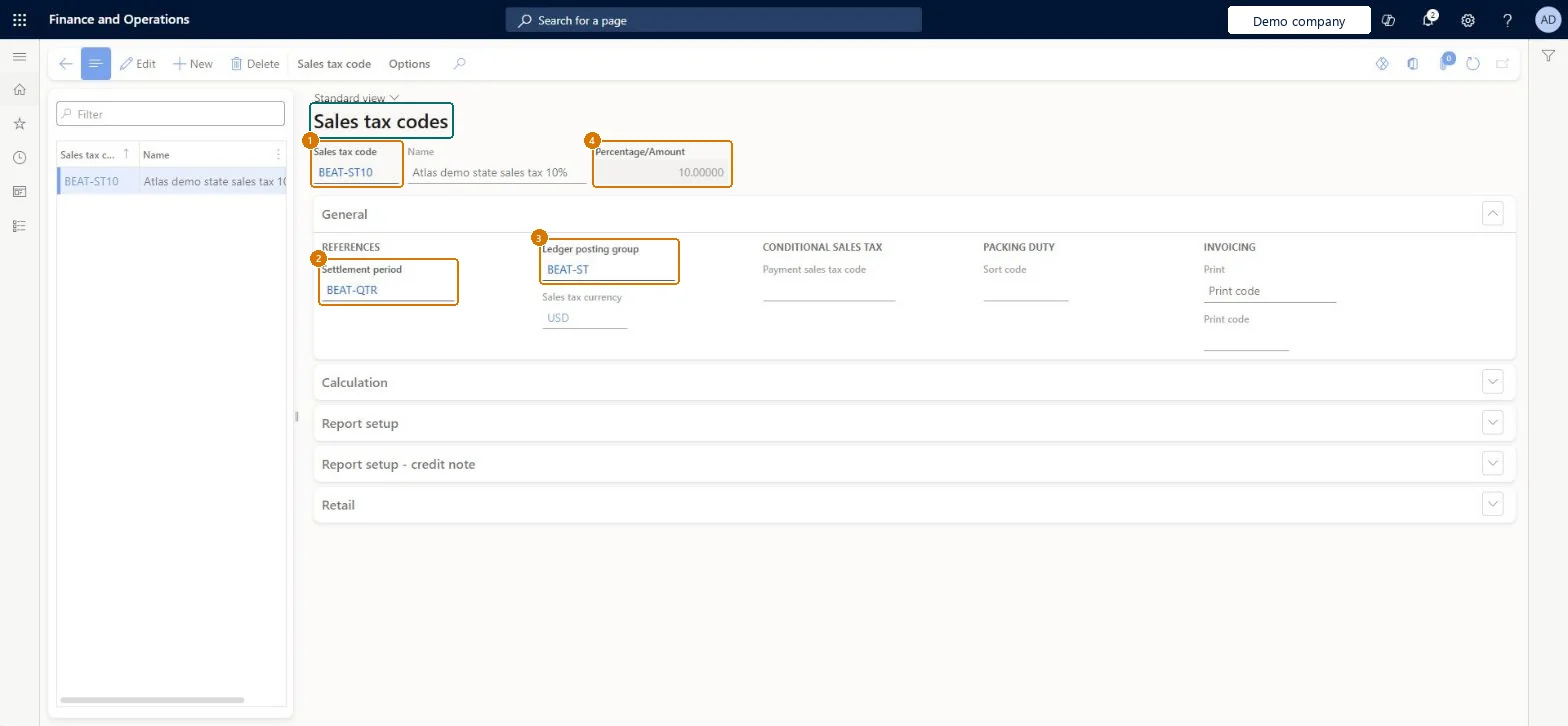
page title tab to open what to set or check
Microsoft's steps
- Go to Tax > Indirect taxes > Sales tax > Sales tax codes.
- Select New.
- In the Sales tax code field, enter a code, and in the Name field, enter a name.
- Select the Settlement period, which sets the sales tax authority and how often the tax is reported and paid.
- Select the Ledger posting group that holds the main accounts the tax posts to.
- Expand the Calculation FastTab and fill in the fields that control how the tax amount is calculated.
- On the Action Pane, select Sales tax code > Values.
- Enter the rate in the Value column, then save and close the page.
Source: Microsoft Learn ↗
Field guide
| Field | What it means | Worked example | Table column |
|---|---|---|---|
| Settlement period | Sets which sales tax authority the tax is reported to and how often it is reported and paid.Microsoft Learn ↗ | BEAT-QTR | — |
| Ledger posting group | Sets the main accounts that the sales tax posts to in the general ledger.Microsoft Learn ↗ | BEAT-ST | — |
| Origin | The calculation method applied to the tax base, such as a percentage of the net amount or an amount per unit.Microsoft Learn ↗ | — | — |
| Sales tax on sales tax | The other sales tax code that this tax is calculated on, when Origin is Percentage of sales tax.Microsoft Learn ↗ | — | TaxOnTax |
| Calculation method | Whether the rate applies to the whole taxable amount or to each amount interval separately.Microsoft Learn ↗ | — | TaxCalcMethod |
| Marginal base | Which amount is used to pick the right rate from the sales tax code values.Microsoft Learn ↗ | — | — |
| Values | The tax rate or amount per unit, by effective dates and by minimum and upper limits.Microsoft Learn ↗ | — | — |
| Limits | The minimum and maximum sales tax that can be calculated on a sale.Microsoft Learn ↗ | — | — |
| Type of tax | The kind of tax, such as Standard VAT, Reduced VAT or VAT 0%, used with the Tax service and multiple VAT registration numbers.Microsoft Learn ↗ | — | — |
| Report setup | The sales tax reporting codes that each type of amount on this code is reported under.Microsoft Learn ↗ | — | — |
| Sales tax code | — | BEAT-ST10 | — |
| Percentage/Amount | — | 10.00000 | — |
Functional consultant
4Setup decisions
| Setup step | Recommended value and why | Decision · common mistake · test |
|---|---|---|
| Set up Sales tax codes | — | — |
Solution architect
5Design impact
| Shared or per company | Per company: each legal entity has its own records. Microsoft data model ↗ |
|---|---|
| Can it be undone | — |
| Feature or country | — |
| If you change it later | When advanced tax calculation is turned on in Tax calculation parameters, the rounding rules set on sales tax codes no longer apply. Microsoft Learn ↗ |
Technical architect
6Technical
| Menu item | TaxTable Checked in Dynamics 365 |
|---|---|
| Form | TaxTable Checked in Dynamics 365 |
| Table | TaxTableShown as “Sales tax codes” in Record infoKey field: TaxCodeChecked in Dynamics 365 |
| Data entities | TaxCodeEntitySales tax codes Microsoft data model ↗ |
| Who can open it | PrivilegesQuery other tax settings RPayOtherTaxSettingsQueryMaintain sales tax codes TaxTableMaintainView sales tax codes TaxTableViewDutiesEnable payroll process HcmPayrollProcessEnableEnable EU sales list process TaxEUSalesListProcessEnableReview EU sales list process performance TaxEUSalesListProcessPerfReviewEnable sales taxes process TaxSalesTaxesProcessEnableInquire into sales tax policies TaxSalesTaxPoliciesInquire8 security rolesAuditorAuditPolicyManagerChief executive officer CompanyChiefExecutiveOfficerAccounts receivable manager CustInvoiceAccountsReceivableManagerPayroll administrator HcmPayrollAdministratorAccountant LedgerAccountantAccounting manager LedgerAccountingManagerAccounting supervisor LedgerAccountingSupervisorFinancial controller LedgerFinancialController |
| Actions on the page | Sales tax code: Sales tax code, Inquiries, Print, Recalculate taxOptions: Personalize, Page options, ShareChecked in Dynamics 365 |
Developer
7Developer
| Open it directly | https://<your-environment>/?mi=TaxTable |
|---|---|
| Integrate with | TaxCodeEntity data entity Microsoft data model ↗ |
| Table definition | TaxTable columns and relations Microsoft data model ↗ |
Everyone
8Sources and checks
- learn.microsoft.com/dynamics365/finance/general-ledger/tasks/set-up-sales-tax-codes
- learn.microsoft.com/common-data-model/schema/core/operationscommon/tables/finance/tax/group/taxtable
- learn.microsoft.com/dynamics365/finance/localizations/global/tax-calculation-rounding-rules
- learn.microsoft.com/dynamics365/finance/general-ledger/sales-tax-calculation-methods-origin-field
- learn.microsoft.com/dynamics365/finance/general-ledger/whole-amount-interval-options-sales-tax-codes
- learn.microsoft.com/dynamics365/finance/general-ledger/marginal-base-field
- learn.microsoft.com/training/modules/set-up-taxes-finance/create-sales-tax-codes
- learn.microsoft.com/dynamics365/finance/localizations/europe/emea-vat-reporting
- learn.microsoft.com/dynamics365/finance/general-ledger/indirect-taxes-overview
- learn.microsoft.com/dynamics365/finance/general-ledger/tasks/set-up-sales-tax-reporting-codes
- learn.microsoft.com/dynamics365/finance/general-ledger/tasks/view-posted-sales-tax-transactions
- learn.microsoft.com/previous-versions/dynamicsax-2012/appuser-itpro/sales-tax-codes-report-taxtable
- Checked in a working Dynamics 365 system, version 10.0.49: the menu item, form, table and security, the page, the demo records and the values in the screenshots.