Business Performance Planning app role, Business events security role, Data management administrator and 4 more roles
Business process
Administer system features
Menu item
DM_DataManagementWorkspaceMenuItem
Data entity
None for this page's own settings
Setup steps
1 on this page
Show what matters for
PAGE GUIDEWhat the page does and how to use it8 sections. Choose a role to highlight what matters to you.
Everyone
1What it is and why
What it is
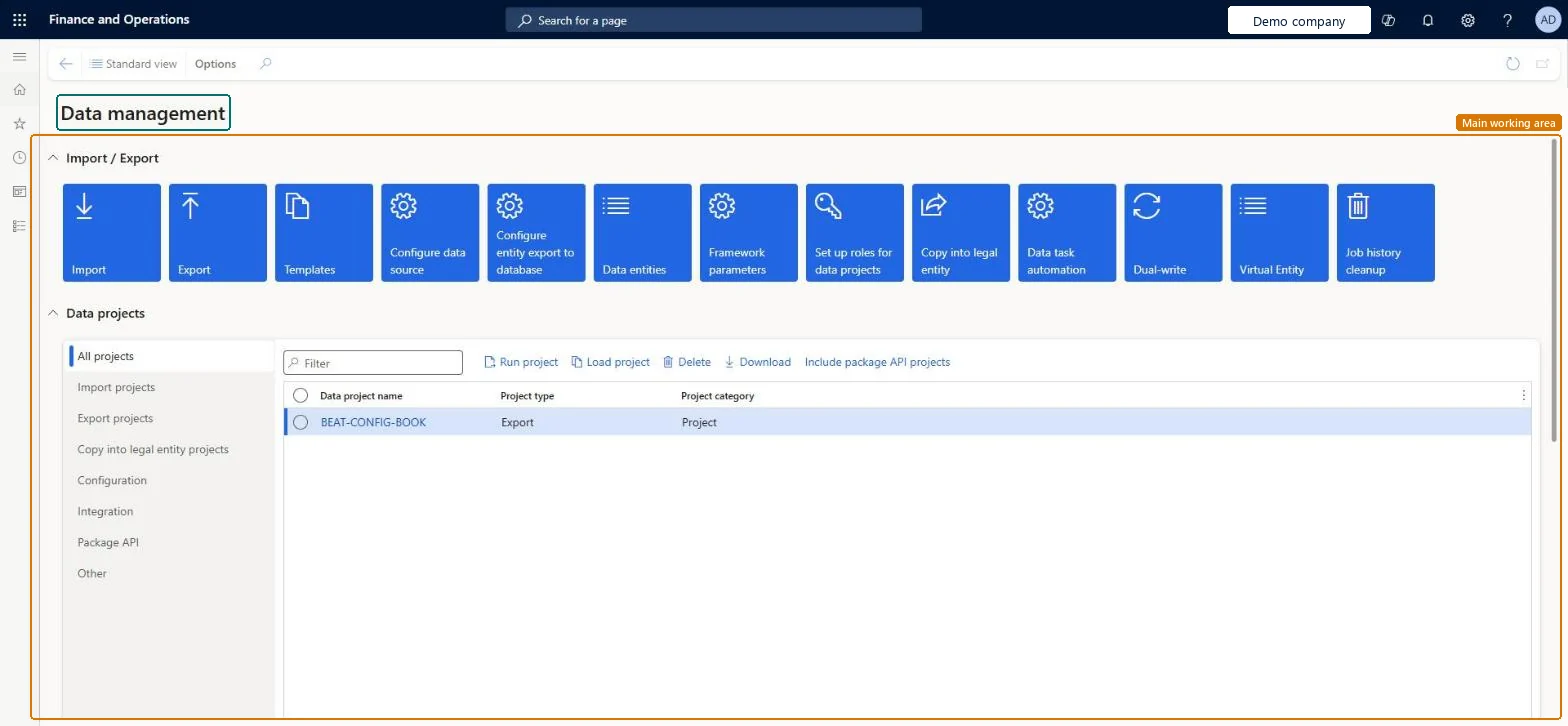
A workspace that gives access to the main data management tasks and shows data projects and how they ran.
What you do here
Use this workspace to import and export data, copy data into another legal entity, and manage data projects built from data entities, templates and data packages.
Example
For example, the BEAT team exports the 010 - System Setup template from a test environment as a data package and imports it into the go-live environment from the Import tile, then follows the job on Job history.
The page in Dynamics 365. page title tab to open what to set or check
About the examples: Examples and screenshots in this guide use BEAT, a demo company in a Dynamics 365 test environment. Use your own company's codes and values instead of copying them.
Setup steps on this page
Load configuration through the Data management workspace
Use the workspace to move configuration between environments with data packages and templates.
Steps from Microsoft
On the dashboard, open the Data management workspace.
Build import and export projects from Microsoft's default templates (010 - System Setup first) and keep their sequenceThe templates order the entities by level and sequence, so records that others depend on load first.
On this system the page opens for Information technology manager, Data management administrator, Business events security role, Data management operations user and Business Performance Planning app role. Data management administrators and migration users work here. No Feature management feature needs to be turned on for this page.
A data project runs in the company you are signed in to; shared entities load for all companies at once. Microsoft Learn
Can it be undone
Hard to reverse: An import writes to the target tables. There is no undo of an import; correct the data with a new import or by hand. Microsoft Learn
If you change it later
Job history entries and their staging data older than 90 days are deleted automatically (from September 2023); a shorter retention needs the Execution history cleanup feature. Microsoft Learn
Technical architect
6Technical
Menu item
DM_DataManagementWorkspaceMenuItemChecked in Dynamics 365
Form
DataManagementWorkspaceChecked in Dynamics 365
Data entities
DataManagementDefinitionGroupEntityDefinition Groups (only the data projects (definition groups) of the workspace) DataManagementExecutionJobEntityJob runs (only the history of data project runs)
Who can open it
PrivilegesData management application administrator DataManagementMaintainMaintain data import export tasks DataManagementOperationsMaintainView data import export tasks DataManagementOperationsViewDutiesApplication document entities DataManagementMaintainMaintain data import export operation processes DataManagementOperationsMaintainView data import export operation processes DataManagementOperationsView12 security rolesBusiness Performance Planning app role BPPBudgetPlanningAppRoleBusiness events security role BusinessEventsSecurityRoleData management administrator DataManagementAdministratorData management migration user DataManagementMigrationUserData management operations user DataManagementOperationsUserDmfTest_SecurityRoleDemand planning app role ScpDemandPlanningAppRoleSysDETstTPFDeleteAccessEntityWithoutTPFAccessSysDETstTPFDeleteAccessEntityWithTPFAccessSysDETstTPFReadAccessEntityWithoutTPFAccessSysDETstTPFReadAccessEntityWithTPFAccessInformation technology manager SysServerITManagerChecked in Dynamics 365
Roles to set it up and use it
To set it up or change itInformation technology manager SysServerITManagerData management administrator DataManagementAdministratorBusiness events security role BusinessEventsSecurityRoleData management operations user DataManagementOperationsUserBusiness Performance Planning app role BPPBudgetPlanningAppRoleGive people one of these roles. On this system, 7 roles can open this page.Checked in Dynamics 365
Actions on the page
Options: Personalize, Page options, ShareChecked in Dynamics 365
DataManagementDefinitionGroupEntity (Definition Groups): shared by all companies; not in Microsoft's default templates.DataManagementExecutionJobEntity (Job runs): shared by all companies; not in Microsoft's default templates.Load order: Neither entity is part of Microsoft's default configuration templates in this system; add them to their own data project when you need to move data projects.Checked in Dynamics 365