Subscription billingRecurring contract billingInquiries and reports
SubBillUnbilledRevenueRecon
Business process
Bill subscriptions
Menu item
SubBillUnbilledRevenueRecon
Setup steps
1 on this page
Show what matters for
PAGE GUIDEWhat the page does and how to use it8 sections. Choose a role to highlight what matters to you.
Everyone
1What it is and why
What it is
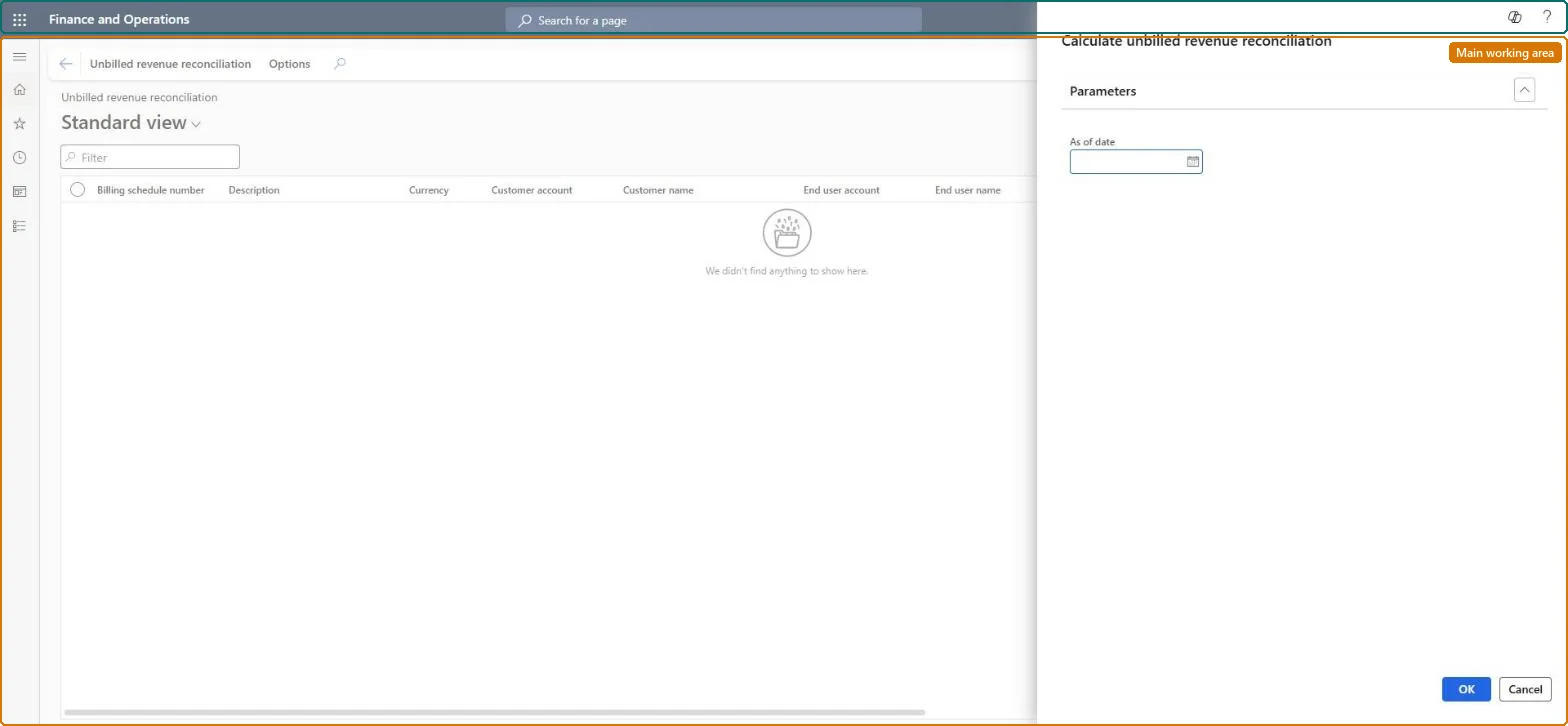
A report page that calculates the unbilled revenue of the billing schedules as of the date you enter, with schedule, currency, customer and end user.
What you do here
Use this page to reconcile the unbilled revenue balance per billing schedule with the unbilled revenue account in the general ledger at period end.
Example
For example, at 30 June a BEAT accountant runs it as of 30 June and finds 750.00 still unbilled on a 250.00-a-month schedule whose first nine months were stubbed.
The page in Dynamics 365. page title tab to open what to set or check
About the examples: Examples and screenshots in this guide use BEAT, a demo company in a Dynamics 365 test environment. Use your own company's codes and values instead of copying them.
Setup steps on this page
Read Unbilled revenue reconciliation for the right dates
Use this page to reconcile the unbilled revenue balance per billing schedule with the unbilled revenue account in the general ledger at period end.
Steps from Microsoft
Go to Subscription billing > Recurring contract billing > Inquiries and reports > Unbilled revenue reconciliation.
In the Calculate unbilled revenue reconciliation dialog, enter the As of date, such as the last day of the period you reconcile.
Select OK to calculate the unbilled revenue balances and show them on the page.
Compare the total with the unbilled revenue account: the initial journal entry debits unbilled revenue, and each invoice moves the amount to accounts receivable.
For a difference on one line, open Unbilled revenue journal entry audit on the Renewals tab of the line details.
The date the unbilled revenue balances are calculated for.Checked in Dynamics 365
Billing schedule number / Description
The billing schedule.Checked in Dynamics 365
Currency
The currency of the schedule.Checked in Dynamics 365
Customer account / Customer name
The customer of the schedule.Checked in Dynamics 365
End user account / End user name
The end user of the contract.Checked in Dynamics 365
Common errors and fixes
Message
What to do
The report page shows no lines after OK
The page only lists billing schedules in the dates you entered. Widen From date and To date, and check that the schedules aren't archived; archived lines no longer appear on inquiry pages. Microsoft Learn
Unbilled revenue doesn't reconcile with the invoices after top billing
Top billing and unbilled revenue don't work together. Set Number of top lines to 0 on every item group that has unbilled revenue items. Microsoft Learn
The invoice for an unbilled revenue line has nothing to reverse from unbilled revenue
Create the unbilled revenue journal entry before invoicing, with Create journal entry on the line or on Unbilled revenue mass processing. Microsoft Learn
The last day of the fiscal period, run after the period's invoices are posted.Invoices move amounts out of unbilled revenue, so the balance agrees with the ledger only when all of the period's invoices are posted.
Subscription billing (Must be on)Recurring contract billing (Must be on)
Licence or add-in
Turn off the Revenue recognition feature first: Subscription billing can't be used while it is on. Then, in Feature management, turn on Subscription billing and after it Recurring contract billing. Revenue recognition was deprecated in January 2024 and replaced by Subscription billing. Subscription billing users and managers can open this page.
Reversible: The page only reads billing schedules; running it again with other dates changes nothing. Microsoft Learn
If you change it later
The page calculates from the unbilled revenue entries each time; it changes no data. Microsoft Learn
Technical architect
6Technical
Menu item
SubBillUnbilledRevenueReconChecked in Dynamics 365
Form
SysOperationTemplateFormChecked in Dynamics 365
Roles to set it up and use it
To use itSubscription billing manager SubBillBillingMaintainSubscription billing allocation, deferral, and billing manager SubBillMaintainSubscription billing user SubBillBillingViewSubscription billing module user with capabilities including billing, allocation, and deferral features SubBillViewGive people one of these roles. On this system, 4 roles can open this page.Checked in Dynamics 365
Load order: Unbilled revenue reconciliation has no data entity in Data management, so there is nothing to load from a file or a configuration template. It is calculated from the billing schedules when you run it, so load the billing schedules and run the page in the new environment.Microsoft Learn