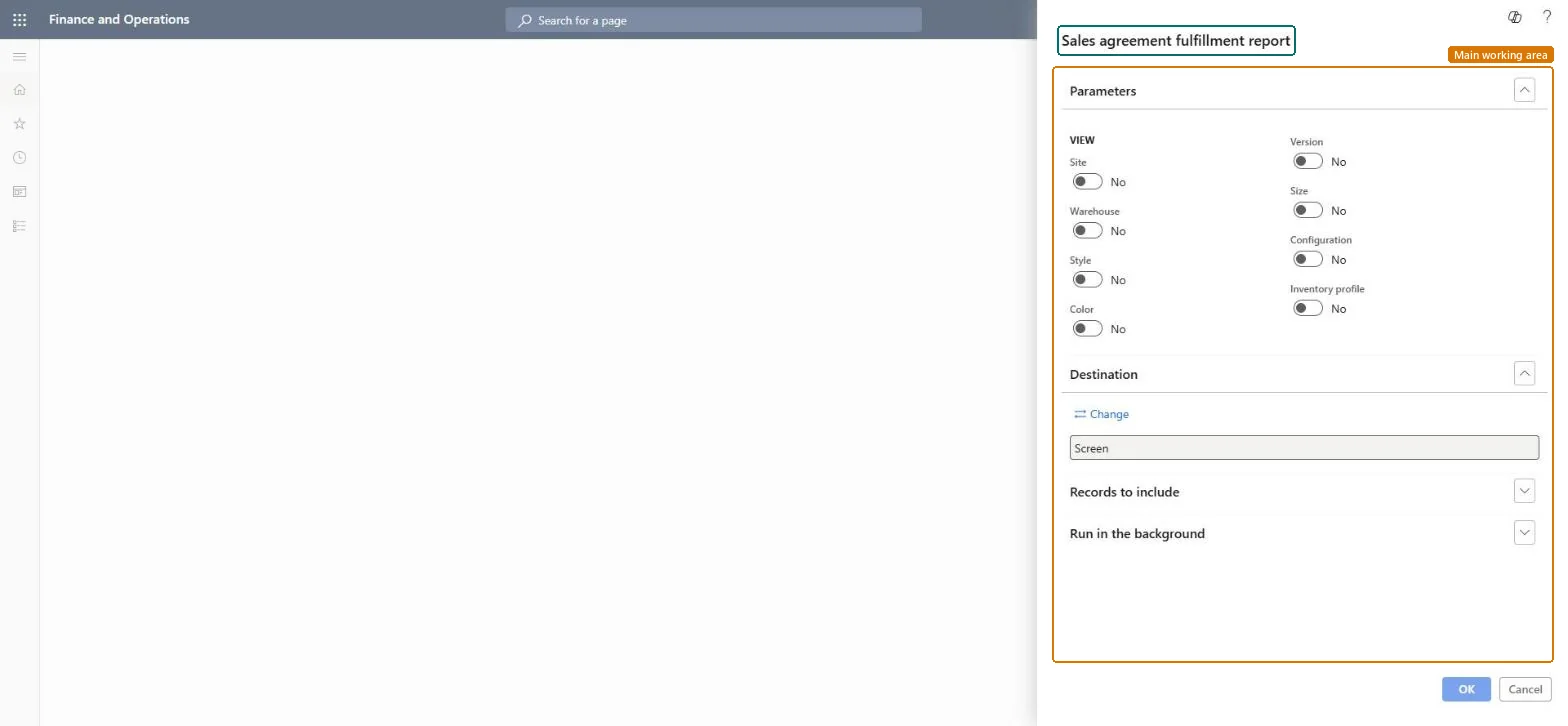
A report that prints, for all or selected sales agreements, how much of each commitment has been fulfilled by linked sales order lines. Its SSRS report is AgreementFollowUp. It is the same report as Sales agreements > Sales agreement fulfillment report, opened from this menu.
Sales and marketingInquiries and reportsSales agreement reports
action:SalesAgreementFulfillment
Business process
Manage blanket sales orders
Menu item
action:SalesAgreementFulfillment
Setup steps
1 on this page
Show what matters for
PAGE GUIDEWhat the page does and how to use it8 sections. Choose a role to highlight what matters to you.
Everyone
1What it is and why
What it is
A report that prints, for all or selected sales agreements, how much of each commitment has been fulfilled by linked sales order lines. Its SSRS report is AgreementFollowUp. It is the same report as Sales agreements > Sales agreement fulfillment report, opened from this menu.
What you do here
Use it before an agreement review or as an agreement nears its expiration date, to see the committed quantity or amount against what linked order lines have used.
Example
For example, BEAT's agreement with BEAT-000210 commits to 500.00 chairs until 31.12.2026. On 09.11.2026 the report shows 310.00 released and 190.00 remaining, so the account manager proposes a final order before year end.
The page in Dynamics 365. page title tab to open what to set or check
About the examples: Examples and screenshots in this guide use BEAT, a demo company in a Dynamics 365 test environment. Use your own company's codes and values instead of copying them.
When to run it
When to run it
Before an agreement review with a customer, or when an agreement nears its expiration date.
How often
On demand, for example monthly for large agreements.
What the output shows
Per agreement line, the committed quantity or amount and the fulfilled and remaining quantity or amount from linked sales order lines; the same figures as the Fulfillment tab of the Line details FastTab on Sales agreements.
Compare each agreement commitment with what linked orders have used.
Steps from Microsoft
Go to Sales and marketing > Inquiries and reports > Sales agreement reports > Sales agreement fulfillment report.
Keep the default selection for every sales agreement, or select Select and limit it to one customer's agreements.
Compare the committed quantity or amount with the fulfilled amount and the remainder for each agreement line.
If a line looks under-fulfilled, check the linked order lines: a price change on a line with Price and discount is fixed breaks the link, and that line no longer counts.
An agreement looks under-fulfilled although orders were placed.
Order lines whose price was changed while Price and discount is fixed lose their link to the commitment and don't count. Check the order lines and link them again if the price change was a mistake. Microsoft Learn
Test checklist
Release a sales order of 10.00 pieces from a test agreement that commits 100.00.
Run the report for that agreement.
Check that 10.00 is fulfilled and 90.00 remains, as on the agreement's Fulfillment tab.
Select the agreements of the customer you are reviewing; run all agreements only for a month-end overview.Fulfillment is per commitment line; one customer's agreements are what you discuss in a review.
On the live system, Sales manager, Sales clerk, Retail service and Project manager use this page; 4 roles can run it in total. No Feature management feature is needed to open it.
Checked in Dynamics 365
Solution architect
5Design impact
Shared or per company
Per company: the report reads the data of the legal entity you run it in. To compare legal entities, run it in each one. Checked in Dynamics 365
Can it be undone
Reversible: The report changes no data; it only reads sales agreements and their linked order lines. Run it again with other parameters at any time. Checked in Dynamics 365
If you change it later
Fulfillment counts all sales order lines linked to the agreement; removing a link, or a return order linked to the agreement, changes the figures on the next run. In 10.0.49 the report's transaction scope is controlled by the feature ProcurementAndSourcingSSRSSkipReportTransactionFeature. Microsoft Learn
Technical architect
6Technical
Menu item
action:SalesAgreementFulfillmentChecked in Dynamics 365
Form
SysOperationTemplateFormChecked in Dynamics 365
Roles to set it up and use it
To use itSales manager TradeSalesManagerSales clerk TradeSalesClerkRetail service RetailServiceProject manager ProjProjectManagerGive people one of these roles. On this system, 4 roles can run this page.Checked in Dynamics 365
Load order: Sales agreement fulfillment report has no data entity in Data management. It is a report: it reads sales agreements and linked order lines and stores nothing of its own. Migrate the agreements with their own entities.Checked in Dynamics 365