BeyondERP.Newsletter
Menu

Job page · Retail and Commerce

Archive credit card transaction data

A batch job that archives to Azure Blob storage, or deletes, the stored credit card authorization data (auth blobs) for older payment transactions.

Business process
Record credit or debit card payments on call center orders in Dynamics 365 Commerce
Menu item
RetailTransactionPaymentTransArchive
Show what matters for
PAGE GUIDEWhat the page does and how to use it7 sections. Choose a role to highlight what matters to you.
Everyone

1What it is and why

What it isA batch job that archives to Azure Blob storage, or deletes, the stored credit card authorization data (auth blobs) for older payment transactions.
What you do hereUse this page to free database space by archiving or deleting credit card payment tokens and signature data older than a minimum age.
ExampleFor example, if the returns policy allows linked refunds for two years, set Minimum transaction age in days to 730.
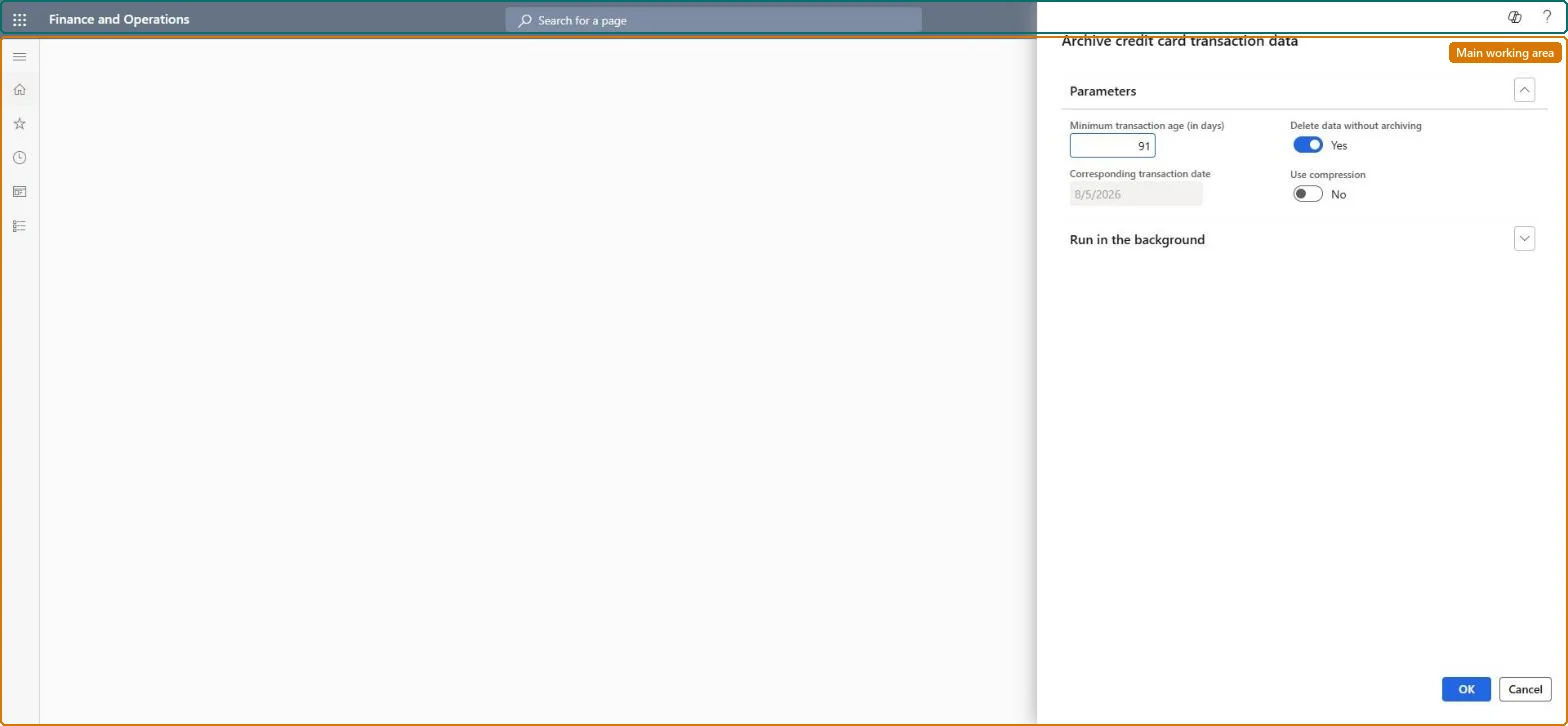
Archive credit card transaction data page in Dynamics 365
The page in Dynamics 365. page title tab to open what to set or check
Functional consultant · Solution architect

2Where it fits

Business processManage accounts receivable › Process customer payments › Record credit or debit card payments on call center orders in Dynamics 365 Commerce
Menu pathRetail and Commerce › Retail and Commerce IT › Clean up › Archive credit card transaction data
Set up firstDocument management Microsoft Learn
Related pagesCompress credit card transaction data Microsoft Learn
End user · Functional consultant

3How to do it

About the examples: Examples and screenshots in this guide use BEAT, a demo company in a Dynamics 365 test environment. Use your own company's codes and values instead of copying them.

When to run it

When to run itWhen credit card authorization data (auth blobs) takes up too much database space, for transactions that are older than your linked-refund period.
How oftenAs a recurring batch job once the backlog is archived; later runs take less time.
Batch settingsA recurring batch job. Start with a large Minimum transaction age in days and lower it step by step, so each run handles fewer transactions.
What the output showsPayment tokens and signature capture data (PaymentAuthorization, PaymentCaptureToken, PaymentCardToken and SigCapData) of older card transactions are exported to a ZIP file in Azure Blob storage and removed from the database, or just deleted. Returns of those transactions then need standalone refunds.

Source: Microsoft Learn

Steps from Microsoft

  1. Go to Retail and Commerce > Retail and Commerce IT > Clean up > Archive credit card transaction data.
  2. In Minimum transaction age in days, enter the period in which customers can still get linked refunds to the original card, for example 730 for two years. Corresponding transaction date then shows the date before which records are affected.
  3. Set Delete data without archiving to Yes only if the payment tokens and signature data should be deleted instead of exported to Azure Blob storage. Archiving needs document management to be set up.
  4. Leave Use compression off on version 10.0.49 and later; compression now has its own Compress credit card transaction data job.
  5. Set the recurrence and batch group in Run in the background; batch processing is always on for this job.
  6. Select OK and confirm the archive prompt with Yes, then check that the job finishes. The first run on a large backlog can take hours or days.

Source: Microsoft Learn

Fields on the page

FieldWhat it means
Minimum transaction age in daysThe age of credit card authorizations that are archived or deleted.Microsoft Learn
Delete data without archivingWhen Yes, the data is deleted instead of archived.Microsoft Learn
Corresponding transaction dateRead-only date matching the minimum age; older records are affected.Microsoft Learn
Use compressionCompresses tokens (deprecated from 10.0.49, replaced by a separate job).Microsoft Learn

Test checklist

  1. Card transactions older than the corresponding transaction date no longer hold token data.
  2. The archive file is in document management storage, unless you chose to delete.
  3. A return of a newer card transaction still offers a linked refund.

Source: Microsoft Learn

Solution architect

4Design impact

Can it be undoneNo: Archived data can't easily be restored and deleted data is gone. Set the minimum age so that no transaction still needs a linked refund. Microsoft Learn
If you change it laterArchived data can't easily be restored, so returns of affected transactions must use standalone refunds instead of linked refunds. Microsoft Learn
Technical architect

5Technical

Menu itemRetailTransactionPaymentTransArchive Checked in Dynamics 365
FormDialog Checked in Dynamics 365
Roles to set it up and use itTo use itRetail operations manager RetailOperationsManagerGive people one of these roles. On this system, 1 role can run this page.Checked in Dynamics 365
Developer

6Developer

Open it by URLhttps://<your-environment>/?mi=RetailTransactionPaymentTransArchive
Everyone

7Sources