BeyondERP.Newsletter
Menu

Job page · Project management and accounting

Reset workflow status

A periodic page that lists unposted timesheets in a chosen document status, such as In review, and sends the selected ones back to Draft with Update to Draft.

Used by
Information technology manager
Business process
Manage project delivery
Menu item
TSTimesheetStatusReset
Main table
TSTimesheetTable
Data entity
TSTimesheetTableEntity
Setup steps
1 on this page
Show what matters for
PAGE GUIDEWhat the page does and how to use it8 sections. Choose a role to highlight what matters to you.
Everyone

1What it is and why

What it isA periodic page that lists unposted timesheets in a chosen document status, such as In review, and sends the selected ones back to Draft with Update to Draft.
What you do hereUse it when unposted timesheets are stuck in the approval workflow and must be corrected and submitted again.
ExampleBEAT's timesheet workflow was changed on 11/02/2026 and 14 timesheets for week 44 are stuck In review, such as TS-004512 with 40.00 hours. The IT manager filters on In review, selects the 14 and selects Update to Draft; the workers then submit them again.
Reset workflow status page in Dynamics 365
The page in Dynamics 365. page title tab to open what to set or check
Functional consultant · Solution architect

2Where it fits

Business processManage project delivery
Menu pathProject management and accounting › Periodic › Timesheets › Reset workflow status
Set up firstProject management and accounting workflows Microsoft Learn
Used next byAll timesheets Microsoft Learn
Related pagesTimesheets for my review Microsoft Learn
End user · Functional consultant

3How to do it

About the examples: Examples and screenshots in this guide use BEAT, a demo company in a Dynamics 365 test environment. Use your own company's codes and values instead of copying them.

When to run it

When to run itWhen unposted timesheets are stuck in a workflow status and must be submitted again.
How oftenOn demand.
Batch settingsNot a batch job; you select the timesheets on the page.
What the output showsThe selected timesheets with the status Draft.

Source: Microsoft Learn

Setup steps on this page

Reset stuck timesheets to Draft

Restart the approval of timesheets stuck in workflow.

Steps from Microsoft

  1. Go to Project management and accounting > Periodic > Timesheets > Reset workflow status.
  2. In Document status to reset, choose the status of the stuck timesheets, for example In review.
  3. Narrow the list by Timesheet number, Personnel number or Resource name.
  4. Select the timesheets and select Update to Draft.
  5. Tell the workers to submit them again, and check that they show In review again with the new workflow.

Source: Microsoft Learn

Fields on the page

FieldWhat it meansExample
Document status to resetThe status of the unposted timesheets to list, for example In review.Checked in Dynamics 365In review
Timesheet numberThe timesheet listed; narrow the list with it.Checked in Dynamics 365TS-004512

Common errors and fixes

MessageWhat to do
A stuck timesheet isn't listed.It is posted or in another status than the one chosen; change Document status to reset. Checked in Dynamics 365

Test checklist

  1. Filter on In review: count the stuck timesheets (for example 14).
  2. Update them to Draft.
  3. Filter on In review again: 0.
  4. Open TS-004512: status Draft, 40.00 hours unchanged.

Source: Microsoft Learn

Functional consultant

4Setup decisions

Setup stepRecommended value and whyDecision, common mistake and test
Reset stuck timesheets to DraftFilter on the stuck status and reset only those timesheets, then ask the workers to resubmit.Resetting only stuck timesheets keeps normal approvals running.Who may reset timesheet workflow status?Resetting all In review timesheets, including those approvers are working on.Test: Reset a stuck timesheet

Feature management and licence

Licence or add-inOn the live system, Information technology manager uses this page.

Checked in Dynamics 365

Solution architect

5Design impact

Shared or per companyPer company: each legal entity has its own timesheets. Microsoft data model
Can it be undoneNo: The workflow isn't restored; the worker must submit the timesheet again. Microsoft Learn
If you change it laterSets the selected unposted timesheets back to Draft, so they leave the approval workflow and must be submitted again. Microsoft Learn
Technical architect

6Technical

Menu itemTSTimesheetStatusReset Checked in Dynamics 365
FormTSTimesheetStatusReset Checked in Dynamics 365
TableTSTimesheetTableShown as “Timesheets” in Record infoChecked in Dynamics 365
Data entitiesTSTimesheetTableEntityTimesheet Headers Microsoft data model
Who can open itPrivileges TSTimesheetDocumentResetDutiesMaintain workflow and alerts settings WorkflowAlertsSettingsMaintain
1 security roleInformation technology manager SysServerITManager
Checked in Dynamics 365
Roles to set it up and use itTo set it up or change itInformation technology manager SysServerITManagerGive people one of these roles. On this system, 1 role can open this page.Checked in Dynamics 365
Actions on the pageOptions: Page options, ShareChecked in Dynamics 365
Developer

7Developer

Open it by URLhttps://<your-environment>/?mi=TSTimesheetStatusReset
Integrate withTSTimesheetTableEntity data entity Microsoft data model
Data migrationTSTimesheetTableEntity Timesheet headers; migrate posted or approved timesheets, not ones stuck in workflow.Load order: Reset or post stuck timesheets before cutover; load timesheet headers with TSTimesheetTableEntity.Microsoft data model
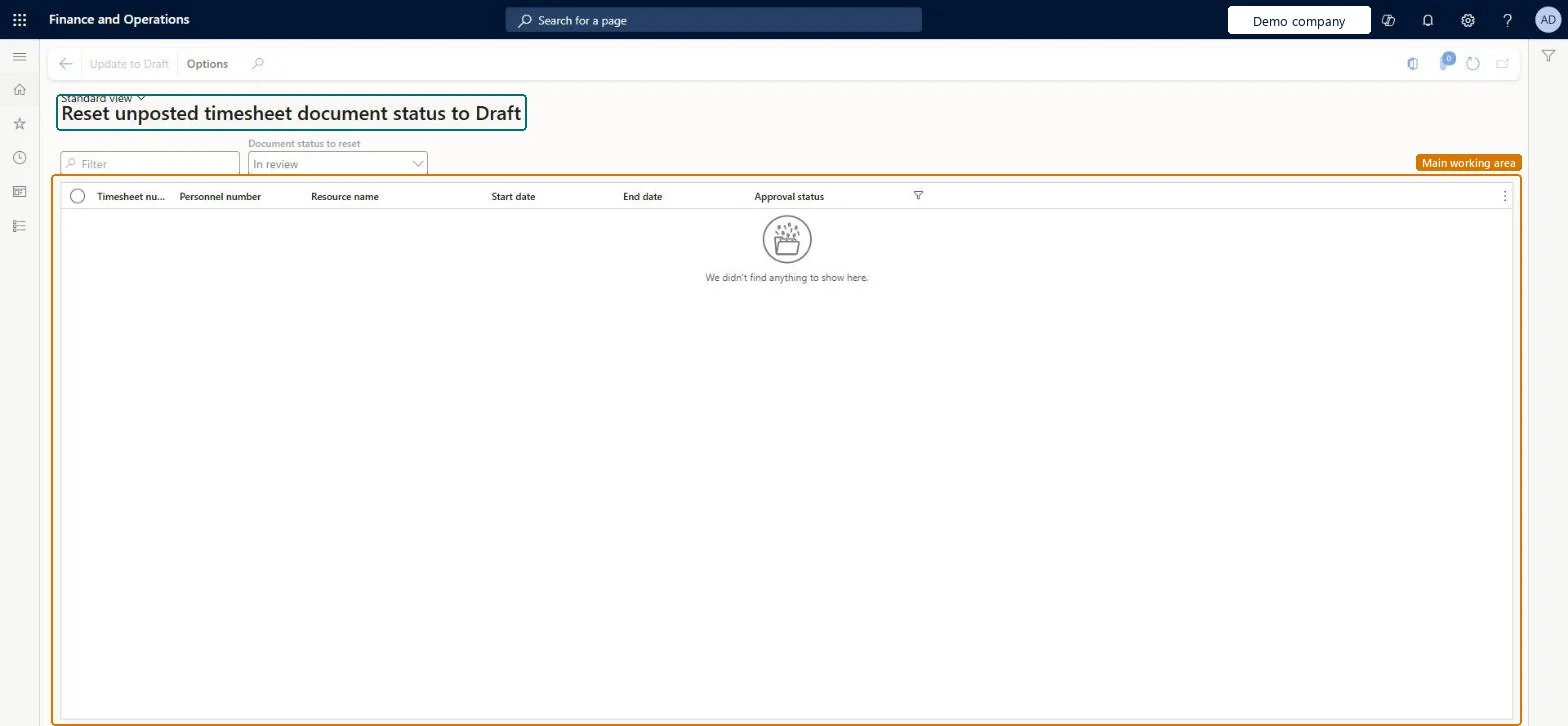
Table definitionTSTimesheetTable columns and relations Microsoft data model
Everyone

8Sources