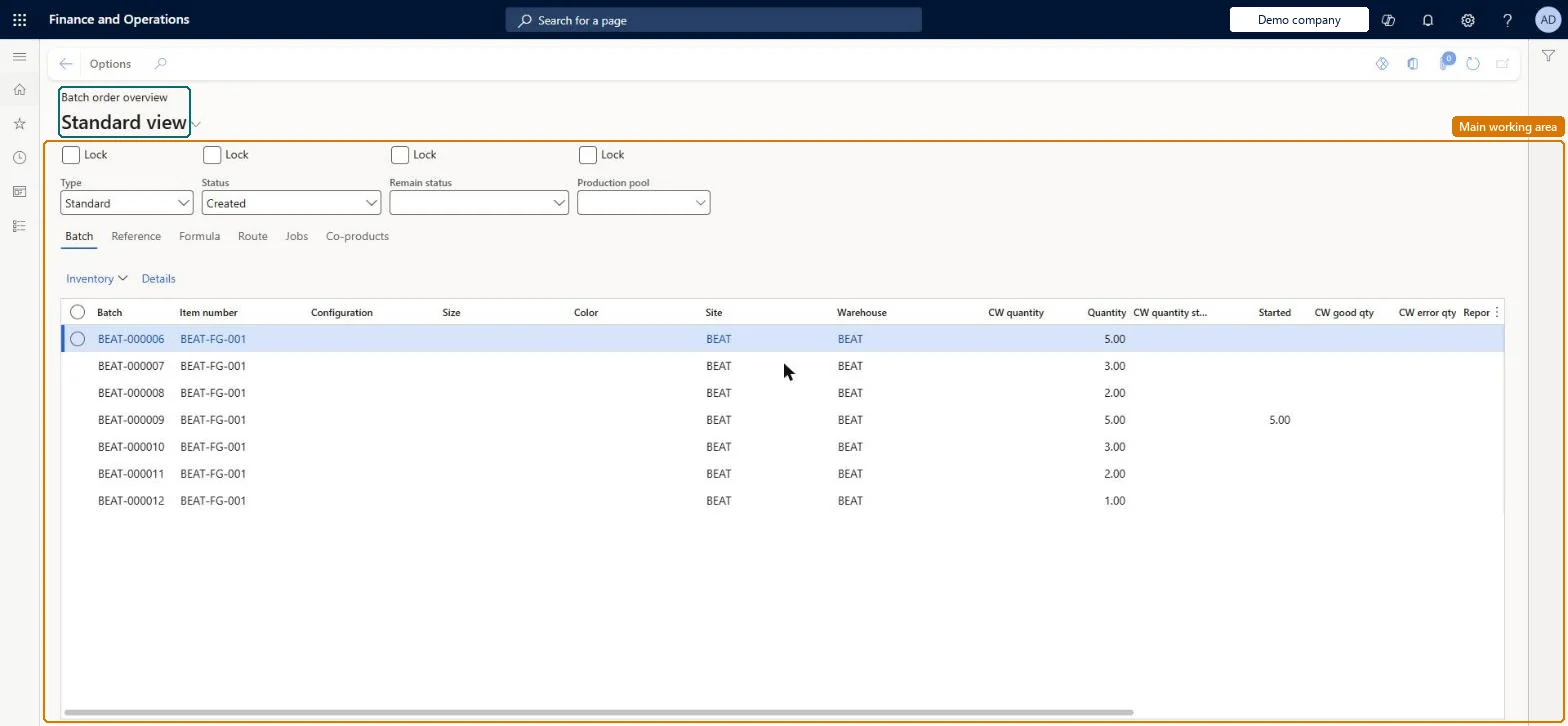
An inquiry that shows batch orders with their status and quantities, and tabs for references, formula lines, route operations, jobs and co-products and by-products.
Inventory accountant, Inventory accountant clerk, Shop supervisor and 7 more roles
Business process
Plan production operations
Menu item
PmfProcessBatchOverview
Main table
ProdTable
Data entity
ProdBatchOrderHeaderEntity
Show what matters for
PAGE GUIDEWhat the page does and how to use it7 sections. Choose a role to highlight what matters to you.
Everyone
1What it is and why
What it is
An inquiry that shows batch orders with their status and quantities, and tabs for references, formula lines, route operations, jobs and co-products and by-products.
What you do here
Use this page to check the status of batch orders and inquire into their finished items, formula, route, jobs and co-products, filtering by batch type, status, remaining status or production pool.
Example
For example, a process planner filters the overview to one production pool and saves the criteria with Lock.
The page in Dynamics 365. page title tab to open what to set or check
About the examples: Examples and screenshots in this guide use BEAT, a demo company in a Dynamics 365 test environment. Use your own company's codes and values instead of copying them.
How to use it
Go to Production control > Inquiries and reports > Production > Batch order overview.
Set the Type, Status, Remain status and Production pool filters at the top, and select Lock to keep a filter when the page is reopened.
On the Batch tab, read the Batch, Item number, Site, Warehouse, Quantity, Started and reported quantities for each order.
Open the Reference, Formula, Route, Jobs or Co-products tab to see that part of the selected order.
Use Inventory and Details above the grid to open the inventory transactions or the order details.
PrivilegesView batch order overview PmfProcessBatchOverviewViewDutiesInquire into production cost calculations ProdProductionCostCalcStatusInquireMaintain production order creation ProdProductionOrderCreationMaintainMaintain production orders ProdProductionOrderMaintainMaintain production order preparation ProdProductionOrderPreparationMaintainInquire into production orders ProdProductionOrderProgressInquire11 security rolesInventory accountant InventCostAccountantInventory accountant clerk InventCostCostClerkShop supervisor JmgShopSupervisorAccounting manager LedgerAccountingManagerMCRTestUserRoleProduction manager ProdProductionManagerProduction supervisor ProdProductionSupervisorProject assistant ProjProjectClerkProject manager ProjProjectManagerProduction planner ReqProductionPlannerSales clerk TradeSalesClerkChecked in Dynamics 365
Roles to set it up and use it
To use itProduction supervisor ProdProductionSupervisorProduction manager ProdProductionManagerShop supervisor JmgShopSupervisorProduction planner ReqProductionPlannerProject manager ProjProjectManagerGive people one of these roles. On this system, 10 roles can open this page.Checked in Dynamics 365