PAGE GUIDEWhat the page does and how to use it7 sections. Choose a role to highlight what matters to you.
Everyone
1What it is and why
What it is
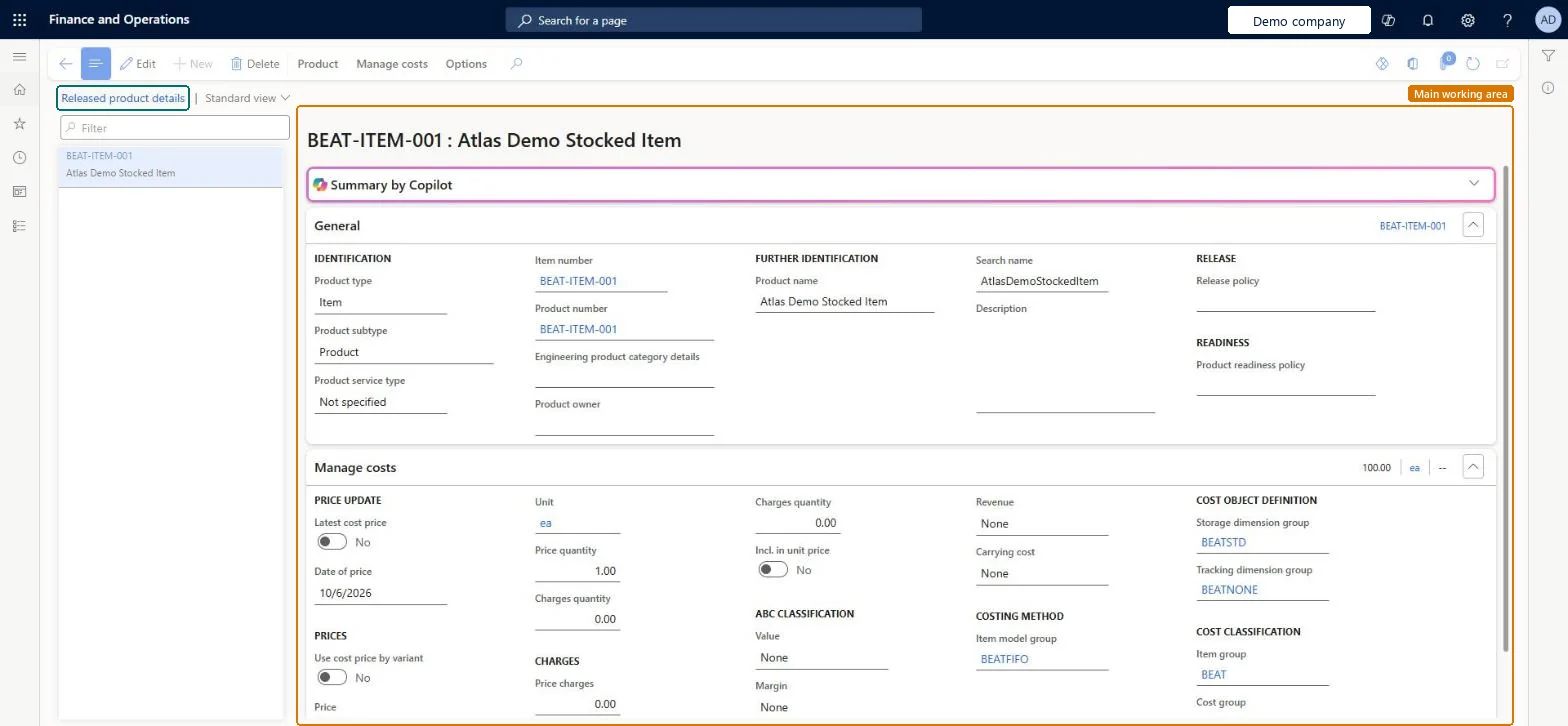
A details page that shows the released products that have no active cost, with the General and Manage costs FastTabs of each product.
What you do here
Use this page to find released products that have no active cost and complete their cost information, such as the default Price on the Manage costs FastTab. A cost price in an active costing version takes precedence over the price entered on the Manage costs FastTab.
The page in Dynamics 365. page title tab to open what to set or check
Product information management › Costing › All released products with no active cost
End user · Functional consultant
3How to do it
About the examples: Examples and screenshots in this guide use BEAT, a demo company in a Dynamics 365 test environment. Use your own company's codes and values instead of copying them.
How to use it
Go to Product information management > Costing > All released products with no active cost.
Select a product in the list on the left.
Select Edit.
On the Manage costs FastTab, enter the Price, the Price quantity and the Date of price.
Use the Manage costs tab on the Action Pane for further cost actions on the selected product.
Source: Checked in Dynamics 365
Fields on the page
Field
What it means
Table column
Price
The default item cost price of the released product, entered on the Manage costs FastTab.Microsoft Learn
Price
Item model group
The item model group of the product, which holds the inventory valuation method used when issue transactions are settled to receipts.Microsoft Learn
ModelGroupId
Test checklist
Open a product on this page and enter a Price on the Manage costs FastTab.
Post an inventory adjustment journal issue for the item before any receipt is invoiced.
Check the issue is costed at the default price, not zero.
Activate a cost in a standard costing version and check new issues use that cost instead.
Reversible: The Price on the Manage costs FastTab is a default cost and can be changed at any time. A cost price in an active costing version always wins over it. Issues posted at zero cost are corrected later by inventory close and adjustment, possibly in a different financial period. Microsoft Learn
Technical architect
5Technical
Menu item
CostReleasedProductsMissingActiveCostChecked in Dynamics 365
Form
EcoResProductDetailsExtendedChecked in Dynamics 365
Table
InventTableShown as “ITEMS” in Record infoKey field: ItemIdChecked in Dynamics 365
PrivilegesConfigure costing data for a product CostProductCostingDataMaintainView costing data for a product CostProductCostingDataViewDutiesInquire into costing data for a product CostProductCostingDataInquireConfigure costing data for a product CostProductCostingDataMaintain3 security rolesInventory accountant InventCostAccountantInventory accountant clerk InventCostCostClerkAccounting manager LedgerAccountingManagerChecked in Dynamics 365
Roles to set it up and use it
To set it up or change itInventory accountant clerk InventCostCostClerkInventory accountant InventCostAccountantTo use itAccounting manager LedgerAccountingManagerGive people one of these roles. On this system, 3 roles can open this page.Checked in Dynamics 365
Actions on the page
Product: Set up, Product media managementManage costs: Set up, Cost transactions, Standard cost transactions, CostingChecked in Dynamics 365
EcoResReleasedProductV2Entity (Released products V2): loaded for each company, in Microsoft's default template 310 - Product information management.Load order: Microsoft's default template 310 - Product information management loads Released products V2 at execution unit 1, level 310, sequence 70. Lower levels load first, and entities at the same level load in sequence order.Load first: Country/regions, States, Units, Buyer groups, Calculation groups, the default templates at lower levels (System setup to Inventory management)Microsoft Learn