BeyondERP.Newsletter
Menu

Page · Procurement and sourcing

Request for quotation follow-up

An inquiry page that gives an overview of all RFQs and their statuses, such as Sent, Received, Accepted and Rejected.

Used by
Purchasing agent, Purchasing Agent - Public Sector, Vendor account manager and 2 more roles
Business process
Source and contract goods and services
Menu item
PurchRFQReplyFollowup
Main table
PurchRFQLine
Data entity
PurchRequestForQuotationReplyLineEntity
Show what matters for
PAGE GUIDEWhat the page does and how to use it7 sections. Choose a role to highlight what matters to you.
Everyone

1What it is and why

What it isAn inquiry page that gives an overview of all RFQs and their statuses, such as Sent, Received, Accepted and Rejected.
What you do hereUse this page to review and manage RFQ replies, for example to find replies that expire soon or lines with no reply.
ExampleFor example, a buyer uses it to find the RFQ replies that expire on a specific date, or the RFQ lines that have not had a reply yet.
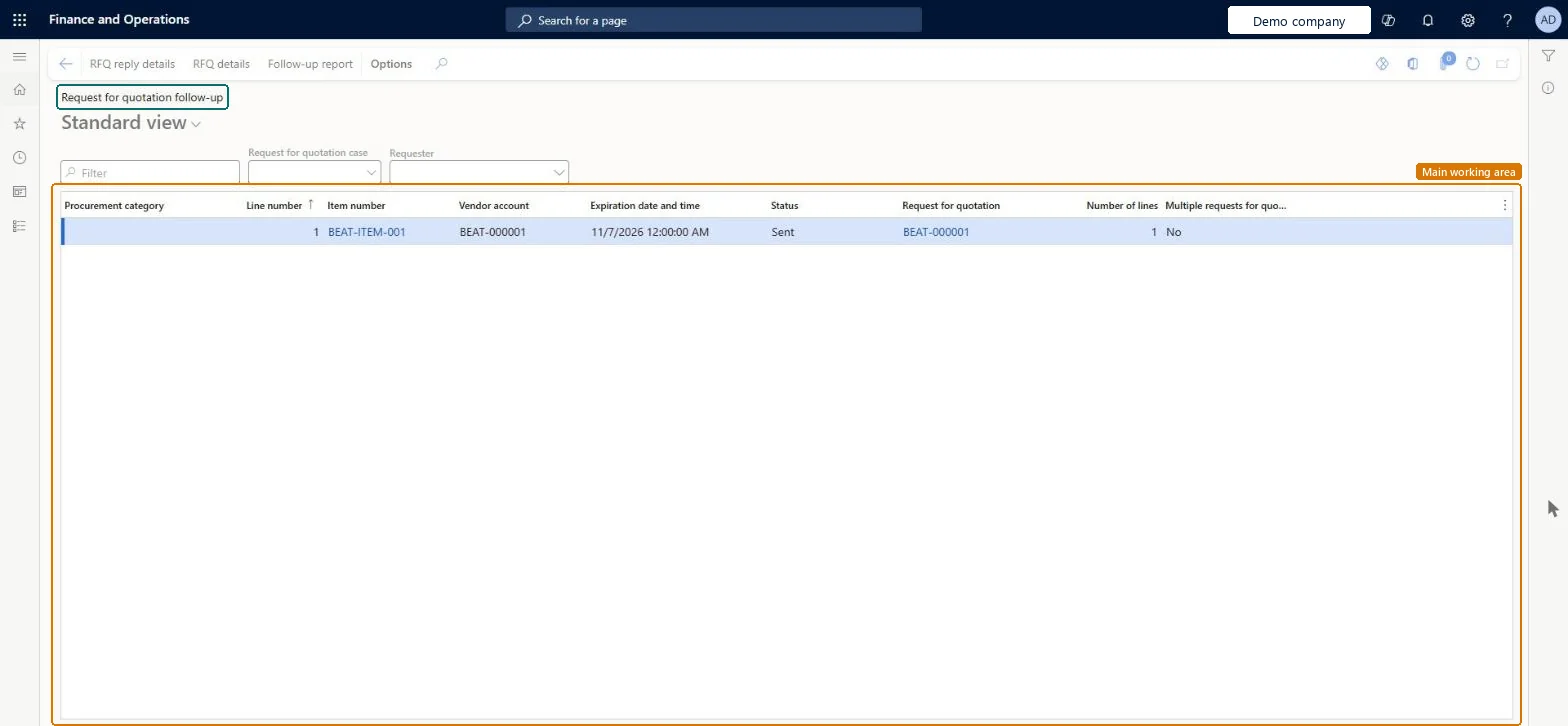
Request for quotation follow-up page in Dynamics 365
The page in Dynamics 365. page title tab to open what to set or check
Functional consultant · Solution architect

2Where it fits

Business processSource and contract goods and services
Menu pathProcurement and sourcing › Requests for quotations › Request for quotations follow-up › Request for quotation follow-up
Used next byRequest for quotation reply follow-up report Microsoft Learn
End user · Functional consultant

3How to do it

About the examples: Examples and screenshots in this guide use BEAT, a demo company in a Dynamics 365 test environment. Use your own company's codes and values instead of copying them.

How to use it

  1. Go to Procurement and sourcing > Requests for quotations > Request for quotations follow-up > Request for quotation follow-up.
  2. Select a Request for quotation case or a Requester to narrow the list.
  3. Check the Procurement category, Item number, Vendor account, Expiration date and time, Status and Number of lines columns.
  4. Select a line, then select RFQ reply details or RFQ details in the Action Pane.
  5. Select Follow-up report to open the report.

Source: Checked in Dynamics 365

Fields on the page

FieldWhat it meansTable column
Case IDFilters the list to the RFQs of one RFQ case.Microsoft Learn
RequesterFilters the list to RFQs created by or for one employee.Microsoft Learn
Expiration dateFilters the list to RFQs that are valid up to the date.Microsoft Learn
Created dateFilters the list to RFQs created on the date.Microsoft Learn
StatusThe current status of the RFQ line.Microsoft Learn Status
Solution architect

4Design impact

Shared or per companyPer company: each legal entity has its own records. Microsoft data model
Technical architect

5Technical

Menu itemPurchRFQReplyFollowup Checked in Dynamics 365
FormPurchRFQReplyFollowup Checked in Dynamics 365
TablePurchRFQLineShown as “Request for quotation lines” in Record infoKey field: RFQId, LineNum, RFQCaseLineLineNumber, RFQTypeChecked in Dynamics 365
Data entitiesPurchRequestForQuotationReplyLineEntityRequest for quotation reply lines Microsoft data model
Who can open itPrivilegesView request for quotation follow-ups PurchRFQReplyFollowupViewDutiesApprove request for quotations PurchRFQRequestForQuoteApproveInquire into request for quotation status PurchRFQRequestForQuoteInquireInquire into request for quotation reply status PurchRFQRequestForQuoteReplyInquireMaintain request for quotation replies PurchRFQRequestForQuoteReplyMaintain
5 security rolesProject manager ProjProjectManagerPurchasing manager TradePurchasingManagerPurchasing agent VendPurchasingAgentPurchasing Agent - Public Sector VendPurchasingAgent_PSNVendor account manager VendVendorAccountManager
Checked in Dynamics 365
Roles to set it up and use itTo use itPurchasing manager TradePurchasingManagerPurchasing agent VendPurchasingAgentPurchasing Agent - Public Sector VendPurchasingAgent_PSNProject manager ProjProjectManagerVendor account manager VendVendorAccountManagerGive people one of these roles. On this system, 5 roles can open this page.Checked in Dynamics 365
Actions on the pageOptions: Personalize, Page options, ShareChecked in Dynamics 365
Developer

6Developer

Open it by URLhttps://<your-environment>/?mi=PurchRFQReplyFollowup
Integrate withPurchRequestForQuotationReplyLineEntity data entity Microsoft data model
Data migrationPurchRequestForQuotationReplyLineEntity (Request for quotation reply lines): loaded for each company.Microsoft Learn
Table definitionPurchRFQLine columns and relations Microsoft data model
Everyone

7Sources