Master planningInquiries and reportsMaster planning
ReqPoItemStatistic
Used by
Chief executive officer, Production manager, Production planner
Business process
Report on and analyze trends
Menu item
ReqPoItemStatistic
Main table
ReqPO
Data entity
ReqDynamicPlanProductionOrderScheduleEntity
Show what matters for
PAGE GUIDEWhat the page does and how to use it7 sections. Choose a role to highlight what matters to you.
Everyone
1What it is and why
What it is
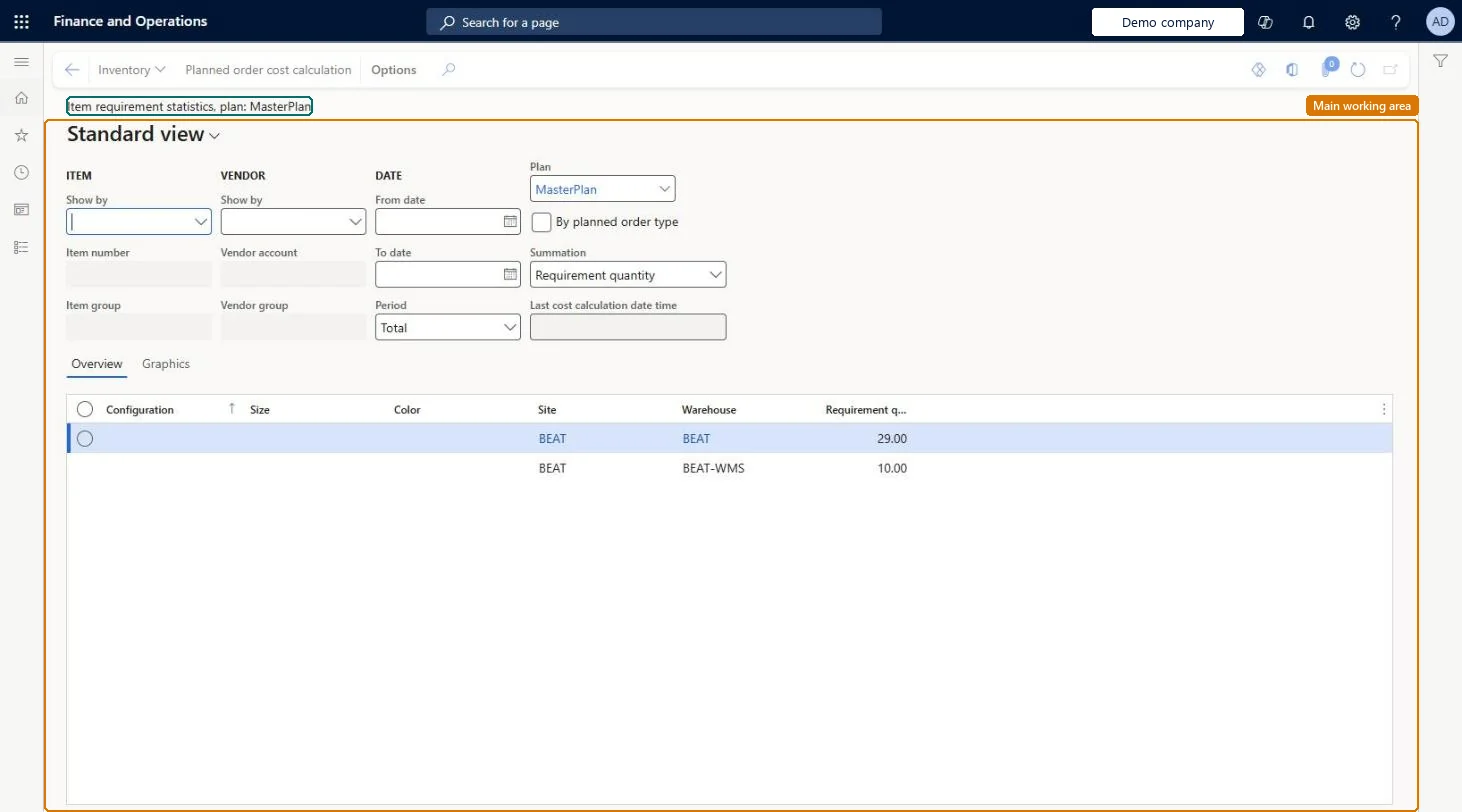
An inquiry page that lists the item requirements, stated as planned orders, that the most recent master planning run calculated.
What you do here
Use this page to analyze long-term and short-term item requirements, for example by vendor group or item group, and use the results when you agree terms with vendors.
Example
For example, you group a plan's requirements by week to see how much of each item is needed in each week.
The page in Dynamics 365. page title tab to open what to set or check
About the examples: Examples and screenshots in this guide use BEAT, a demo company in a Dynamics 365 test environment. Use your own company's codes and values instead of copying them.
How to use it
Go to Master planning > Inquiries and reports > Master planning > Item requirement statistics.
In Plan, select the plan, such as MasterPlan.
Under Item and Vendor, use Show by to total the requirements by item or item group and by vendor or vendor group.
Enter the From date and To date, and choose the Period, such as Total.
Choose the Summation, such as Requirement quantity, and select By planned order type to split the totals by order type.
Review the Site, Warehouse and Requirement quantity columns on the Overview tab, or open the Graphics tab for a chart.
Source: Checked in Dynamics 365
Fields on the page
Field
What it means
Show by
Shows requirements by vendor or by item, at group or single level.Microsoft Learn
From date / To date
The period to show; if left empty, all requirements are listed.Microsoft Learn
To use itProduction planner ReqProductionPlannerProduction manager ProdProductionManagerChief executive officer CompanyChiefExecutiveOfficerGive people one of these roles. On this system, 3 roles can open this page.Checked in Dynamics 365
Actions on the page
(Action Pane without tabs): Inventory, Planned order cost calculationChecked in Dynamics 365