Product design manager, Materials manager, Production manager and 4 more roles
Business process
Use batch disposition codes to handle quarantined inventory in Dynamics 365 Supply Chain Management
Menu item
PdsDispositionMaster
Main table
PdsDispositionMaster
Data entity
PdsBatchDispositionEntity
Setup steps
1 on this page
Show what matters for
PAGE GUIDEWhat the page does and how to use it8 sections. Choose a role to highlight what matters to you.
Everyone
1What it is and why
What it is
A setup page where you create batch disposition codes, each with a status of Available or Unavailable.
What you do here
Use this page to mark inventory batches as available or unavailable for master planning, reservation, picking and shipping.
Example
For example, if one batch has an available code and another has an unavailable code, master planning uses only the available batch and plans a new purchase for the rest of the demand.
The page in Dynamics 365. page title tab to open what to set or check
About the examples: Examples and screenshots in this guide use BEAT, a demo company in a Dynamics 365 test environment. Use your own company's codes and values instead of copying them.
Step by step, with screenshots
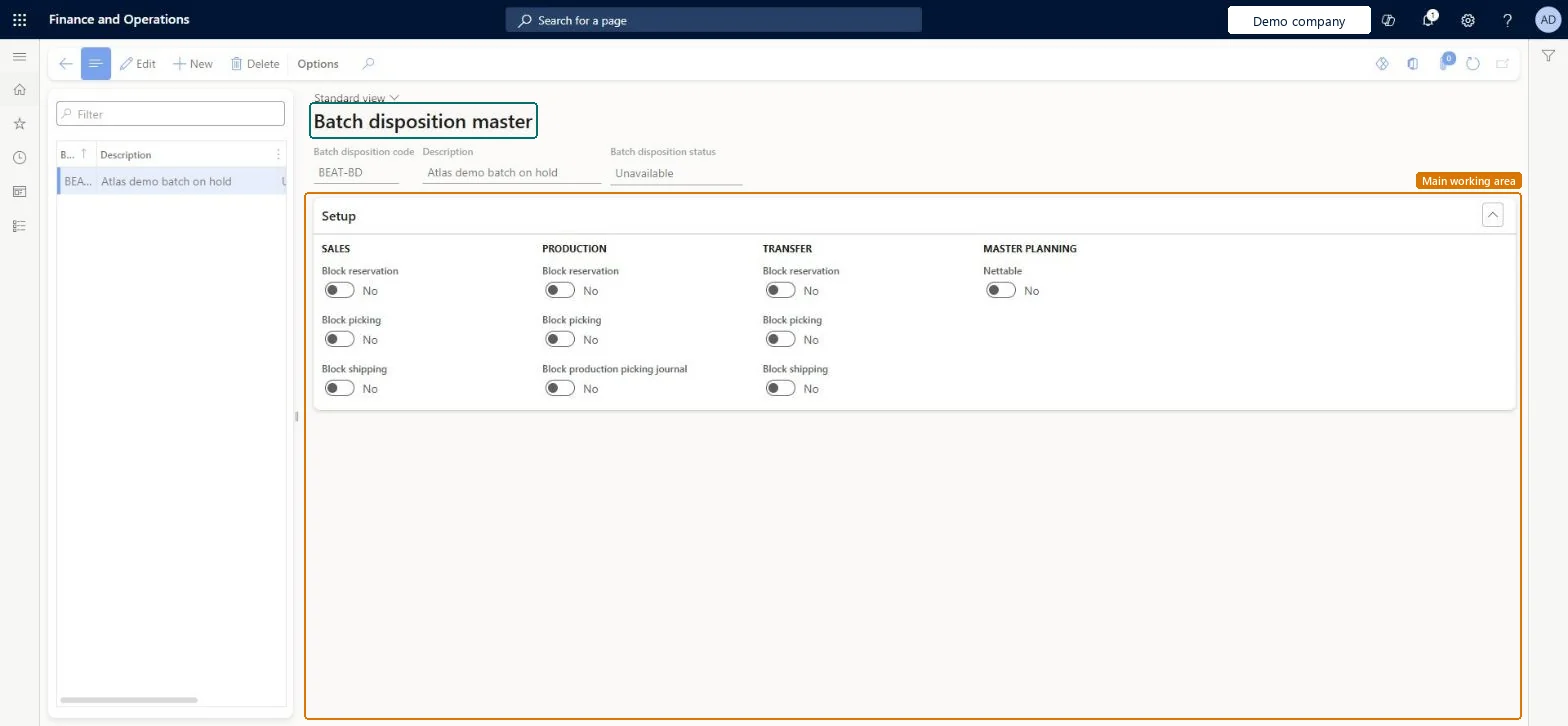
Set up Batch disposition master1 screen
Use this page to mark inventory batches as available or unavailable for master planning, reservation, picking and shipping.
Screen 1
Create a batch disposition code
Go to Inventory management > Setup > Batch > Batch disposition master
Select New
Enter the disposition code and description
Choose the batch disposition status
Under Setup, turn on the blocks for sales, production and transfer, and Nettable for master planning, as the disposition needs
Select Save
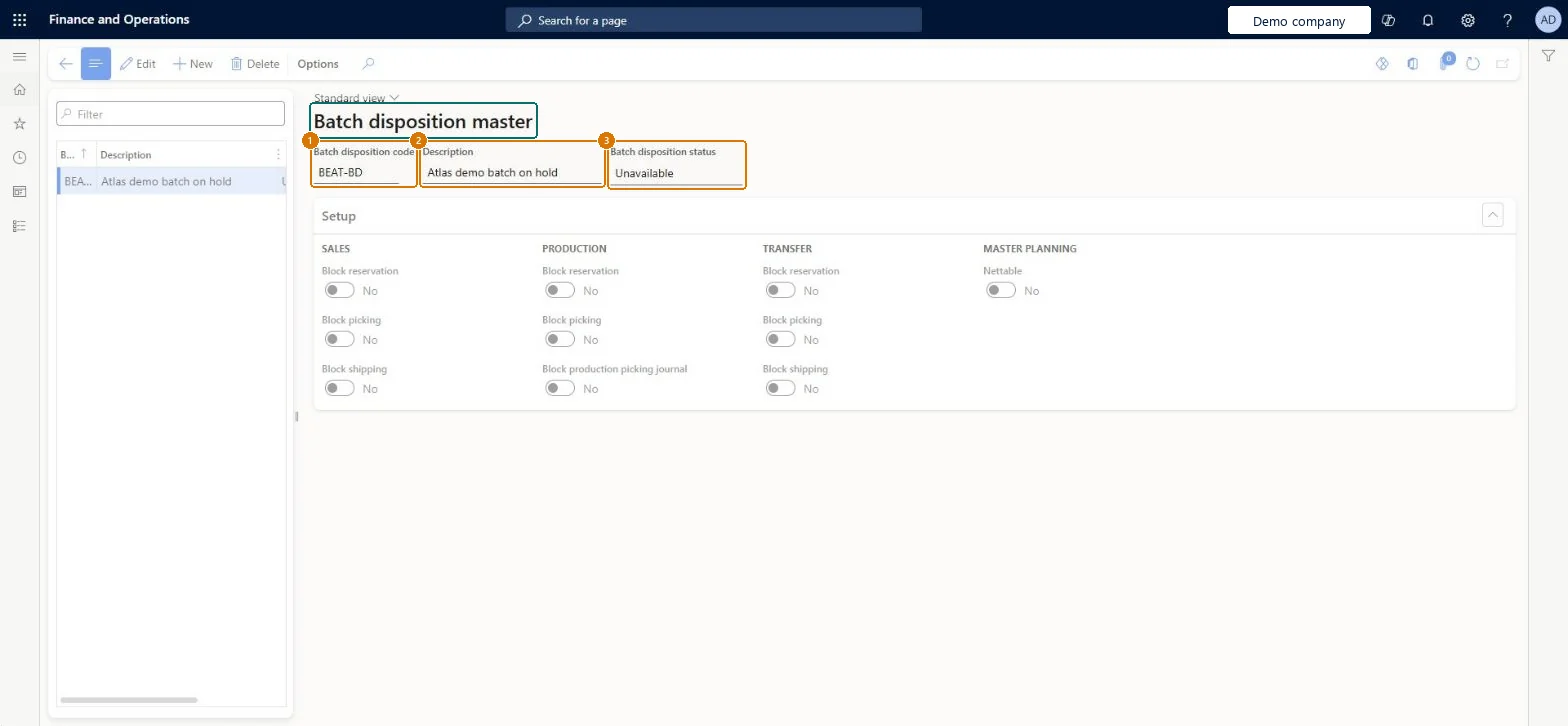
1Batch disposition code
BEAT-BD
2Description
Batch on hold
3Batch disposition status
Unavailable
Show the full screen page title tab to open what to set or check
Steps from Microsoft
Go to Inventory management > Setup > Batch > Batch disposition master.
Select New, or select an existing code to edit.
Enter the Batch disposition code and a Description.
In the Batch disposition status field, select Available or Unavailable.
For an Unavailable code, use the Setup FastTab to block or unblock each operation for sales, transfer and production orders.
Set Nettable to Yes to allow master planning, or No to block it.
Two codes to start: one with status Available and one with status Unavailable; add custom Unavailable codes only for real exceptionsLearn says you often need just two codes, and that Unavailable codes can be customised to unblock individual operations or master planning.
Expecting the code to block reservations in every warehouse. For WMS items with Batch below Location in the reservation hierarchy, it's enforced at reservation only in WMS warehouses or when the batch reservation policy is Advanced.
Reversible: Codes can be created, edited and deleted, and a batch's code is changed with Reset batch disposition code on the Batches page. Microsoft Learn
If you change it later
Choosing a status resets the Block and Nettable options; with Available they are read-only, and with Unavailable everything is blocked until you add exceptions. Microsoft Learn
Technical architect
6Technical
Menu item
PdsDispositionMasterChecked in Dynamics 365
Form
PdsDispositionMasterChecked in Dynamics 365
Table
PdsDispositionMasterShown as “Batch disposition master” in Record infoChecked in Dynamics 365
PrivilegesMaintain batch disposition master PdsDispositionMasterMaintainView batch disposition master PdsDispositionMasterViewDutiesInquire into logistic policies InventLogisticPoliciesInquireEnable the logistic process InventLogisticProcessEnable7 security rolesProduct design manager BOMProductDesignManagerMaterials manager InventMaterialsManagerProduction manager ProdProductionManagerProduction supervisor ProdProductionSupervisorProcess engineer RouteProcessEngineerProcess engineering manager RouteProcessEngineeringManagerWarehouse manager WMSWarehouseManagerChecked in Dynamics 365
Roles to set it up and use it
To set it up or change itWarehouse manager WMSWarehouseManagerMaterials manager InventMaterialsManagerProduction manager ProdProductionManagerTo use itProduction supervisor ProdProductionSupervisorProcess engineer RouteProcessEngineerProduct design manager BOMProductDesignManagerProcess engineering manager RouteProcessEngineeringManagerGive people one of these roles. On this system, 7 roles can open this page.Checked in Dynamics 365
Actions on the page
Options: Personalize, Page options, ShareChecked in Dynamics 365
PdsBatchDispositionEntity (Batch dispositions): loaded for each company, in Microsoft's default template 300 - Inventory.Load order: Microsoft's default template 300 - Inventory loads Batch dispositions at execution unit 1, level 30, sequence 10. Lower levels load first, and entities at the same level load in sequence order.Load first: the default templates at lower levels (System setup to General ledger)Microsoft Learn
Checked in a working Dynamics 365 system, version 10.0.49: the menu item, form, table and security, the page, the demo records and the values in the screenshots.