BeyondERP.Newsletter
Menu

Job page · Inventory management

Correct inventory transfer order lines manually

A periodic job that fixes inconsistent data and unexpected quantities on transfer orders.

Business process
Manage data
Menu item
action:InventTransferOrderManualCorrection
Show what matters for
PAGE GUIDEWhat the page does and how to use it7 sections. Choose a role to highlight what matters to you.
Everyone

1What it is and why

What it isA periodic job that fixes inconsistent data and unexpected quantities on transfer orders.
What you do hereUse this periodic task to repair transfer order quantities, transactions and header status when the data has become inconsistent.
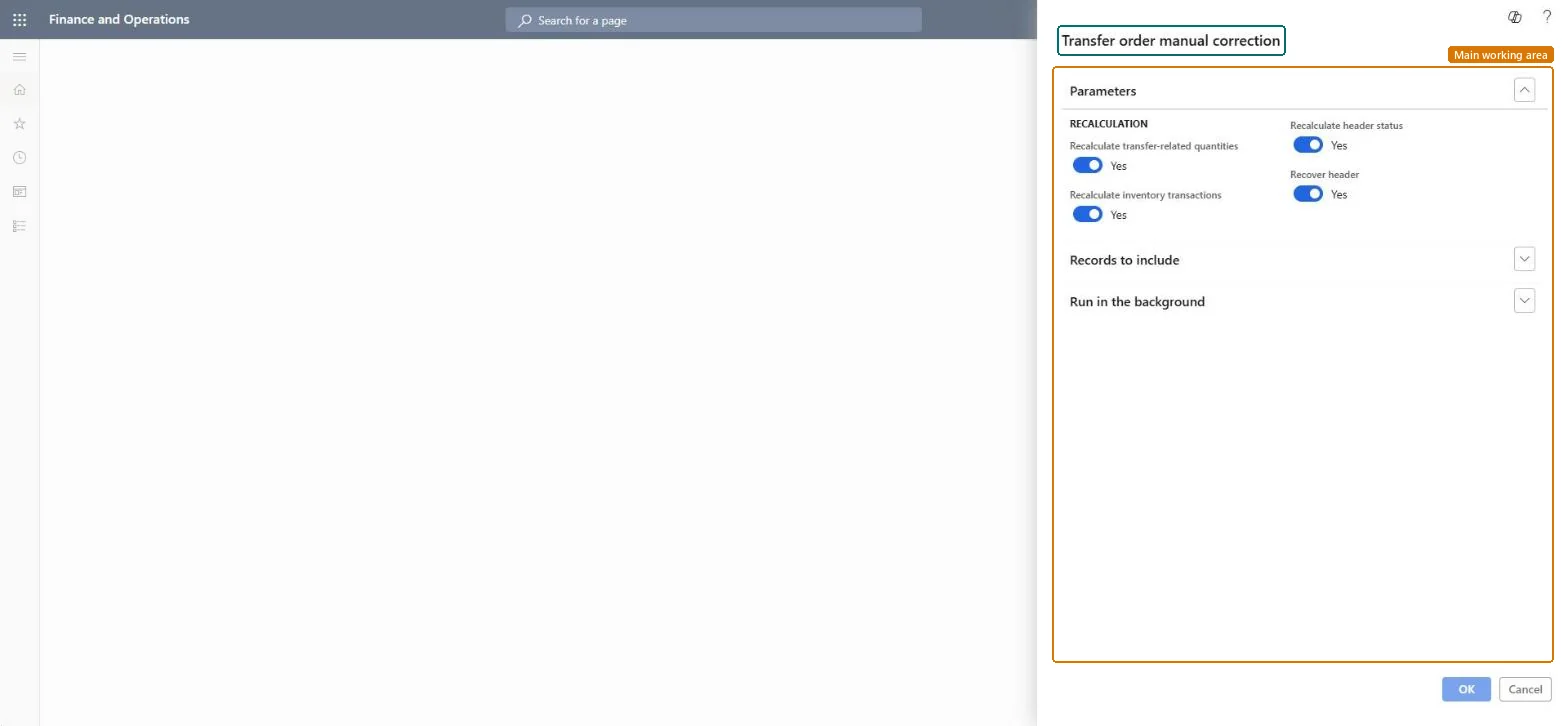
Correct inventory transfer order lines manually page in Dynamics 365
The page in Dynamics 365. page title tab to open what to set or check
Functional consultant · Solution architect

2Where it fits

Business processManage data
Menu pathInventory management › Periodic tasks › Clean up › Correct inventory transfer order lines manually
End user · Functional consultant

3How to do it

About the examples: Examples and screenshots in this guide use BEAT, a demo company in a Dynamics 365 test environment. Use your own company's codes and values instead of copying them.

When to run it

When to run itWhen transfer orders show inconsistent data or unexpected quantities, or a transfer order header has gone missing while its lines or transactions still exist.
How oftenOn demand, only when you find inconsistent transfer orders.
Batch settingsRun it in the background only when many transfer orders are affected; for a few orders, filter on them and run it directly.
What the output showsThe selected transfer orders are corrected: quantities are recalculated, corrupted transactions fixed, header status reset from the lines, and missing headers recovered, depending on the options you set. If an order is still wrong, it's usually outside the filter you used.

Source: Microsoft Learn

Steps from Microsoft

  1. Go to Inventory management > Periodic tasks > Clean up > Correct inventory transfer order lines manually.
  2. Set Recalculate transfer-related quantities to Yes to recalculate and correct the shipped, ship remaining and receive remaining quantities.
  3. Set Recalculate inventory transactions to Yes to fix corrupted transactions, such as received transfer orders that still have ordered transactions.
  4. Set Recalculate header status to Yes to correct the header status from the line status, and Recover header to Yes to restore transfer orders that were removed while lines or transactions still exist.
  5. Use Records to include to limit the run to the transfer orders with the problem.
  6. Afterwards, open those transfer orders: quantities, transactions and header status should now match their lines.
Source: Microsoft Learn

Fields on the page

FieldWhat it means
Recalculate transfer-related quantitiesRecalculates the shipped, ship remaining and receive remaining quantities.Microsoft Learn
Recalculate inventory transactionsFixes corrupted inventory transactions on transfer orders.Microsoft Learn
Recalculate header statusCorrects the header status from the status of the lines.Microsoft Learn
Recover headerRestores transfer orders that were removed by mistake while lines or transactions still exist.Microsoft Learn

Test checklist

  1. Shipped and remaining quantities match the lines.
  2. Header status matches the line status.
  3. Recovered headers appear for orders that had lost them.

Source: Microsoft Learn

Solution architect

4Design impact

Can it be undoneNo: The corrections overwrite the previous quantities, transactions and status. Test the run on a copy of the data first. Microsoft Learn
If you change it laterRecalculates quantities, inventory transactions and header status on the selected transfer orders, and can restore removed headers. Microsoft Learn
Technical architect

5Technical

Menu itemaction:InventTransferOrderManualCorrection Checked in Dynamics 365
FormDialog Checked in Dynamics 365
Developer

6Developer

Open it by URLhttps://<your-environment>/?mi=action:InventTransferOrderManualCorrection
Everyone

7Sources