BeyondERP.Newsletter
Menu

Inquiry page · Inventory management

Transactions

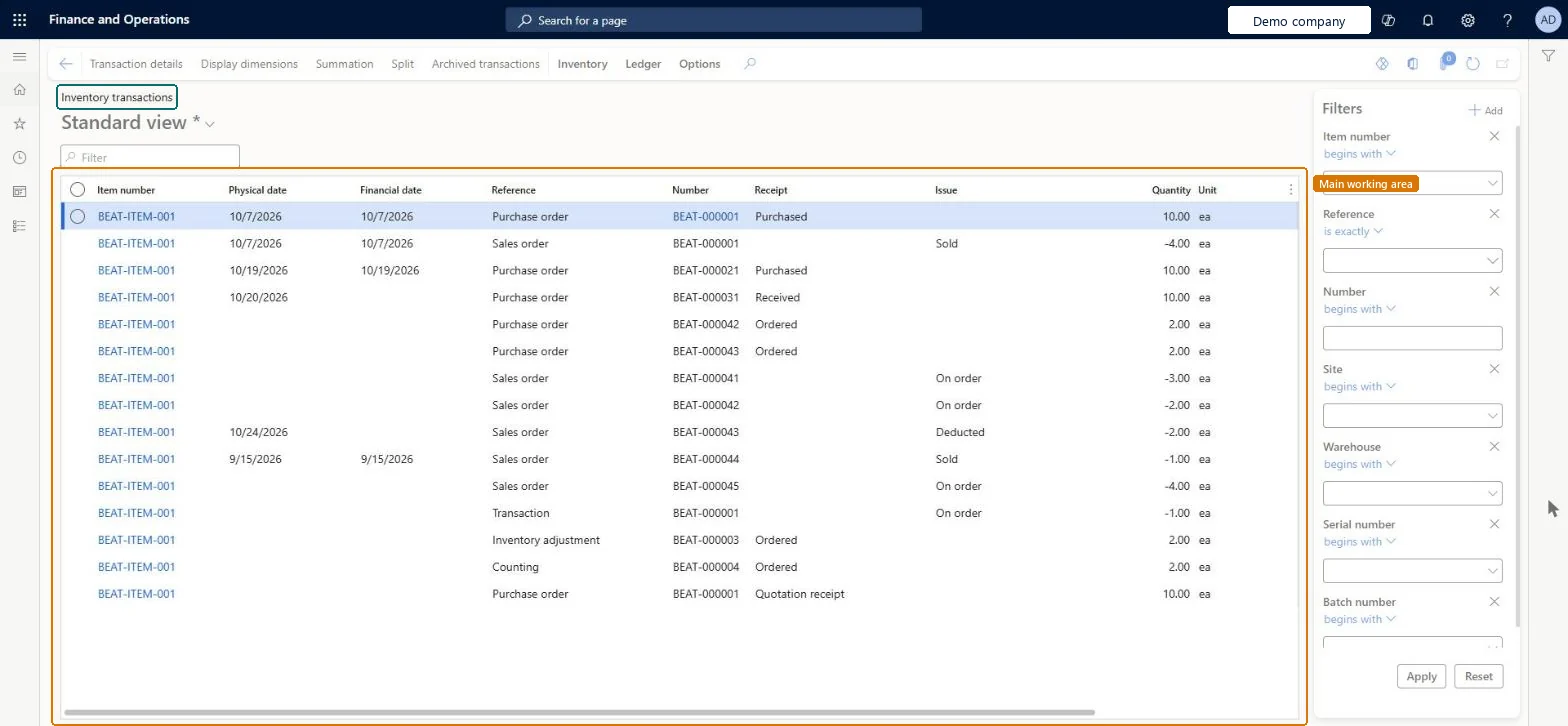
An inquiry page that lists inventory transactions, with a Filters pane to limit the list and a details view for each transaction.

Business process
Maintain inventory levels
Menu item
InventTransNew
Main table
InventTrans
Show what matters for
PAGE GUIDEWhat the page does and how to use it7 sections. Choose a role to highlight what matters to you.
Everyone

1What it is and why

What it isAn inquiry page that lists inventory transactions, with a Filters pane to limit the list and a details view for each transaction.
What you do hereUse this page to find inventory transactions and open the Transaction details page for any of them.
Transactions page in Dynamics 365
The page in Dynamics 365. page title tab to open what to set or check
Functional consultant · Solution architect

2Where it fits

Business processMaintain inventory levels
Menu pathInventory management › Inquiries and reports › Transactions
End user · Functional consultant

3How to do it

About the examples: Examples and screenshots in this guide use BEAT, a demo company in a Dynamics 365 test environment. Use your own company's codes and values instead of copying them.

Steps from Microsoft

  1. Go to Inventory management > Inquiries and reports > Transactions.
  2. On the Filters pane, set filters to narrow the list, and select Apply.
  3. Select the transaction that you want to look at.
  4. On the Action Pane, select Transaction details.

Source: Microsoft Learn

Fields on the page

FieldWhat it meansTable column
PartyThe vendor, customer or other party linked to the transaction.Microsoft Learn
Lot IDThe unique lot ID that the system gives the transaction.Microsoft Learn InventTransOrigin
Value openShows whether inventory closing has settled the transaction yet.Microsoft Learn ValueOpen
Inventory referenceThe type of another transaction that this one is linked to, such as a sales order it is marked against.Microsoft Learn
Solution architect

4Design impact

Shared or per companyPer company: each legal entity has its own records. Microsoft data model
If you change it laterThe page shows no transactions until you set filters and select Apply, and it remembers your last filters. Microsoft Learn
Technical architect

5Technical

Menu itemInventTransNew Checked in Dynamics 365
FormInventTransNew Checked in Dynamics 365
TableInventTransShown as “Inventory transactions” in Record infoKey field: ItemIdChecked in Dynamics 365
Roles to set it up and use itTo use itQuality control manager InventQualityControlManagerWarehouse manager WMSWarehouseManagerMaterials manager InventMaterialsManagerQuality control clerk InventQualityControlClerkProduction supervisor ProdProductionSupervisorGive people one of these roles. On this system, 36 roles can open this page.Checked in Dynamics 365
Actions on the pageInventory: Vouchers, Costing, View, Tracing, BatchesLedger: VouchersOptions: Personalize, Page options, ShareChecked in Dynamics 365
Developer

6Developer

Open it by URLhttps://<your-environment>/?mi=InventTransNew
Table definitionInventTrans columns and relations Microsoft data model
Everyone

7Sources