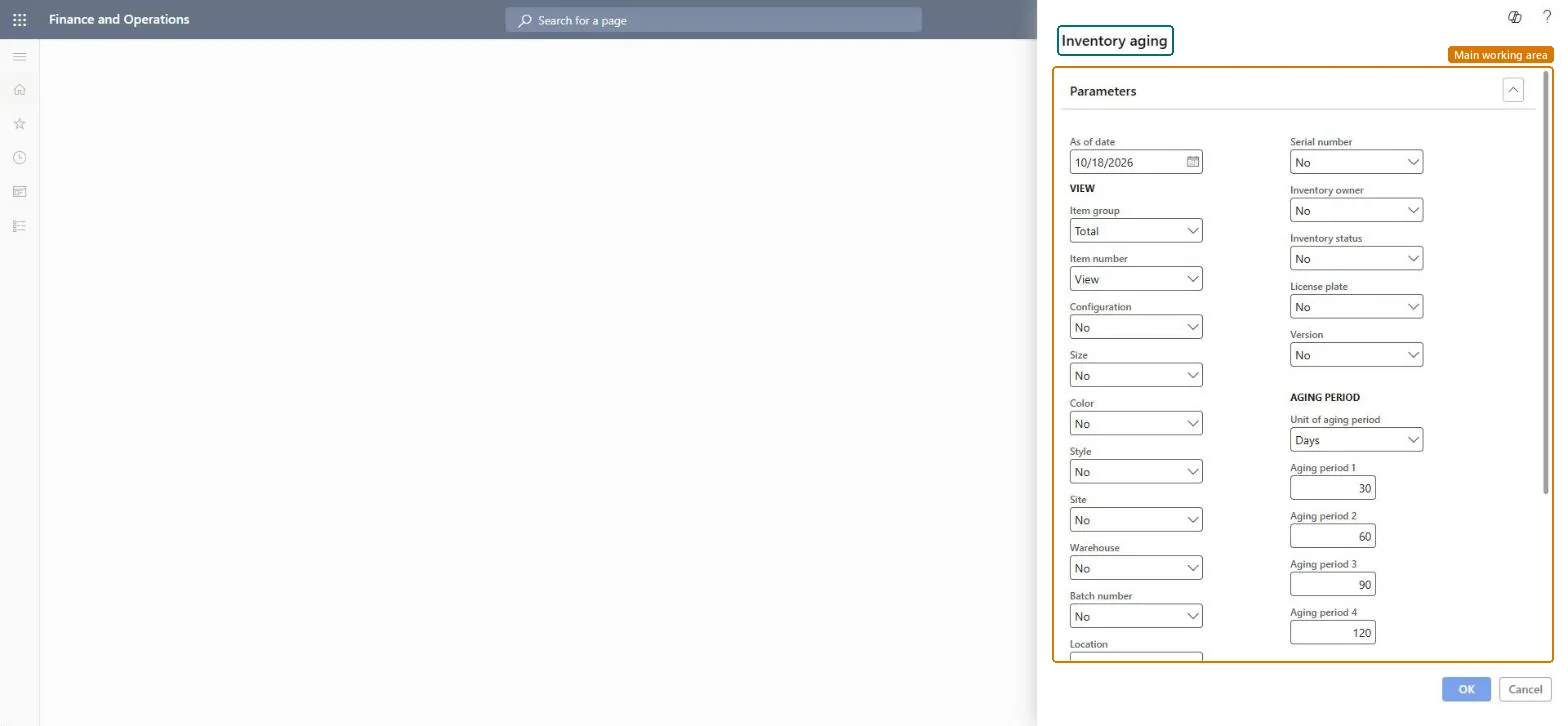
About the examples: Examples and screenshots in this guide use BEAT, a demo company in a Dynamics 365 test environment. Use your own company's codes and values instead of copying them.
When to run it
When to run it
After inventory close for the month, or whenever you need to see how long stock has been on hand as of a date.
How often
Monthly after inventory close, and on demand for analysis.
Batch settings
For many items and warehouses, Microsoft recommends the Inventory aging report storage version, which saves each run and lets you export it.
What the output shows
Per item and dimension: On-hand quantity, On-hand value, Inventory value quantity, Inventory value, Average unit cost, and a quantity and amount for each aging period. Issues are deducted first in, first out regardless of the item's inventory model, so bucket amounts can differ from the costing view; values change after inventory close.
Go to Inventory management > Inquiries and reports > Physical inventory reports > Inventory aging.
Enter the As of date. For final values, use a date in a period that inventory close has already settled, because closing updates the inventory value and average unit cost.
Under View, set Item group and Item number, and choose Yes or No for each dimension. Showing Warehouse splits a site into one row per warehouse, while the value columns stay at the financial dimension level.
Under Aging period, select the Unit of aging period and enter Aging period 1 to Aging period 4 to size each bucket.
Run the report and read the buckets: each holds the quantity received in that period that is still on hand, valued at the average unit cost.
Nothing to undo: The aging report only reads transactions; it changes nothing. Microsoft Learn
If you change it later
Run the report after inventory closing to get final values; closing updates the inventory value and average unit cost shown. Microsoft Learn
Technical architect
5Technical
Menu item
output:InventAgingChecked in Dynamics 365
Form
SysOperationTemplateFormChecked in Dynamics 365
Roles to set it up and use it
To use itQuality control manager InventQualityControlManagerWarehouse manager WMSWarehouseManagerMaterials manager InventMaterialsManagerProduction supervisor ProdProductionSupervisorAccounting manager LedgerAccountingManagerGive people one of these roles. On this system, 16 roles can run this page.Checked in Dynamics 365