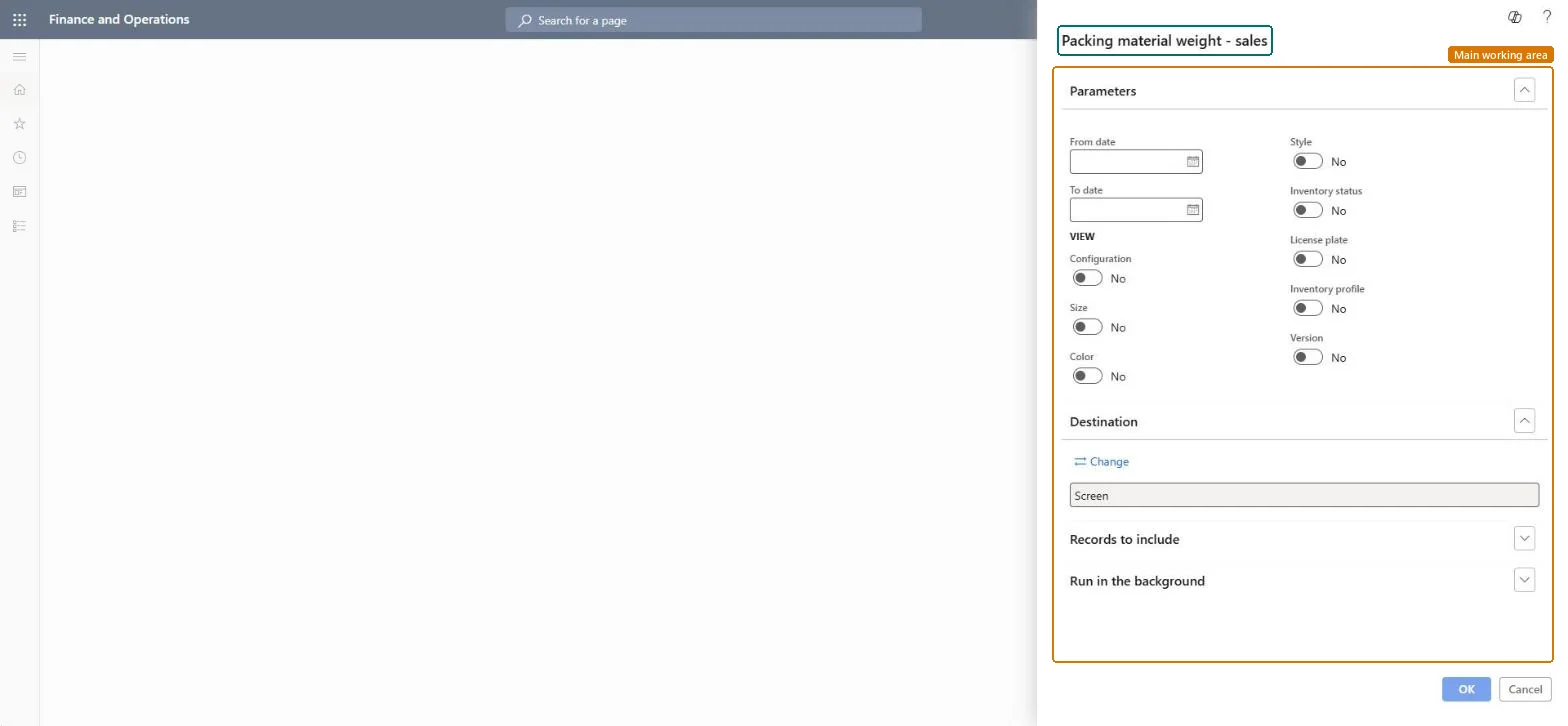
A report that shows packing material weights for sales within a date range, with options to break the figures down by configuration, size, color, style, inventory status, license plate, inventory profile and version.
Inventory managementInquiries and reportsPacking material reports
output:InventPackingMaterialTransSalesReport
Business process
Analyze warehouse operations
Menu item
output:InventPackingMaterialTransSalesReport
Show what matters for
PAGE GUIDEWhat the page does and how to use it7 sections. Choose a role to highlight what matters to you.
Everyone
1What it is and why
What it is
A report that shows packing material weights for sales within a date range, with options to break the figures down by configuration, size, color, style, inventory status, license plate, inventory profile and version.
What you do here
Use this report to see the packing material weight for sales transactions between a from date and a to date.
The page in Dynamics 365. page title tab to open what to set or check
Inventory management › Inquiries and reports › Packing material reports › Packing material weight - sales
End user · Functional consultant
3How to do it
About the examples: Examples and screenshots in this guide use BEAT, a demo company in a Dynamics 365 test environment. Use your own company's codes and values instead of copying them.
When to run it
When to run it
At the end of each fee or reporting period, once the sales orders of the period are invoiced.
How often
At the interval at which you report packing material weights or pay the fees.
What the output shows
Packing material weights from sales invoices in the date range, broken down by the dimensions you switched on. Sales lines without weight usually had no packing unit on the order line when it was invoiced.
Go to Inventory management > Inquiries and reports > Packing material reports > Packing material weight - sales.
Enter the From date and To date that cover the sales invoices to report.
Under View, switch on Configuration, Size, Color, Style, Inventory status, License plate, Inventory profile or Version to break the weights down by those dimensions.
Under Records to include, filter the sales transactions if you need only some items or customers.
Compare the weights per packing material with your sales volumes for the period.
Nothing to undo: The report reads sales packing material transactions only; nothing is changed. Microsoft Learn
Technical architect
5Technical
Menu item
output:InventPackingMaterialTransSalesReportChecked in Dynamics 365
Form
SysOperationTemplateFormChecked in Dynamics 365
Roles to set it up and use it
To use itWarehouse manager WMSWarehouseManagerMaterials manager InventMaterialsManagerAccounting manager LedgerAccountingManagerGive people one of these roles. On this system, 3 roles can run this page.Checked in Dynamics 365