BeyondERP.Newsletter
Menu

Inquiry page · Inventory management

Inventory on-hand report storage

A list page that shows inventory on-hand report runs by execution name and execution time, with the inventory dimensions each one includes.

Business process
Maintain inventory levels
Menu item
InventOnhandStorage
Main table
InventOnhandStorage
Show what matters for
PAGE GUIDEWhat the page does and how to use it6 sections. Choose a role to highlight what matters to you.
Everyone

1What it is and why

What it isA list page that shows inventory on-hand report runs by execution name and execution time, with the inventory dimensions each one includes.
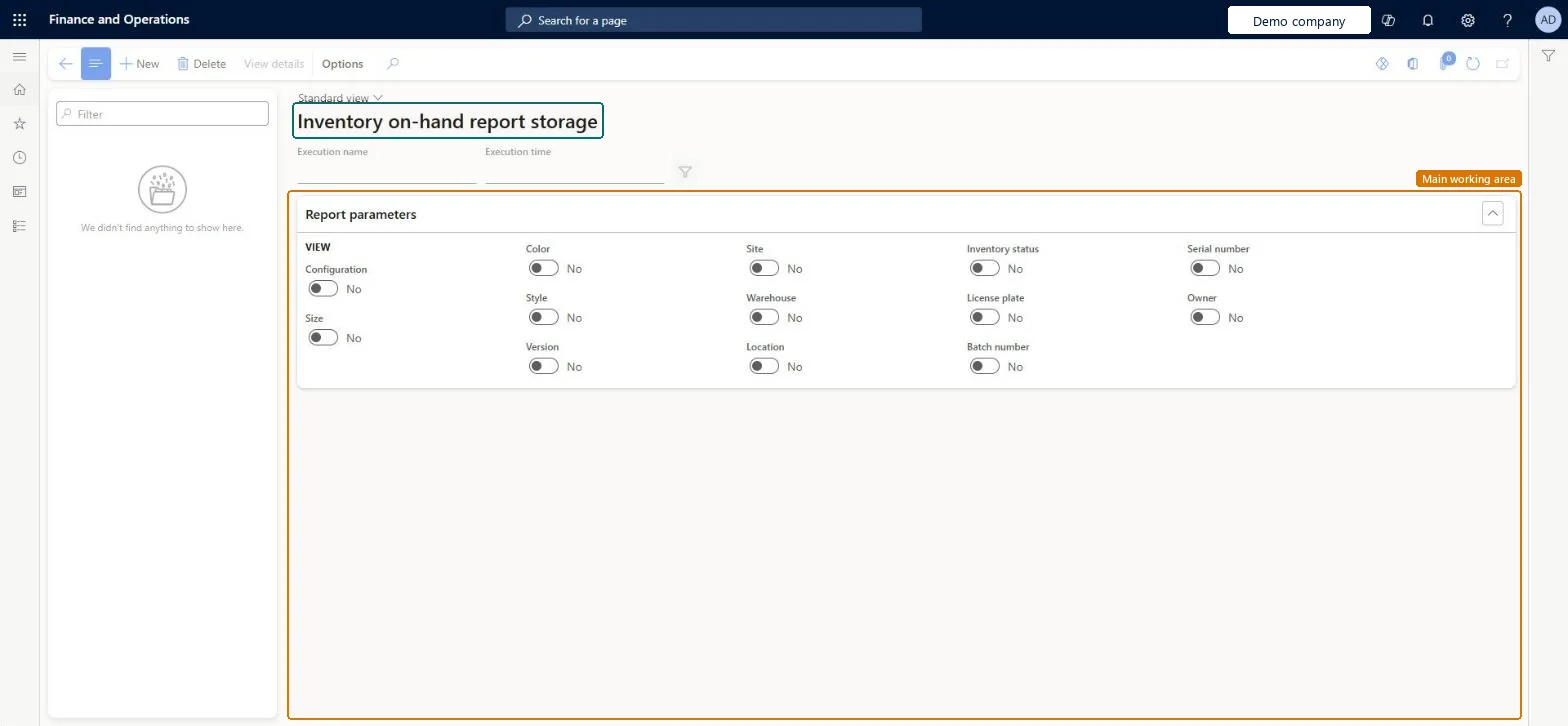
What you do hereUse this page to review on-hand report runs and to create a new one by choosing which inventory dimensions the report shows.
Inventory on-hand report storage page in Dynamics 365
The page in Dynamics 365. page title tab to open what to set or check
Functional consultant · Solution architect

2Where it fits

Business processMaintain inventory levels
Menu pathInventory management › Inquiries and reports › On-hand reports › Inventory on-hand report storage
End user · Functional consultant

3How to do it

About the examples: Examples and screenshots in this guide use BEAT, a demo company in a Dynamics 365 test environment. Use your own company's codes and values instead of copying them.

How to use it

  1. Go to Inventory management > Inquiries and reports > On-hand reports > Inventory on-hand report storage.
  2. Type in the Filter box on the left to find an earlier run, and read its Execution name and Execution time.
  3. Select New to start a new run.
  4. Under Report parameters, switch on the dimensions you want to see: Configuration, Size, Color, Style, Version, Site, Warehouse, Location, Inventory status, License plate, Batch number, Serial number and Owner.
  5. Select View details to open the selected run, or Delete to remove it.

Source: Checked in Dynamics 365

Technical architect

4Technical

Menu itemInventOnhandStorage Checked in Dynamics 365
FormInventOnhandStorage Checked in Dynamics 365
TableInventOnhandStorageChecked in Dynamics 365
Roles to set it up and use itTo set it up or change itQuality control manager InventQualityControlManagerWarehouse manager WMSWarehouseManagerQuality control clerk InventQualityControlClerkSales manager TradeSalesManagerMaterials manager InventMaterialsManagerGive people one of these roles. On this system, 31 roles can open this page.Checked in Dynamics 365
Actions on the pageOptions: Personalize, Page options, ShareChecked in Dynamics 365
Developer

5Developer

Open it by URLhttps://<your-environment>/?mi=InventOnhandStorage
Everyone

6Sources

  • Checked in a working Dynamics 365 system, version 10.0.49: the menu item, form, table and security, the page.